How to turn off incessant pings?

Disclaimer: Links on this page pointing to Amazon, eBay and other sites may include affiliate code. If you click them and make a purchase, we may earn a small commission.

Memphisto

Member
Joined
May 5, 2026
Posts
8
Reaction score
1
Location
Tennessee
I'm a newer owner and dealer couldn't help me find the car setting to STOP all incoming pings whenever I get an email or text on my phone. I've turned notifications off on my phone, but I still get a loud ping everytime I get email or text. Sure hoping for help here. Thanks in advance.
 

99WhiteC5Coupe

Full Access Members
Joined
Jun 3, 2015
Posts
3,430
Reaction score
2,012
Location
USA
I'm a newer owner and dealer couldn't help me find the car setting to STOP all incoming pings whenever I get an email or text on my phone. I've turned notifications off on my phone, but I still get a loud ping everytime I get email or text. Sure hoping for help here. Thanks in advance.


Disconnect your phone from the vehicle.
 

HILLY

Full Access Members
Joined
May 12, 2023
Posts
325
Reaction score
243
Location
Greenville, SC
Bluetooth connection will play every last alert your phone does. It will take adjusting settings on the phone to minimize alerts.

CarPlay/Android Auto will minimize this.
 

TheDoug

Full Access Members
Joined
Apr 20, 2019
Posts
617
Reaction score
351
Location
Mansfield, TX
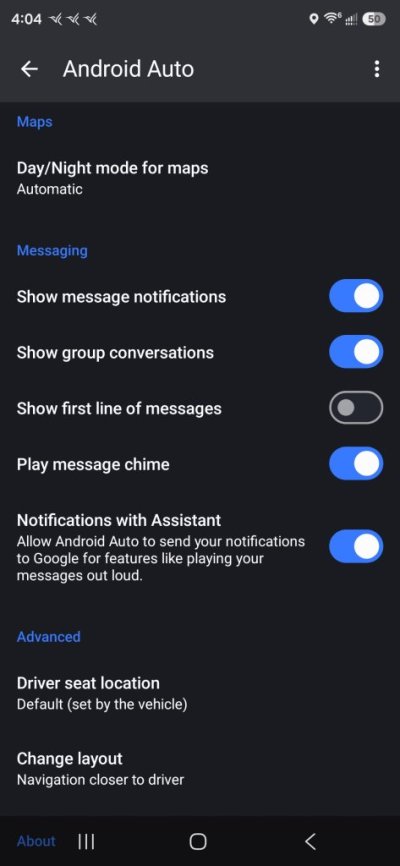
I use android auto... The only things I allow to come through are calls and texts. (No emails or other app notifications)

This can be adjusted in android auto settings section.
 
OP
OP
M

Memphisto

Member
Joined
May 5, 2026
Posts
8
Reaction score
1
Location
Tennessee
Thanks for replies but I've tried everything and haven't been able to stop this loud pings. If anyone has a specific outline of steps, I'd greatly appreciate it. Like I said, dealer couldn't figure it out but perhaps I need to lean on them to get someone else to help me.
 

99WhiteC5Coupe

Full Access Members
Joined
Jun 3, 2015
Posts
3,430
Reaction score
2,012
Location
USA
Thanks for replies but I've tried everything and haven't been able to stop this loud pings. If anyone has a specific outline of steps, I'd greatly appreciate it. Like I said, dealer couldn't figure it out but perhaps I need to lean on them to get someone else to help me.


Did you try disconnecting (unpair) your phone from the vehicle?
 

EngineHostler

Member
Air Force
Joined
Mar 21, 2025
Posts
23
Reaction score
16
Location
Jersey, GA
You don't tell us what phone you're using. I'm using an iPhone and therefore I am using CarPlay. The only time I get dings is when I receive notifications is a text message is received or when the navigation system or Waze dings and I using either for guidance. Phone calls are not dings but a ring tone not of my choosing.

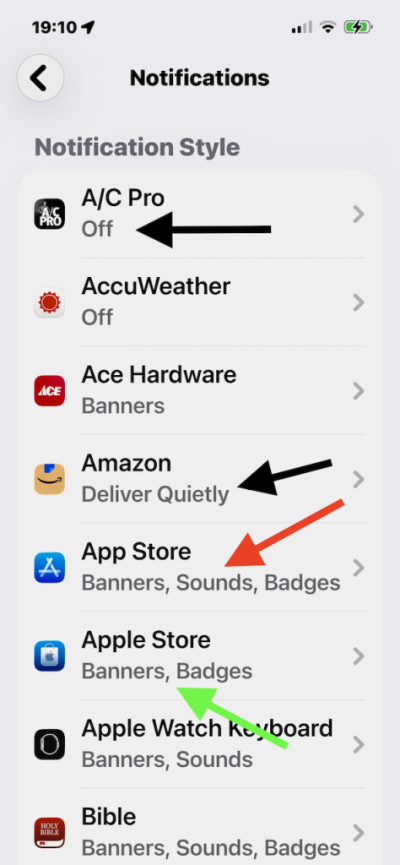
If you're using and iPhone the got to Settings > Notifications and scroll to the bottom and look at Notification Style. Notice in the attached graphic that anything that says Off or Deliver Quietly does not deliver any kind of notification. Notice that App Store (red arrow) has Banners, Sounds, and Badges turned on and these will give you a ding and put a message on your iPhone screen which does not transfer to the CarPlay screen when it dings. The Apple Store (green arrow) just shows Banners and Badges and these only display on your iPhone screen and do not produce any sound and will not display.

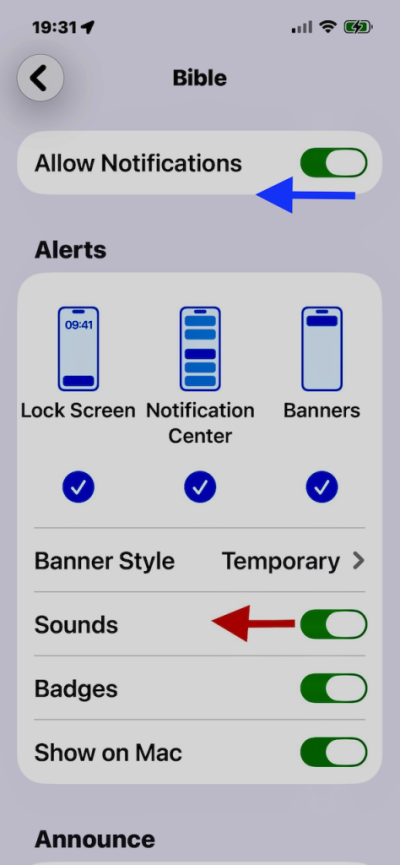
In the second graphic, I've clicked on my Bible App on the notifications screen. To kill the sounds, just move the Sounds slider to the left. If you don't want to allow any notifications, slide the Allow Notifications to the left and it will kill any notifications.

 

Attachments

  • IMG_0904.png
    IMG_0904.png
    201.8 KB · Views: 1
  • IMG_0906 (1).png
    IMG_0906 (1).png
    163.4 KB · Views: 1

TheDoug

Full Access Members
Joined
Apr 20, 2019
Posts
617
Reaction score
351
Location
Mansfield, TX
Sorry about earlier post...I use Samsung S24 so.

I have used an s21, s22 and now s25 ultra in my 2018 and never had an issue with the notifications coming through android auto. Now if I have it just playing through Bluetooth then everything comes through. In settings of the phone you can go to android auto and customize it further.

Hope this helps
 

Attachments

  • Screenshot_20260627_160456_Android Auto.jpg
    Screenshot_20260627_160456_Android Auto.jpg
    50.9 KB · Views: 0
Top