2019 Expy Forscan

Disclaimer: Links on this page pointing to Amazon, eBay and other sites may include affiliate code. If you click them and make a purchase, we may earn a small commission.


taaangy234

Well-Known Member
Joined
Jul 12, 2019
Posts
52
Reaction score
30
Location
US
So far I tried last night, only had these working so far.
BdyCM 726-41-02 xxx0 xxxx xxxx Disable No Key Present Double Honk
BdyCM 726-27-01 xxxx xxx0 xxxx Enable Fogs On w/ LED headlamps
APIM 7D0-01-01 xxxx xxxx xExx Enable On-Screen H/C Seat Buttons
APIM 7D0-01-01 9xxx xxxx xxxx Disable Sirius As Audio Source
APIM 7D0-02-01 5753 xxxx xxxx Data Entry While Vehicle Moving

As I used a OBDII Bluetooth + W10 virtual machine running on my work laptop.
-I can't do any SCCM mods without getting the wired one.

I tried the these as well but it threw a bunch of warning on my ODO with sensors, etc...
Lights - DRL options BCM 726-11-01 x?xx xxxx xx Change ? To: 0-DRL Disable, 1-DRL 50% Low Beam, 2-DRL Fog Lights, 3-DRL Turn Signal
Auto Start/Stop give battery error "Charging System Service Now"
 

ssmorga

Member
Joined
Jul 19, 2011
Posts
7
Reaction score
0
Location
Alabama
I just got the wife a 2019 Expy XLT and somehow she has managed to turn off the Auto Start/Stop in the menu without the need for using ForScan to turn it off. Do y'all not have this option in the menu? She went into the Vehicle Settings menu in the Information Screen/Cluster, then went to Advanced Settings, then selected Auto Engine Off and disabled it. Haven't had an issue with the Auto Start/Stop kicking on since then ...... have yall tried that to get the Start/Stop to shut off?
 

retired_chemist

Active Member
Joined
May 12, 2011
Posts
26
Reaction score
8
Location
NH
My experience says that only works until you shut off the vehicle. It then reverts to the factory default. I find it easier to turn off the auto start/stop with the button on the dash.
 

Tracy Cook

Member
Joined
Dec 15, 2019
Posts
6
Reaction score
2
Location
CO
does anyone know if these codes work for the '20 too?

I've started updating mine. Some codes have worked, some I have not tried yet - when looking at the default values and some of the google spread sheets put out by others, some default values don't line up. so have been hesitant to change too many things.

So far Coolant and trans temperature over gauges,and disable fake engine noise has worked.
IPC 720-07-01 xxxx xE5x xxxx
ACM 727-01-01 xxxx x0xx ***


Stock value for heated/cooled seats with HSW isn't what I expected, or documented as a normal value in spread sheets - so I have not changed that. Next time around I'll be looking at doing 3 ding at start up, panic alarm set to two pressens, and bambi mode.
I'm referencing - https://docs.google.com/spreadsheets/d/1qf2gYgkhmsX-dnFO3Ki0nYUvr7aeLKsHsA0WxhDns1s/edit#gid=0
https://docs.google.com/spreadsheet...iVSlDFGFHnfeuhb3RTMVz95730/edit#gid=815852466
https://docs.google.com/spreadsheet...TKARDo2Y7lfSOMFj6Gott8g7yg/edit#gid=756156726
 

bushpilot

Full Access Members
Joined
Feb 20, 2020
Posts
375
Reaction score
159
Location
Houston, Tx
So far Coolant and trans temperature over gauges,and disable fake engine noise has worked.
IPC 720-07-01 xxxx xE5x xxxx
ACM 727-01-01 xxxx x0xx ***


Which code is which?


Stock value for heated/cooled seats with HSW isn't what I expected, or documented as a normal value in spread sheets - so I have not changed that. Next time around I'll be looking at doing 3 ding at start up, panic alarm set to two pressens, and bambi mode.

on my '17 super duty -

I disabled:
Double horn honk (occurs when you exit running truck w/ key in pocket).
Drivers seatbelt warning (left all other seat belt warnings on)

I ENABLED:
Numbers over Gauges
Bambi mode (driving/fog lights on w/ high beams)
Remove Sirus Option from infotainment (the day the free trial ran out)

Lower TPMS pressure (i run 55psi, factory minimum was 65psi)
Heated & Cooled Seat Icons on Home Screen (infotainment system / center of dash).
Increased power point time out after engine off (was 15min) to 4 hours (can make them hot all the time)
Turn signal flash increase to 5 flashes (quick lane change/short press of turn signal) - was 3 flashes

These items aren't necessary on the Expy but I also enabled:

Heated Steering Wheel control on Home Screen
Global Window Close (can close windows w/ remote/fob)
Add DPF filter % full (gauge)
 

Tracy Cook

Member
Joined
Dec 15, 2019
Posts
6
Reaction score
2
Location
CO
Did some more playing this weekend on my 2020 Maxpedition Plat - I can confirm the following codes work

ACM 727-01-01 xxxx x0xx xxxx - Fake engine noise off - V8 sound disabled

APIM 7D0-01-01 xxxx xxxx xExx - heated/Cooled seats, HSW, Rear Controls on Sync Screen
APIM 7D0-02-01 xxxx x5xx xxxx - Raptor boot up screen
APIM 7D0-02-01 x7xx xxxx xxxx - Can enter nav while driving - Will set European speed limit sign in Nav, and disables 911 call on crash - so I've set it back to the default value of 5

IPC 720-07-01 xxxx xE5x xxxx - Engine-trans temps over gauges

HSWM 714-01-01 Cxxx xxxx xxxx - Heated Steering Wheel timeout - 18min

SCCM 724-01-01 xxxx xBxx xx - 5 turn signal flash

I'm trying to write BCM values - but on my Expy writing get's to about 4% and then gives me an error - anyone else see this behavior - this is the message that it gives.
service procedure has been interrupted
 
Last edited:

bushpilot

Full Access Members
Joined
Feb 20, 2020
Posts
375
Reaction score
159
Location
Houston, Tx
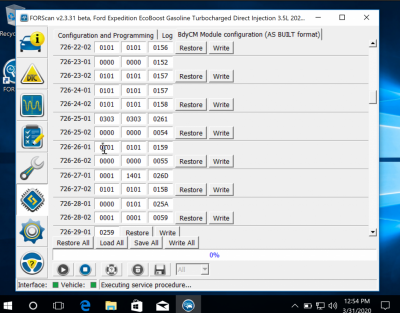
BdyCM 726-27-01 xxxx xxx0 xxxx Enable Fogs On w/ LED headlamps
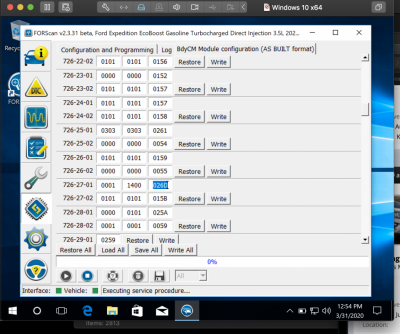
yeah I tried that one ....and it didn't turn Bambi on (that sounds weird as I type it.
my 2020 was set to 0001 1401 026D and I changed it to 0001 1400 026D w/ no results.

BambiBefore.png

BambiAfter.png
 

wakeboarder

Full Access Members
Joined
Nov 16, 2019
Posts
811
Reaction score
468
Location
Fort Lauderdale, FL
Last edited:

Lou Hamilton

Full Access Members
Joined
Nov 28, 2019
Posts
939
Reaction score
640
Location
Maryland
Im not having any luck w/ the double horn honk when key not present either.

What setting did you use? I know you have the 2020, but I used the following on my 2019 with success:

BCM 726-41-02 xxx0 xxxx xxxx

My default stock setting was 0001 0101 0174.
 

bushpilot

Full Access Members
Joined
Feb 20, 2020
Posts
375
Reaction score
159
Location
Houston, Tx
What setting did you use? I know you have the 2020, but I used the following on my 2019 with success:

BCM 726-41-02 xxx0 xxxx xxxx

My default stock setting was 0001 0101 0174.

Lou -

Ive tried several diff options including "plain english" none have been successful.
 

CGETX20

Member
Joined
Apr 21, 2020
Posts
14
Reaction score
6
Location
East TX
Good evening folks. I'm new here but I've been doing a lot of research before trying this out myself. I've gotten my ODB2 connector (Veepeak brand), purchased a Forscan license, and started playing with the plain English/easy mods on my 2020 Max XLT. For some reason, I'm connecting up fine and everything looks to be working, writing changes shows to work in Forscan, but only one (heated/cooled seat buttons on home screen) has actually worked. They just don't seem to take. I'm following all the steps as explained in all the forums and videos. Another odd thing is within some of the modules I show some things as "disabled" that I know are working (like remote start). I'm to the point of thinking any updates will have to be done through the As-Built codes, and that we'll have to wait until a new spreadsheet comes out that is applicable to newer Expeds. As some others have mentioned, the codes in the F150 spreadsheet don't line up with what I'm showing for the 20 Exped. Does anyone know how the Forscan group works well enough to know if they are working on this currently? I'm wondering if it should be pushed with Forscan support or if they're on it. Thoughts?

 

Tracy Cook

Member
Joined
Dec 15, 2019
Posts
6
Reaction score
2
Location
CO
Good evening folks. I'm new here but I've been doing a lot of research before trying this out myself. I've gotten my ODB2 connector (Veepeak brand), purchased a Forscan license, and started playing with the plain English/easy mods on my 2020 Max XLT. For some reason, I'm connecting up fine and everything looks to be working, writing changes shows to work in Forscan, but only one (heated/cooled seat buttons on home screen) has actually worked. They just don't seem to take. I'm following all the steps as explained in all the forums and videos. Another odd thing is within some of the modules I show some things as "disabled" that I know are working (like remote start). I'm to the point of thinking any updates will have to be done through the As-Built codes, and that we'll have to wait until a new spreadsheet comes out that is applicable to newer Expeds. As some others have mentioned, the codes in the F150 spreadsheet don't line up with what I'm showing for the 20 Exped. Does anyone know how the Forscan group works well enough to know if they are working on this currently? I'm wondering if it should be pushed with Forscan support or if they're on it. Thoughts?

Unfortunately, I don't think the forscan guys are going to work on lining what the values need to be. Looks like the 20MY Expy did get different values, my guess is that maybe the 21MY F150's will start to see it, and someone smarter than me will figure them out - there will be far more MY F150 purchases than 20MY Expy, so just waiting.

I did notice that trying to write anything to the BCM settings will fail. I've sent a message to the forscan dev's to see if they know anything about that - hopefully it will get addressed at some point. Looks like it took a few years for them to address writing IPC settings when the 18MY was released.

To enable heated/cooled seats on the home screen - use this setting, it's worked on mine, and I have a 20MY.

APIM 7D0-01-01 xxxx xxxx xExx - heated/Cooled seats, HSW, Rear Controls on Sync Screen
 

LokiWolf

Staff member
Moderator
Joined
Apr 2, 2016
Posts
3,971
Reaction score
2,837
Location
Richmond VA
Why are we discussing 2020 Exp FORSCAN Settings in a Thread called "2019 Expy Forscan"?

We aren't even discussing it in the 4th Gen FORSCAN Thread.

If you read that from earlier today or last night, you would see there is a dev build that lets you write to the BCM in the 2020. I have spent an hour today trying to test settings. The BCM in the 2020 addressing is NOT the same. Nothing works. I stumbled across one thing that did, but it was a previous change I was trying. I think I can map it out, but I need to compare the 2019 file that Wakeboarder sent me line for line...and see if I can find the patterns & similarities.
 

CGETX20

Member
Joined
Apr 21, 2020
Posts
14
Reaction score
6
Location
East TX
My apologies LokiWolf, I appreciate the feedback from you and Tracy Cook. I'm new here and while reading this thread saw some questions about 2020's, and posts from people that show to own 2020's, so I wrote it here hoping to find help from the right folks.

Sounds like we're in a waiting game now. I'll try to follow in the 4th Gen thread.
 
Top




