
Master Reset on 2020 Expedition never completes? Can't activate FordPass

Disclaimer: Links on this page pointing to Amazon, eBay and other sites may include affiliate code. If you click them and make a purchase, we may earn a small commission.

stealthmax

Member
Joined
Apr 11, 2022
Posts
8
Reaction score
4
Location
STL
Edit: RESOLVED

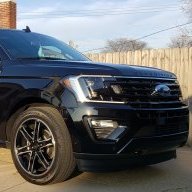
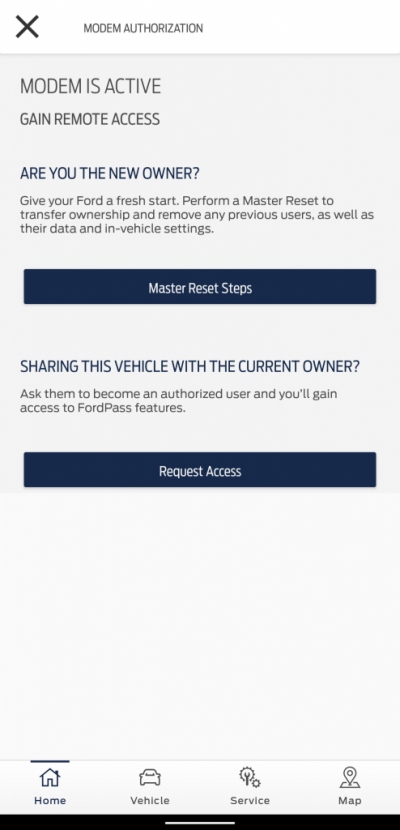
We recently picked up a used 2020 Expedition MAX (stealth). In order to activate FordPass Connect, I've gone through several attempts at doing the Master Reset through the Sync screen, but it doesn't seem to ever "complete" - the screen stays black for 15+ minutes. If I get out/lock/get back in, the screen comes back, but it doesn't appear to actually reset everything (radio station is still set, etc).

Any ideas what's going on? The Ford dealers near me seem to be 1+ month out for service.
 
Last edited:
5280tunage

Full Access Members
Joined
Sep 17, 2019
Posts
1,882
Reaction score
1,159
Location
colorado
have you tried a soft reset first? that is, use the power and skip buttons together for a few seconds. That is a soft reset, try doing that two times in a row first, then try your master reset.

Also, any chance you can post your sync version?
 
OP
OP
S

stealthmax

Member
Joined
Apr 11, 2022
Posts
8
Reaction score
4
Location
STL
I did do a soft reset or two, but can try again. Looks like it's Sync 3.4, build 19274 21194. It was working on downloading an update earlier, though I'm not sure if it finished.

Edit: it apparently did update, and is working on another download right now.
 
Last edited:
OP
OP
S

stealthmax

Member
Joined
Apr 11, 2022
Posts
8
Reaction score
4
Location
STL
Not sure if the soft resets or the Sync update did it, but I am able to do a master reset now. It didn't fix the FordPass Connect activation problem, though.
 

caplanm

Well-Known Member
Supporting Member
Joined
Dec 12, 2012
Posts
154
Reaction score
101
Location
Boston
Two thoughts, first the VIN still might be associated with the previous owner's FordPass account, and wasn't removed. A Ford dealer can probably check if it is via OASIS. A second thought is to remove the activation from the Ford Pass app on your iPhone/Android, providing you were able to register your VIN and Activate it via the app. The app will allow you to remove to activation. If you are able to remove it on the app, do 1 key cycle, shut down, open and close the drivers door and wait 30 minutes. Then try to add the FordPassConnect on your app, and see what happens
 
Last edited:
OP
OP
S

stealthmax

Member
Joined
Apr 11, 2022
Posts
8
Reaction score
4
Location
STL
I have no clue if the previous owner removed the VIN from their account - is that strictly required? Or should a master reset clear that association?

Another thing that's odd to me - after the master reset, it still doesn't seem like everything is being reset. The radio station is still set to what it was beforehand, and I don't get asked if I want to enable data/automatic updates like I've seen in some videos. Odd.
 

caplanm

Well-Known Member
Supporting Member
Joined
Dec 12, 2012
Posts
154
Reaction score
101
Location
Boston
Did you purchase the vehicle from a Ford Dealer? I would definitely engage them, if you did. It still seems like it is set to the previous owner. Any Ford dealer with your VIN should probably figure it out.
 

caplanm

Well-Known Member
Supporting Member
Joined
Dec 12, 2012
Posts
154
Reaction score
101
Location
Boston
I still think you should reach out to a Ford Dealer. If it is still associated with the previous owner, it is not going to remove that owner with a Master Reset. I'm assuming that you got your pre-owner Expedition from a Ford Dealer. If that is the case. Shame on them for not clearing everything including any SXM Subscriptions, as well as the FordPass Modem If you go to a Ford dealer, he should be able to pull up OASIS and find out who the previous owner was.
 

Tha Capn

New Member
Joined
Mar 29, 2022
Posts
2
Reaction score
2
Location
United States, CA
We had the same issue. Our 2020 Expy was a prior rental, so we had to call the help desk. They had to remove the info saying that it was a rental and did a master reset. After that everything was working like it should.
 

Rob6805

Full Access Members
Joined
Mar 25, 2021
Posts
819
Reaction score
533
Location
49735
I still think you should reach out to a Ford Dealer. If it is still associated with the previous owner, it is not going to remove that owner with a Master Reset. I'm assuming that you got your pre-owner Expedition from a Ford Dealer. If that is the case. Shame on them for not clearing everything including any SXM Subscriptions, as well as the FordPass Modem If you go to a Ford dealer, he should be able to pull up OASIS and find out who the previous owner was.
I do think a master reset is supposed to wipe out all previous data, include ForsPass linked accounts. For some reason his isn't working.
 

Rob6805

Full Access Members
Joined
Mar 25, 2021
Posts
819
Reaction score
533
Location
49735
I'm able to add it, but when I click Activate, I get this:
You may need to replace the APIM. If
it's under warranty push the dealer to either get it reset so you can start out fresh or replace it.
 
OP
OP
S

stealthmax

Member
Joined
Apr 11, 2022
Posts
8
Reaction score
4
Location
STL
Update: I did a rain dance and tried another sequence of toggling the connectivity, locking the car, FordPass reset, locking the car, etc and it finally did a proper reset and the app was able to activate.
 

Rob6805

Full Access Members
Joined
Mar 25, 2021
Posts
819
Reaction score
533
Location
49735
Update: I did a rain dance and tried another sequence of toggling the connectivity, locking the car, FordPass reset, locking the car, etc and it finally did a proper reset and the app was able to activate.
Oh man, nice. Something was hung up for sure. Glad you got it.
 
Top