NO GPS icon on nav screen

Disclaimer: Links on this page pointing to Amazon, eBay and other sites may include affiliate code. If you click them and make a purchase, we may earn a small commission.

Artie

Full Access Members
Joined
Jul 24, 2017
Posts
1,870
Reaction score
1,036
Location
Georgia
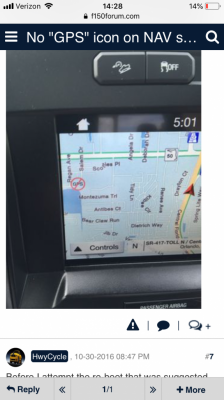
I’ve never had this icon appear until today and it’s done it twice now. Any ideas on what causes this? It stays on until I turn off the vehicle. It came on during a second trip and stays on until I power down the truck. Thanks in advance.

 

J Ski

3.5plati
Joined
Apr 4, 2017
Posts
1,019
Reaction score
485
Location
VA
I’ve never had this icon appear until today and it’s done it twice now. Any ideas on what causes this? It stays on until I turn off the vehicle. It came on during a second trip and stays on until I power down the truck. Thanks in advance.

Like this?
404C25C3-393F-4955-9EB5-BA121FF5E274.png
 

Flexpedition

Full Access Members
Joined
May 26, 2015
Posts
1,339
Reaction score
665
Location
midwest
I see this occasionally as well and the explanation offered was the nav module prefers to receive from multiple satellites. I believe with 24 in orbit ideally there would be 6 usable at most times. When 3 or fewer are detected the red circle/slash appears. You'll notice that even with this icon route guidance still works 100% and your position on the map is constantly updated. It is odd that a keycycle is the fix.
 

J Ski

3.5plati
Joined
Apr 4, 2017
Posts
1,019
Reaction score
485
Location
VA
F150 guys say a master reset worked for them and they never saw it pop up again
 
OP
OP
Artie

Artie

Full Access Members
Joined
Jul 24, 2017
Posts
1,870
Reaction score
1,036
Location
Georgia
I see this occasionally as well and the explanation offered was the nav module prefers to receive from multiple satellites. I believe with 24 in orbit ideally there would be 6 usable at most times. When 3 or fewer are detected the red circle/slash appears. You'll notice that even with this icon route guidance still works 100% and your position on the map is constantly updated. It is odd that a keycycle is the fix.
So the guidance worked but the nav put my position on the map half a mile from where I was in reality.
 
OP
OP
Artie

Artie

Full Access Members
Joined
Jul 24, 2017
Posts
1,870
Reaction score
1,036
Location
Georgia
F150 guys say a master reset worked for them and they never saw it pop up again
So when you do a master reset what all are you losing? Radio presets and profile stuff like program seat setting and such?
 

J Ski

3.5plati
Joined
Apr 4, 2017
Posts
1,019
Reaction score
485
Location
VA
So when you do a master reset what all are you losing? Radio presets and profile stuff like program seat setting and such?
I’m not 100% sure so dont wanna tell you wrong. Ive never had to do it. Quite a bit of info on f150 forum about this issue though. A lot of ppl say it has to do with # of satellites your gps is picking up too
 

aggiegrad05

Full Access Members
Joined
Nov 6, 2017
Posts
1,833
Reaction score
1,390
Location
North Texas
On the random occasion that my CarPlay decides not to work and it instead just cycles power (there’s a whole ‘nuther thread), this ALWAYS accompanies that problem.
 

JExpedition07

That One Member
Joined
Mar 30, 2017
Posts
6,530
Reaction score
3,140
Location
New York
While my 2007 isn’t a 4th gen it does have factory navigation and I occasionally get this same symbol on the screen, however usually it functions fine.
 
Top