ForScan Tweaks - 2015+

Disclaimer: Links on this page pointing to Amazon, eBay and other sites may include affiliate code. If you click them and make a purchase, we may earn a small commission.

chuck s

Full Access Members
Joined
Dec 20, 2006
Posts
1,990
Reaction score
753
Location
Chesterfield, VA (that's south of Richmond, y'all)
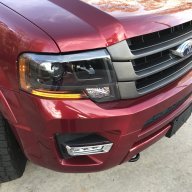
Activating the LED fog lights as DRLs has been completely documented here. Just one line of code in my 2017 Expedition XLT. The large green foglight indicator also comes on the dash so you may want to suppress it as I find it annoying it's so big. Several here have also suppressed the headlight indicator and I did for a while but have restored it. The DRLs work regardless of the headlight position and work via the light sensor in the middle of the dashboard. Set the headlights to Auto and pull out the knob and you'll get the normal automatic headlight operation with fogs (as fogs!) at night. Press the switch in and no fogs at night but they'll be on during daylight.

Keep notes so you can restore any settings. Pay close attention to which digit gets edited as well, there are a lot of them.

I prefer a direct, wired connection to the OBD2 port, not wireless. Twenty bucks as I recall.

Most things available in the SuperDuty notes don't work.

Someone with lots of time on their hands will eventually develop a complete matrix and we'll all be grateful. :)

-- Chuck
 

ExpeditionAndy

Full Access Members
Joined
Aug 31, 2013
Posts
3,708
Reaction score
1,130
Location
Fort Wayne, Indiana
Someone with lots of time on their hands will eventually develop a complete matrix and we'll all be grateful. :)

-- Chuck
I've started to do that but so far the only thing I have in it is to turn of the Hyper Flash (thanks to @LokiWolf) on the front turn signals. As If ind more stuff I will try to make a list of the things that I know will work.
 

AllBoostNoEco

Full Access Members
Joined
May 2, 2017
Posts
328
Reaction score
196
Location
GA
@ads245 posted (post #111) a link to a spreadsheet he compiled of known changes that work in the Expeditions so far.

@chuck s I got 6 free months of Sirius when I bought my XLT used, and I kept ignoring their little cards to extend the service, and the price kept going lower and lower. I think the final price came down to $25 for an additional 6 months before they gave up on me.
In regards to your tracking of the DRL problem, while activating DRLs is well-documented and easy to do, on trucks with factory-activated DRLs, they are coded like a Canadian truck, and changing the line of code in the BCM for DRLs doesn't actually turn off the factory DRLs. There is an option in the IPC for the DRLs, but it is grayed out and not selectable. I've been hunting how to either make them selectable or turn them off entirely. There's a piece of the puzzle missing. Since I'm without my truck for another three weeks, my research has become limited and I reached out here to try and get a few more pieces in place in my off time.

@flexitis I'd be curious if it works in your Flex the way it does in the Expy, or if it pops up in the IPC as a selectable option, or doesn't show up at all. Would let me know that I need to start digging into the Flex programming more deeply as a comparison or not. For secure idle, I was basing my thinking off there only being two styles of keys for Ford vehicles: the "keyed" ignition style where the key juts out from the fob and it's all one piece; and the keyless ignition where the key is simply hidden in the fob but it is removable. I assumed that police vehicles would all come with the keyless style to enable them to take the fob with them but leave the vehicle running, because the keyed style you have to shut it off or leave a fob in the vehicle to keep it running. Which would be self-defeating for the "secure idle" feature. Did they make a different key style for the interceptors where the key and fob are in fact separate pieces, but with a keyed ignition as well?
 

flexitis

Active Member
Joined
Oct 3, 2017
Posts
39
Reaction score
14
Location
US
@ads245 posted (post #111) a link to a spreadsheet he compiled of known changes that work in the Expeditions so far.

@chuck s I got 6 free months of Sirius when I bought my XLT used, and I kept ignoring their little cards to extend the service, and the price kept going lower and lower. I think the final price came down to $25 for an additional 6 months before they gave up on me.
In regards to your tracking of the DRL problem, while activating DRLs is well-documented and easy to do, on trucks with factory-activated DRLs, they are coded like a Canadian truck, and changing the line of code in the BCM for DRLs doesn't actually turn off the factory DRLs. There is an option in the IPC for the DRLs, but it is grayed out and not selectable. I've been hunting how to either make them selectable or turn them off entirely. There's a piece of the puzzle missing. Since I'm without my truck for another three weeks, my research has become limited and I reached out here to try and get a few more pieces in place in my off time.

@flexitis I'd be curious if it works in your Flex the way it does in the Expy, or if it pops up in the IPC as a selectable option, or doesn't show up at all. Would let me know that I need to start digging into the Flex programming more deeply as a comparison or not. For secure idle, I was basing my thinking off there only being two styles of keys for Ford vehicles: the "keyed" ignition style where the key juts out from the fob and it's all one piece; and the keyless ignition where the key is simply hidden in the fob but it is removable. I assumed that police vehicles would all come with the keyless style to enable them to take the fob with them but leave the vehicle running, because the keyed style you have to shut it off or leave a fob in the vehicle to keep it running. Which would be self-defeating for the "secure idle" feature. Did they make a different key style for the interceptors where the key and fob are in fact separate pieces, but with a keyed ignition as well?
I think that the police interceptors you can take the key out while leaving the engine running but I'm not sure. I'll have to start a chat with one of my local police buddy's on that.

Sent from my Z982 using Tapatalk
 
OP
OP
LokiWolf

LokiWolf

Staff member
Moderator
Joined
Apr 2, 2016
Posts
3,971
Reaction score
2,834
Location
Richmond VA
I would rather use Waze over the factory navigation but Apple Controls whether or not Waze can be used with car play and right now it will not allow it. If you figure out how let me know. :)

So I did a little research on the Waze thing...cause I like the app, and am an iGeek. So it appears Apple is not the hold up. Waze/Google Maps(Waze is owned by Google by the way), neither have submitted to Apple a CarPlay compatible app. Apple isn’t going to write it for them! One of Apple dev team leads is on record in a dev forum saying they would love to have a version for CarPlay. But they must submit a CarPlay coded version of the app.

So, my previous assumption that Apple was the hold up does not appear to be true. Everybody go submit feed back to both apps and ask they develop a Car Play compatible version...
 

chuck s

Full Access Members
Joined
Dec 20, 2006
Posts
1,990
Reaction score
753
Location
Chesterfield, VA (that's south of Richmond, y'all)
and changing the line of code in the BCM for DRLs doesn't actually turn off the factory DRLs.
OK, you're trying to extinguish DRLs?! I never imagined anyone would want to do that. :)

There is another line of code someone posted that they noted had to be changed to turn on DRLs but I never touched that code and it may be the one you need to change to turn off DRLs. I'm unable to find my notes but it was here that I saw it a few weeks ago. Some comment that it was necessary to turn on DRLs.

Dash selectable DRLs may be part of or like the "dark car" police car settings.

-- Chuck
 

ads245

Full Access Members
Joined
Jul 24, 2017
Posts
80
Reaction score
47
Location
Tampa
i drive ours like its possibly stolen...this is a real deal pic of real deal mpg at real highway speeds that we drive.
a pic of how ours goes behind the "bus"
enjoy the ecoboost grasshopper

View attachment 21993

View attachment 21994

Was reading another thread in these forums and came across what would be a neat FORScan find. . .if the edit would even be supported. I have a 2015 and don't have the indicated gear display that I noticed in this post with the picture of the dash of a 2016 Expedition. . .

I'll compare the As-Built files between my 2015 and a 2016 this week and see if I find anything of interest.
 

chuck s

Full Access Members
Joined
Dec 20, 2006
Posts
1,990
Reaction score
753
Location
Chesterfield, VA (that's south of Richmond, y'all)
Selected gear shows on my 2017 dash display in some configurations. May have to tap the up/down gear button on the shift lever to get it to show. I know it's blank sometimes and shows other times. Shows available gears and what gear the truck is in.

-- Chuck
 

AllBoostNoEco

Full Access Members
Joined
May 2, 2017
Posts
328
Reaction score
196
Location
GA
Chuck nailed it. Press the "-" button on the shifter and that will pop up. Both my 2015s have it and it stays on any time the trucks are in drive. I find it useful to lock out 5th and 6th when I'm towing my trailer in slower traffic so I don't have to wait for boost.
 
OP
OP
LokiWolf

LokiWolf

Staff member
Moderator
Joined
Apr 2, 2016
Posts
3,971
Reaction score
2,834
Location
Richmond VA
Chuck nailed it. Press the "-" button on the shifter and that will pop up. Both my 2015s have it and it stays on any time the trucks are in drive. I find it useful to lock out 5th and 6th when I'm towing my trailer in slower traffic so I don't have to wait for boost.

Yep, I do the same when sitting in traffic, even with out a trailer.
 

ExpeditionAndy

Full Access Members
Joined
Aug 31, 2013
Posts
3,708
Reaction score
1,130
Location
Fort Wayne, Indiana
Was reading another thread in these forums and came across what would be a neat FORScan find. . .if the edit would even be supported. I have a 2015 and don't have the indicated gear display that I noticed in this post with the picture of the dash of a 2016 Expedition. . .

I'll compare the As-Built files between my 2015 and a 2016 this week and see if I find anything of interest.
Mine doesn't display as a normal condition. When you are in Drive press either the up or down button on the shifter to get it to display. Try that before you do anything in FORScan. I discovered it by accident.
 

AllBoostNoEco

Full Access Members
Joined
May 2, 2017
Posts
328
Reaction score
196
Location
GA
I'm going to add this here even though I don't have a way to test it out until later. In the Fusion, Explorer, and F-150, the following corresponds to DRLs in Canadian vehicles:
726-16-02 0202 0202 02 IPC Control locked out

In all three, it says to change it to 0101 0101 00 to unlock the option.

In our Expeditions, 726-49-02 is 0202 0202 03; which is the only line of code in the BCM that compares.

My "hope" is that perhaps changing that line to 0101 0101 00 will enable IPC control. If you didn't have DRLs as an option in the IPC previously, you'd have to change 726-11-01 and 720-02-01 as previously discussed to both enable the option and have the setting pop up in the IPC.

Huge shoutout to @ExpeditionAndy for his help in narrowing this down. Whether it works or not.
 
Last edited:

ads245

Full Access Members
Joined
Jul 24, 2017
Posts
80
Reaction score
47
Location
Tampa
I'm going to add this here even though I don't have a way to test it out until later. In the Fusion, Explorer, and F-150, the following corresponds to DRLs in Canadian vehicles:
726-16-02 0202 0202 02 IPC Control locked out

In all three, it says to change it to 0101 0101 00 to unlock the option.

In our Expeditions, 726-49-02 is 0202 0202 03; which is the only line of code in the BCM that compares.

My "hope" is that perhaps changing that line to 0101 0101 00 will enable IPC control. If you didn't have DRLs as an option in the IPC previously, you'd have to change 726-11-01 and 720-02-01 as previously discussed to both enable the option and have the setting pop up in the IPC.

Huge shoutout to @ExpeditionAndy for his help in narrowing this down. Whether it works or not.

Gave this a shot! Changed the IPC line to bring up the option in the dash screen, activated the DRLs and then changed line 726-49-02 and yet the dash option was still greyed out.

On another note, sure enough, touched the "-" button on the shifter and up popped the indicated transmission gear. Awesome!
 

AllBoostNoEco

Full Access Members
Joined
May 2, 2017
Posts
328
Reaction score
196
Location
GA
Well, that's a drag. Thanks @ads245 for trying it out.

Beyond the as-built data that you can pull from the Motorcraft site, all of which we've narrowed down as not being relevant, the only other lines of code I can find that seem to differ between my truck and trucks without DRLs are the following:
726-49-01 0101 0101 01 (DRL)
0101 0101 00 (no DRL)

726-59-01 50A5 195E
0000 0000

726-65-01 C4BE 35FF
0000 0000

726-66-01 C40E FCFF
0000 0000

I have NO clue what 59, 65, and 66 are all about, or why I have actual code there and the others just have zeros. My comparison was my 15 XLT against a 15 Plat and 17 Limited. The Plat and Limited were identical in their code beyond the Motorcraft data.
This leaves my last hope being 726-49-01, or it in combination with 726-49-02 as noted above, along with 726-11-01 and 720-02-01.
 

flexitis

Active Member
Joined
Oct 3, 2017
Posts
39
Reaction score
14
Location
US
I have a flex and I'm ready to try out the DRL option in the IPC and report back.
Regarding secure idle I don't think it has anything to do with push button start since it's a police option and I don't think that police interceptors is push button start.

Sent from my Z982 using Tapatalk
I checked now and I don't have 720-02-01 in the IPC so I'll have to fig a little deeper in the IPC when I'll have more time.

Sent from my SM-N900V using Tapatalk
 

ads245

Full Access Members
Joined
Jul 24, 2017
Posts
80
Reaction score
47
Location
Tampa
Well, that's a drag. Thanks @ads245 for trying it out.

Beyond the as-built data that you can pull from the Motorcraft site, all of which we've narrowed down as not being relevant, the only other lines of code I can find that seem to differ between my truck and trucks without DRLs are the following:
726-49-01 0101 0101 01 (DRL)
0101 0101 00 (no DRL)

726-59-01 50A5 195E
0000 0000

726-65-01 C4BE 35FF
0000 0000

726-66-01 C40E FCFF
0000 0000

I have NO clue what 59, 65, and 66 are all about, or why I have actual code there and the others just have zeros. My comparison was my 15 XLT against a 15 Plat and 17 Limited. The Plat and Limited were identical in their code beyond the Motorcraft data.
This leaves my last hope being 726-49-01, or it in combination with 726-49-02 as noted above, along with 726-11-01 and 720-02-01.

I wonder if it's possible for mine which came with no DRLs if line 726-49-01 also needs to be changed to 01 at the end instead of 00. I'll try this when I get a chance in addition to changing the IPC line to bring up the option in the dash screen, activating the DRLs and then changing line 726-49-02 as well. I'll report back.
 

AllBoostNoEco

Full Access Members
Joined
May 2, 2017
Posts
328
Reaction score
196
Location
GA
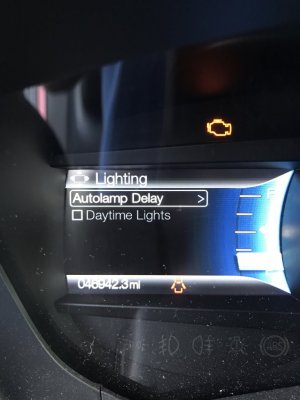
Drove 200 miles today just to be able to try this. No luck getting the option to be available in the IPC (yet), but changing 726-49-01 did the magic. The checkmark is gone. I am unable to physically verify they are in fact off, because my truck doesn't have any headlights. But I consider that a good sign.

IMG_0601.JPG
 

ExpeditionAndy

Full Access Members
Joined
Aug 31, 2013
Posts
3,708
Reaction score
1,130
Location
Fort Wayne, Indiana
Drove 200 miles today just to be able to try this. No luck getting the option to be available in the IPC (yet), but changing 726-49-01 did the magic. The checkmark is gone. I am unable to physically verify they are in fact off, because my truck doesn't have any headlights. But I consider that a good sign.

View attachment 22043
Okay, I'll bite, why doesn't your truck have headlights?
 
Top