disabling auto start/stop with forscan...

Disclaimer: Links on this page pointing to Amazon, eBay and other sites may include affiliate code. If you click them and make a purchase, we may earn a small commission.

Left Coast Geek

Full Access Members
Joined
Aug 31, 2023
Posts
634
Reaction score
312
Location
Mid Left Coast
so, on my 2019 Limited Stealth, I took a stab at disabling Auto Start/Stop with Forscan, but it triggers a error at startup about 'Check Charging System Soon' or something. meh.

First, I tried following someone elses howto that had me putting hex codes into various 'AS BUILT' things, but my IPC codes didn't match his, so I backed out what I'd changed on the BdyCM and FCIM. Then I just went into the BdyCM (not AS BUILT) and instead of hex codes, its a simple 'AutoStart/Stop disable' and it seemed to work, but throws the Check Charging error every startup. No DTC's in any modules.
 

HILLY

Full Access Members
Joined
May 12, 2023
Posts
320
Reaction score
235
Location
Greenville, SC
People have various results with this, mostly successful. That said, you are essentially deactivating the Battery Control Module (BCM) which actively monitors and charges the battery as well as communicating with the PCM, etc. Proper way IMO is to get an eliminator such as Autostop Eliminator, while allowing the BCM to continue to do its thing. The kit works well and is seemless.
 

techdude99

Full Access Members
Joined
Nov 25, 2019
Posts
367
Reaction score
140
Location
US
so, on my 2019 Limited Stealth, I took a stab at disabling Auto Start/Stop with Forscan, but it triggers a error at startup about 'Check Charging System Soon' or something. meh.

First, I tried following someone elses howto that had me putting hex codes into various 'AS BUILT' things, but my IPC codes didn't match his, so I backed out what I'd changed on the BdyCM and FCIM. Then I just went into the BdyCM (not AS BUILT) and instead of hex codes, its a simple 'AutoStart/Stop disable' and it seemed to work, but throws the Check Charging error every startup. No DTC's in any modules.
The current consensus on the 4th gen is to get the start/stop eliminator. I tried it both ways and gave up with Forscan. It seems like it should work but I ran into the same issue as you and the start/stop eliminator was simple to install. You can buy a new one or get a used one fairly cheap. It's a very simple device.
 

giraffenut

Member
Joined
Aug 5, 2021
Posts
9
Reaction score
3
Location
lakeland florida
People have various results with this, mostly successful. That said, you are essentially deactivating the Battery Control Module (BCM) which actively monitors and charges the battery as well as communicating with the PCM, etc. Proper way IMO is to get an eliminator such as Autostop Eliminator, while allowing the BCM to continue to do its thing. The kit works well and is seemless.
Does not work with 2020 or newer per the site.
 

image98

Active Member
Joined
Jul 11, 2021
Posts
35
Reaction score
28
Location
California
I disabled Auto Start/Stop on my 2017 raptor with Forscan. Worked perfectly, However like you I tried to program the same on my 2019 Expedition and it was giving me the same error, so obviously Ford changed the programming. So I reverted back to stock settings. If you put a trailer brake adapter (brake light, etc.) or plug in the 7 pin trailer hitch, auto/ start/stop will be disabled.
 

sixstring

Full Access Members
Joined
May 13, 2020
Posts
188
Reaction score
129
Location
Florida
Does not work with 2020 or newer per the site.
You are looking at the wrong part.

AE002 Harness Type Installs in minutes behind the auto start-stop switch assembly. Works with any 2018-2021 Ford Expedition.


Mr Big

Full Access Members
Joined
May 29, 2023
Posts
1,003
Reaction score
586
Location
Tampa Bay, Florida USA
I successfully disabled it on my 2019, with no errors using Forscan. However, after a week of driving, it went back to working again. So, I went back into Forscan and put things back to normal. I just got used to disabling start/stop and traction control, as soon as I start the vehicle. I disable traction control, because when it's on it makes a grind noise when I back up quickly, turn the wheel and apply he brakes.
 

bighayden

New Member
Joined
Jun 21, 2021
Posts
3
Reaction score
10
Location
South Carolina
I disabled the auto start/stop (very appropriately abbreviated A-S-S) with Forscan by disabling the battery management system (2019 Stealth). If the BMS doesn't report the battery status to the PCM (or whichever module is actually controlling the start/stop), it deactivates it. The auto start icon on the cluster will come on whenever I come to a stop, but it's grayed out instead of the white that it would be if it's active. No issues with the original battery for 5 years. Considering how many power accessories are used without the truck running (running boards, mirrors, lift gate, easy entry seat/steering wheel), it's done pretty well. I did pre-emptively change the battery last month, since it's my wife's truck and I don't need her getting stranded; it was starting to show some signs that it was getting a little tired.
 

brownandrew24

New Member
Joined
Mar 29, 2026
Posts
2
Reaction score
0
Location
Michigan
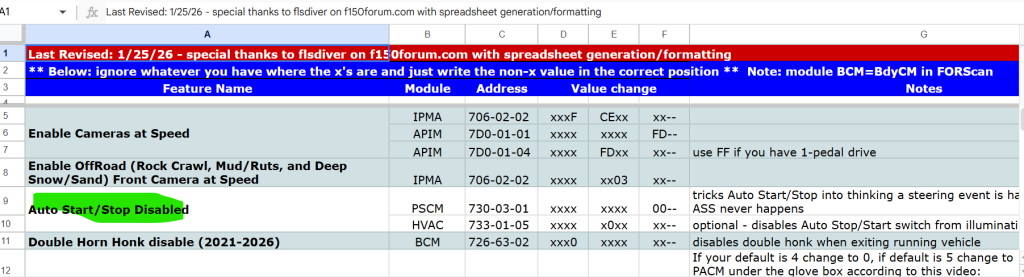
I just acquired my 2024 Expedition -- first thing I did was disable the auto stop/start.
I would not suggest doing it through the BCM configuration as it will also disable the BMS system and I immediately got the red battery MIL on the cluster.

Go through the PSCM configuration for it. I copied what is shared on all of the F-150 forums. I could not get the HVCA as-built data to write, but the PSCM config change shown here worked for me. 1774816860359.png
 

Just Ask Why

Member
Joined
Mar 26, 2026
Posts
6
Reaction score
1
Location
Retired nomad
I'm a new 2025 Expedition Tremor owner and newer Forscan user but I have a considerable amount of computer experience for a late Boomer generation member. When jcroman73 stated he did it but couldn't recall the steps I found it debatable but not impossible. I have spent a considerable amount of time trying to find a method but as you all are aware, it ain't easy. I found a simple solution which would disable it but it also gave you a battery low voltage error and corresponding red battery dash light. In the BdyCM module non as built. 1775509651811.png

After reading this post I spent some time using jcroman73's "method" of "by opening each one, but just open each one that can be programmed and look through the list. You will see start/stop and want to disable all of them. It takes it completely off the screen."

He's close but not quite accurate. I'll specify below in the changes I made.

Here's what I found when I went line by line through all of the non as built configurable modules. As of several hours ago and about 30 miles traveled I have a disabled "Auto Stop Start" system and no error codes or DTC codes. Not all these stated they were "Auto Stop Start" system orientated and I make no claim that they are all for that system or that this will work in the long run. If I run into issues I'll try to update this forum post.

1775509686555.png


Where jcroman73 was inaccurate was in the BdyCM BMS / Auto Start Stop system disablement.

This is the one reference I did not disable because if you do it causes a Battery Management System (BMS) battery low voltage error and corresponding red battery dash light.


As I said , no guarantees since I don't know wtf I'm doing and I'm just a hack n slash trial n error Boomer programmer so if I'm wrong, tell me but don't hang me out to dry.
 

Mr Big

Full Access Members
Joined
May 29, 2023
Posts
1,003
Reaction score
586
Location
Tampa Bay, Florida USA
I'm a new 2025 Expedition Tremor owner and newer Forscan user but I have a considerable amount of computer experience for a late Boomer generation member. When jcroman73 stated he did it but couldn't recall the steps I found it debatable but not impossible. I have spent a considerable amount of time trying to find a method but as you all are aware, it ain't easy. I found a simple solution which would disable it but it also gave you a battery low voltage error and corresponding red battery dash light. In the BdyCM module non as built. View attachment 86913

After reading this post I spent some time using jcroman73's "method" of "by opening each one, but just open each one that can be programmed and look through the list. You will see start/stop and want to disable all of them. It takes it completely off the screen."

He's close but not quite accurate. I'll specify below in the changes I made.

Here's what I found when I went line by line through all of the non as built configurable modules. As of several hours ago and about 30 miles traveled I have a disabled "Auto Stop Start" system and no error codes or DTC codes. Not all these stated they were "Auto Stop Start" system orientated and I make no claim that they are all for that system or that this will work in the long run. If I run into issues I'll try to update this forum post.


As I said , no guarantees since I don't know wtf I'm doing and I'm just a hack n slash trial n error Boomer programmer so if I'm wrong, tell me but don't hang me out to dry.
BIGGEST thing you have to worry about is causing issues with the BMS. I hope you remembered to backup.
 

Just Ask Why

Member
Joined
Mar 26, 2026
Posts
6
Reaction score
1
Location
Retired nomad
I have backup as purchased and I make separate backups as I make changes.
No issues with BMS since as mentioned in the post
"Where jcroman73 was inaccurate was in the BdyCM BMS / Auto Start Stop system disablement.

This is the one reference I did not disable because if you do it causes a Battery Management System (BMS) battery low voltage error and corresponding red battery dash light."
 

ranger22

Well-Known Member
Joined
Feb 23, 2025
Posts
51
Reaction score
37
Location
tejas
Another auto stop eliminator here. It’s working perfectly on mine and was an easy install.
 

Tylus

Member
Joined
Feb 19, 2025
Posts
11
Reaction score
7
Location
SE Georgia
I just acquired my 2024 Expedition -- first thing I did was disable the auto stop/start.
I would not suggest doing it through the BCM configuration as it will also disable the BMS system and I immediately got the red battery MIL on the cluster.

Go through the PSCM configuration for it. I copied what is shared on all of the F-150 forums. I could not get the HVCA as-built data to write, but the PSCM config change shown here worked for me. View attachment 86858
can you update if this is still working for you? any issues?

I've been copying F-150 forums for my 2024 Expy Forscan adventures. Want to make sure this is a true carry-over as well before messing with the wifes ride.
 

Mr Big

Full Access Members
Joined
May 29, 2023
Posts
1,003
Reaction score
586
Location
Tampa Bay, Florida USA
can you update if this is still working for you? any issues?

I've been copying F-150 forums for my 2024 Expy Forscan adventures. Want to make sure this is a true carry-over as well before messing with the wifes ride.
The main concern would be if it messes with the bms, (battery monitoring system), at all. I guess time will tell.
 
Top