
Auto reverse tilt side mirrors.

Disclaimer: Links on this page pointing to Amazon, eBay and other sites may include affiliate code. If you click them and make a purchase, we may earn a small commission.

5280tunage

Full Access Members
Joined
Sep 17, 2019
Posts
1,875
Reaction score
1,154
Location
colorado
This post hasn't been touched in quite a while, and I've seen several other posts on other forums, but i'm wondering if any of the super experienced folks on here can answer a simple question. If you go through the proper calibration routine (which seems to be very "up in the air" at the moment), can this vehicle (for me a 2019 platinum) actually have two mirrors that auto tilt down when i put my vehicle in reverse? This is stupid, I paid substantially more for this than I did my 2011 jeep that had fully functioning auto tilt mirrors. It really helped in that vehicle, and would help even more in this. I guess I would have just thought this function was table stakes these days, and unlike lots of folks, I don't stare at the screen all the time, I prefer to actually turn my head and look around my vehicle, and use my mirrors to get as close to curbs as I can.

Anyway, if it actually can be done (keep in mind that I've already used Forscan to enable it) but after my first attempt at calibrating the mirrors, they do the crazy constant popping thing if I use the memory functions ever. Please, if anyone has been able to make this work, please let me know, and by working I mean auto-tilt, not push this button before you backup every time. Or should I just return the DDM/PDM settings back to normal and accept that my $80K list price vehicle doesn't have what my $50K jeep had?

 

Johhn14

Well-Known Member
Joined
Sep 15, 2019
Posts
48
Reaction score
16
Location
boston
I also came from the Jeep brand and this is the thing I miss most. Hugely helpful when backing into spots or parallel parking and judging distance from the curb. The 360 cam is not a proper substitute.
 

5280tunage

Full Access Members
Joined
Sep 17, 2019
Posts
1,875
Reaction score
1,154
Location
colorado
I also came from the Jeep brand and this is the thing I miss most. Hugely helpful when backing into spots or parallel parking and judging distance from the curb. The 360 cam is not a proper substitute.

It's crazy. I've read posts where Ford removed it because it was problematic, how dumb, that's a software issue. The mirrors already have the locations logic built in, hence the memory mirror functions in general.

So frustrating.
 

bushpilot

Full Access Members
Joined
Feb 20, 2020
Posts
375
Reaction score
159
Location
Houston, Tx
I'm with the 360 camera opinion but you can do this if you really want it to tilt in R.

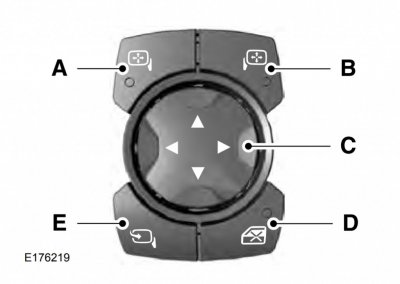
Reverse Tilt Mirror Calibration:

1) Switch the ignition on
2) Press the memory button you want to setup
3) Select the mirror you want to adjust
4) Put your vehicle into reverse (R) and adjust the mirror where desired
5) Hold the memory button for 5 seconds to save the setting
6) Press the mirror button and return to park (P)
7) Hold the memory button again until saved

When in reverse push mirror button to tilt. Push it again to return it to normal position.

Thanks AAOO - worked perfectly!
 

lobsenza

Full Access Members
Joined
Jun 21, 2018
Posts
329
Reaction score
119
Location
Texas
I am confused. Which mirror button do you push to get them to tilt down?

It is a shame this can't be set to automatic.
 

5280tunage

Full Access Members
Joined
Sep 17, 2019
Posts
1,875
Reaction score
1,154
Location
colorado
So here's a crazy issue, that I'd love some help on. So I originally had both the lincoln fold and reverse tilt settings in place using Forscan, but I never got the reverse tilt to work properly, and after reading this it turns out it won't do what I want anyways. So with that, I removed the reverse tilt settings but left the lincoln style fold. I reprogrammed positions 1 and 2 (me and my wife) and now, every time I select one of them, the mirrors do the crazy move to extreme positions and start popping. No matter what I do.

How do I fix this issue? I've tried turning PDM and DDM back to original settings as well, still no luck. Even stranger, my right and left move buttons are reversed. That is, if I select the left mirror and try to move it outward (in this case, to the left) using the left arrow, it moves right. Up and down directions are fine, but left and right are reversed.

Would really love some ideas here!
Thanks, Jared
 

wakeboarder

Full Access Members
Joined
Nov 16, 2019
Posts
811
Reaction score
468
Location
Fort Lauderdale, FL
So here's a crazy issue, that I'd love some help on. So I originally had both the lincoln fold and reverse tilt settings in place using Forscan, but I never got the reverse tilt to work properly, and after reading this it turns out it won't do what I want anyways. So with that, I removed the reverse tilt settings but left the lincoln style fold. I reprogrammed positions 1 and 2 (me and my wife) and now, every time I select one of them, the mirrors do the crazy move to extreme positions and start popping. No matter what I do.

How do I fix this issue? I've tried turning PDM and DDM back to original settings as well, still no luck. Even stranger, my right and left move buttons are reversed. That is, if I select the left mirror and try to move it outward (in this case, to the left) using the left arrow, it moves right. Up and down directions are fine, but left and right are reversed.

Would really love some ideas here!
Thanks, Jared

When you say you changed them back to their original settings, did you just change the individual setting or did you reflash the whole PDM and DDM back to the original values that was saved before any modifications?

I didn't have to change any settings in Forscan to get the reverse tilt to work on mine.
 

5280tunage

Full Access Members
Joined
Sep 17, 2019
Posts
1,875
Reaction score
1,154
Location
colorado
I reloaded the original forscan backup files that I saved prior to making any changes, I also confirmed those settings with the factory settings i received from the Ford website. I then changed them so that the lincoln style fold still worked. Before I did that I tested it and it was still messed up.

I did use the settings listed in the Forscan tools (changing the first characters to "F's" to enable the reverse tilt feature, guess I didn't even try it prior to that, but the calibration setup is a pain and to be honest, if you're only going to get one mirror at a time, and it only works if that mirror is selected, then it's kind of a waste. Let me rephrase that, coming from a vehicle bought in 2010, that had a fully functioning reverse tilt function, that is, every time I put it in reverse, both mirrors would tilt, this seems pretty lackluster.
 
Last edited:

wakeboarder

Full Access Members
Joined
Nov 16, 2019
Posts
811
Reaction score
468
Location
Fort Lauderdale, FL
I reloaded the original forscan backup files that I saved prior to making any changes, I also confirmed those settings with the factory settings i received from the Ford website. I then changed them so that the lincoln style fold still worked. Before I did that I tested it and it was still messed up.

I did use the settings listed in the Forscan tools (changing the first characters to "F's" to enable the reverse tilt feature, guess I didn't even try it prior to that, but the calibration setup is a pain and to be honest, if you're only going to get one mirror at a time, and it only works if that mirror is selected, then it's kind of a waste. Let me rephrase that, coming from a vehicle bought in 2010, that had a fully functioning reverse tilt function, that is, every time I put it in reverse, both mirrors would tilt, this seems pretty lackluster.

What other Forscan tweaks did you attempt? Since things are reversed, do you think there is any possibility that you inadvertently enabled right hand drive? Have you tried reflashing the rest of the modules you have modified to the backups?
 

5280tunage

Full Access Members
Joined
Sep 17, 2019
Posts
1,875
Reaction score
1,154
Location
colorado
Goodness no, I would think other things would be messed up and given that it's just the mirror adjustment buttons that are flipped, I feel like it has to be something with that module. Other than that, the only things I did were the numbers above the gauges, disabled the double honk, changed the number of blinks on the turn signals for passing. That's really it.
 

wakeboarder

Full Access Members
Joined
Nov 16, 2019
Posts
811
Reaction score
468
Location
Fort Lauderdale, FL
Goodness no, I would think other things would be messed up and given that it's just the mirror adjustment buttons that are flipped, I feel like it has to be something with that module. Other than that, the only things I did were the numbers above the gauges, disabled the double honk, changed the number of blinks on the turn signals for passing. That's really it.

Could it just be the standard mirror clicking issue and have nothing to do with your Forscan mods? https://www.expeditionforum.com/threads/passenger-side-mirror-freaking-out.35480/

The mirror adjustment buttons flipped still seems very strange to me. From what I could tell, it is a bus communication between the master window control switch and the DDM for the mirror adjustment.
 

5280tunage

Full Access Members
Joined
Sep 17, 2019
Posts
1,875
Reaction score
1,154
Location
colorado
Could it just be the standard mirror clicking issue and have nothing to do with your Forscan mods? https://www.expeditionforum.com/threads/passenger-side-mirror-freaking-out.35480/

The mirror adjustment buttons flipped still seems very strange to me. From what I could tell, it is a bus communication between the master window control switch and the DDM for the mirror adjustment.

It's possible that it's just the standard clicking issue, I just never ran into it until the first time I attempted the reverse tilt programming procedure, which was back in January. Ever since then, ANY time I use the memory buttons (even immediately after programming one of them, which means the mirror shouldn't have to move at all), the clicking happen.

As for the reverse buttons, I double checked the DDM/PDM settings again, they are exactly as they were before I programmed anything. I can try pulling the battery cable for a few minutes to see if the canbus will reset or something, but I doubt it will help. I've searched Google 10 ways from sunday and can't find anyone that seems to have the same issue.
 

5280tunage

Full Access Members
Joined
Sep 17, 2019
Posts
1,875
Reaction score
1,154
Location
colorado
Okay, so here's yet another update. I got a few minutes to troubleshoot some stuff today.

I went ahead and restored both DDM and PDM to their original settings, prior to changing anything. Oddly enough, the reversed mirror controls went back to normal, and my mirrors stopped doing the clicking them, immediately. I tried several times, turned off the car, started it, etc. Now anytime I used the memory buttons, they work properly, the mirrors move to where they should be, and no issues at all.

Next, I tried setting only the Lincoln Style autofold settings, which in my vehicle both 740-12-01 and 741-12-01 (DDM and PDM respectively) are already set with an F in the first position, so I simply change the second and third positions to 84 as stated in the FORSCAN Excel spreadsheet. As soon as I commit those settings, and only those settings, the mirror controls reverse again, and the clicking returns.

So needless to say, I've returned it back to original settings so that everything works as it should. Any additional thoughts here? And just to be clear, I didn't change the reverse tilt settings at all on the test. Only the setting for Autofold.
 

wakeboarder

Full Access Members
Joined
Nov 16, 2019
Posts
811
Reaction score
468
Location
Fort Lauderdale, FL
Are you changing the 2nd and 3rd position to 8 and 4 in the 740-12-01 and 741-12-01 lines?

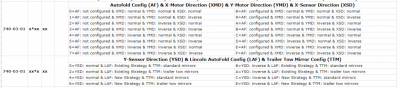
As I read the F150 spreadsheet, the 8 and 4 are for the 740-03-01 and 741-03-01 lines.


upload_2020-3-31_20-24-45.png
 

5280tunage

Full Access Members
Joined
Sep 17, 2019
Posts
1,875
Reaction score
1,154
Location
colorado
No, as I tried to state above, following exactly the same spreadsheet you're referencing, positions 12-01 are just using the F in the first position, which on my vehicle was already set. positions 03-01 on both are set to 84, which neither of those were 84 to begin with, so those are the only ones i'm setting. Sorry if I made that confusing at all. But I do appreciate you trying to help.
 
Last edited:

wakeboarder

Full Access Members
Joined
Nov 16, 2019
Posts
811
Reaction score
468
Location
Fort Lauderdale, FL
No, as I tried to state above, following exactly the same spreadsheet you're referencing, positions 12-01 are just using the F in the first position, which on my vehicle was already set. positions 03-01 on both are set to 84, which neither of those were 84 to begin with, so those are the only ones i'm setting. Sorry if I made that confusing at all. But I do appreciate you trying to help.

What is the original value for the X84X XX in 740-03-01 and 741-03-01? Below is the image from the DDM/PDM tab of the spreadsheet. Maybe by changing to 84, the x direction motor or sensor is being inverted. It may be worthwhile asking in the Forscan section of the forum as well.

upload_2020-3-31_23-0-19.png
 

5280tunage

Full Access Members
Joined
Sep 17, 2019
Posts
1,875
Reaction score
1,154
Location
colorado
When I read the original files, here's what I see.
740-03-01 - DDM - BC8087
741-03-01 - PDM - BD8089


I have actually posted in the forscan forums as well. hoping I get some responses there. Thank you.
 
Top