Display audio track on gauge cluster screen?

Disclaimer: Links on this page pointing to Amazon, eBay and other sites may include affiliate code. If you click them and make a purchase, we may earn a small commission.

carymccarr

Full Access Members
Joined
Aug 11, 2019
Posts
1,749
Reaction score
390
Location
Earth
@carymccarr You were correct on the Factory Nav for other manufacturers. I know BMW, VW, Toyota, Mazda, Dodge, and Nissan do not allow Native Nav access when Carplay is attached, but apparently some do. I played with a neighbors chevy a few months ago, and his did not. Factory Nav button sent you to Apple Maps when his phone was connected, so maybe there has been an update or GMC uses a slightly different version.

Turning off Carplay is 4 button presses for me, but all good if that is too hard.

We can agree to disagree, I don't see them as limitations. Do I wish it was better, yes, but I have used MANY systems that were WAY worse. I change what I can, and live with what I can't.

Whether they bug you or not doesn’t change whether they are limited functions within sync.

We can agree to disagree about whether they are bothersome or not.

[emoji482]

 

AKentPhoto

Full Access Members
Joined
Jan 23, 2020
Posts
508
Reaction score
309
Location
New Orleans
AAuto is two presses to get back to factory OS from Nav/Map... Pretty acceptable if you ask me. If you need a charge and don't want phone OS just put in a real 12v charger. It will do a much better job of charging the phone anyway.

I have yet to use a factory nav that has access to gps while navigating with phone OS. It still shows up while not navigating... Its really annoying on the Audi setup that offers full screen maps on the 12in gauge cluster.
 

carymccarr

Full Access Members
Joined
Aug 11, 2019
Posts
1,749
Reaction score
390
Location
Earth
AAuto is two presses to get back to factory OS from Nav/Map... Pretty acceptable if you ask me. If you need a charge and don't want phone OS just put in a real 12v charger. It will do a much better job of charging the phone anyway.

Yep. No doubt there are work arounds to the systems limitations. Though connecting to 12v wouldn’t allow you to stream music without having to use BT audio.

Not sure how you get to native navigation in 2 button presses when in a carplay map? In mine I have at least 6 steps unless I’m doing it wrong?

1) press carplay menu button to get back to main carplay screen
2) press Lincoln sync button to get back to main car screen
3) press settings button
4) scroll screen to the right
5) press carplay settings button
6) turn off carplay
7) press nav button and voila! You can use factory nav again!


Sent from my iPhone using Tapatalk
 
Last edited:

AKentPhoto

Full Access Members
Joined
Jan 23, 2020
Posts
508
Reaction score
309
Location
New Orleans
I don't mind bluetooth for around town... I
is rare im in the car for more than 10min so by the time I plug everything in... It's just not worth the wear and tear on the phone for me. Especially with radiant charging available...

Can you access all your playlists etc via Bluetooth? Or just play/next track? Going to have to try that today...
 

carymccarr

Full Access Members
Joined
Aug 11, 2019
Posts
1,749
Reaction score
390
Location
Earth
by the time I plug everything in... It's just not worth the wear and tear on the phone for me.

Ha! Odd that you find a 7 step process to use factory nav a non issue but the one step process of plugging in your phone is too much work!! ;-)

What’s the wear and tear btw?
 

AKentPhoto

Full Access Members
Joined
Jan 23, 2020
Posts
508
Reaction score
309
Location
New Orleans
Wear and tear on my phone's usbC port... We live in town so I do a lot of short trips. Plugging in your phone 10x a day for what will end up being maybe one song each, will wear out the connection a lot faster than 0 (I use radiant charging on my bedside). I also currently use an Otterbox case that has a flap you have to push out of the way to plug the phone in. Again, short term, no big deal. But do this for a year and it adds up.
 

wakeboarder

Full Access Members
Joined
Nov 16, 2019
Posts
811
Reaction score
468
Location
Fort Lauderdale, FL
“hey Siri” works as long as the phone microphone can hear you. I think it may also work with the Apple EarPods.

I could be incorrect. After watching this video, Apple made it possible in iOS 13 to use the car microphone for “hey Siri”. It is a matter of if Ford supports it.
 

dlcorbett

Full Access Members
Air Force
Joined
Mar 26, 2014
Posts
3,086
Reaction score
1,149
Location
tx
It looks like the 2021 f150 is bringin this back in the tft, so thats good news for the expy getting this back. I do hope ford does something different with the expy interior aside from the new f150.
 

wakeboarder

Full Access Members
Joined
Nov 16, 2019
Posts
811
Reaction score
468
Location
Fort Lauderdale, FL
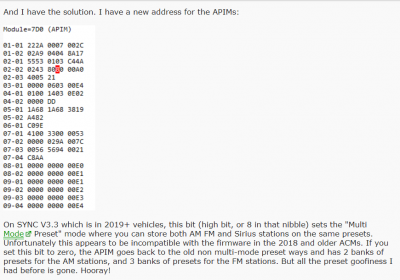
2) preset station list cannot have multiple sources. - This is a feature of some of the newer vehicles. I have the feature on my Explorer but not my Expy. Really honestly is not a big deal for me. I expect that either we will have an update that allows it, or somebody will figure out the FORSCAN for it. Please give feedback to Ford.

On #2, could this possibly be a Forscan solution? I haven't checked to see what mine is set at. Also, I'm not brave enough to try it yet.

A link to the site. https://www.f150forum.com/f118/sync-3-technical-discussion-399837/index79/ Post #787 from Fast351

upload_2020-6-13_8-21-33.png
 

LokiWolf

Staff member
Moderator
Joined
Apr 2, 2016
Posts
3,971
Reaction score
2,837
Location
Richmond VA

LokiWolf

Staff member
Moderator
Joined
Apr 2, 2016
Posts
3,971
Reaction score
2,837
Location
Richmond VA
Alright, so we are on to something...It changes the view, but doesn't actually work. As in it doesn't let me set the presets. It changes to a common list. I need to compare the settings to my Explorer...and see if I can figure out a pattern.
 

carymccarr

Full Access Members
Joined
Aug 11, 2019
Posts
1,749
Reaction score
390
Location
Earth
Alright, so we are on to something...It changes the view, but doesn't actually work. As in it doesn't let me set the presets. It changes to a common list. I need to compare the settings to my Explorer...and see if I can figure out a pattern.

When you say “common list” what do you mean?


Sent from my iPhone using Tapatalk
 

LokiWolf

Staff member
Moderator
Joined
Apr 2, 2016
Posts
3,971
Reaction score
2,837
Location
Richmond VA
When you say “common list” what do you mean?


Sent from my iPhone using Tapatalk

The thing you have been asking for...that even though we don’t need it, have still been investigating for you. @wakeboarder posted a clue above. It is a crumb, that I might be able to make a cake out of.


Sent from my iPhone using Tapatalk Pro
 
Top