ForScan Tweaks - 2015+

Disclaimer: Links on this page pointing to Amazon, eBay and other sites may include affiliate code. If you click them and make a purchase, we may earn a small commission.

ads245

Full Access Members
Joined
Jul 24, 2017
Posts
80
Reaction score
47
Location
Tampa
For the front Fast turn signal change this line to - 726-13-01 0000 0000 43 - you have to change 0101 to 0000
@LokiWolf said that he thinks the line below the 726-13-01 is the one that controls the rear hyper flash.

For the double honk, you can defeat it by closing your door but not completely latching it - if your door isn't completely closed you can walk away from the vehicle while it's running and not get the horn honk.

One thing to remember (this caused me some worry before I figured it out) if you have power running boards and you update the BdyCM module it will turn your running boards off and you will have to reset them in the instrument panel on the left hand side in settings.

@ExpeditionAndy in the spreadsheet I compiled a few posts back, it outlines the FORScan code change to disable the double honk.
 

mossback

2017 Limited EL
Joined
Oct 9, 2017
Posts
359
Reaction score
176
Location
WA state
Got a '17 Limited EL Expy and I've been reading up and gathering the tools to make some changes to the rig via FORScan. Very grateful to you guys for sharing this info and taking the time to figure out what codes are compatible with these trucks. ads245, your list, in particular, is fantastic. I'm happy to share the original module backups from my truck if it will help you or anyone isolate additional codes.

btw, for me, all of this started with the double horn honk issue. A very personal preference, but I have hated it since day one. For work I'm often in/out while it's running. I asked the dealer about it and they were very certain it was not something that could be disabled. I resigned myself to the fact and got pretty good at closing the door almost fully... LOL On a whim one day I did a google search and found the F150 forum guys doing all kinds of mods with FORScan. Powerful and awesome stuff for sure.

Would be wonderful to find the right address for dark mode. I'll try experimenting a little bit and see what I can find.
 

ads245

Full Access Members
Joined
Jul 24, 2017
Posts
80
Reaction score
47
Location
Tampa
Got a '17 Limited EL Expy and I've been reading up and gathering the tools to make some changes to the rig via FORScan. Very grateful to you guys for sharing this info and taking the time to figure out what codes are compatible with these trucks. ads245, your list, in particular, is fantastic. I'm happy to share the original module backups from my truck if it will help you or anyone isolate additional codes.

btw, for me, all of this started with the double horn honk issue. A very personal preference, but I have hated it since day one. For work I'm often in/out while it's running. I asked the dealer about it and they were very certain it was not something that could be disabled. I resigned myself to the fact and got pretty good at closing the door almost fully... LOL On a whim one day I did a google search and found the F150 forum guys doing all kinds of mods with FORScan. Powerful and awesome stuff for sure.

Would be wonderful to find the right address for dark mode. I'll try experimenting a little bit and see what I can find.

I haven't recorded the actual address for 'Dark Car' yet, but if you click on 'BdyCM Module Configuration' in FORScan, instead of 'BdyCM Module Configuration (AS BUILT format)' you will get a plain English menu instead of hexadecimal code lines where you can enable or disable this. The coding lines to identify 'Dark Car' have already been identified by the FORScan team, which is why they present a plain English option to 'enable' and 'disable'. By selecting either 'enabled' or 'disabled' FORScan is actually changing the As-Built coding lines in the BdyCM automatically for you.

As an example if you use the plain English option to turn on the DRLs, by selecting 'enabled', the FORScan application in the background edits BdyCM line 726-11-01 by changing it from x0xx *** xx to x1xx xxxx xx.

Here's a video of someone using the plain English option:


It will take a little time to find the specific coding address that enables/disables 'Dark Car', but all one has to do is save the As-Built data in the BdyCM before using the plain English option to enable 'Dark Car' and then save the As-Built data after enabling it and find the one line that has a change in it.
 

ExpeditionAndy

Full Access Members
Joined
Aug 31, 2013
Posts
3,708
Reaction score
1,130
Location
Fort Wayne, Indiana
@ExpeditionAndy in the spreadsheet I compiled a few posts back, it outlines the FORScan code change to disable the double honk.

Thanks ADS, I'll have to go back and look for it. I remember seeing it a while back and I wanted to save it but I think I saw something shiny and I got side tracked. :)

I want to figure out how to do two things. Auto fold the mirrors when I shut it off, and do the Auto Tilt when you put the truck in reverse. I also what to activate my Parking Lights for DRLs since I installed the switchbacks I figured it's cheaper to burn those out than the fog lights.
 

ads245

Full Access Members
Joined
Jul 24, 2017
Posts
80
Reaction score
47
Location
Tampa
Thanks ADS, I'll have to go back and look for it. I remember seeing it a while back and I wanted to save it but I think I saw something shiny and I got side tracked. :)

I want to figure out how to do two things. Auto fold the mirrors when I shut it off, and do the Auto Tilt when you put the truck in reverse. I also what to activate my Parking Lights for DRLs since I installed the switchbacks I figured it's cheaper to burn those out than the fog lights.

And so it begins! The auto fold mirrors and auto tilt will be quite tricky to isolate due to the fact that code changes from other vehicles will be of little help. Most of these changes on the F150s are code within the DDM and PDM of which the Expedition has neither (I confirmed this after talking with the FORScan team). Instead the FORScan team speculated that what the DDM and PDM handle on other vehicles will be found within the Expedition's BdyCM. Of course to make things more difficult, on the F150s, these mirror functions require 4 different address line changes.

I'll also throw it out there, although I'm not sure it's possible. Global windows (open and close windows with the remote) would be neat. This is only possible with numerous address line changes on the 2015 - current F150s in the DDM, PDM and BdyCM. This is due to the fact that the window motors are wired to the Door Modules. However, 2014 and older F150s don't have any Door Modules (just like the Expedition) or any wiring that goes from the motors to a module. I'd assume this is the case with our Expeditions ('15 - '17) since they closely resemble the build of the 2013 and 2014 F150s.
 
Last edited:

ExpeditionAndy

Full Access Members
Joined
Aug 31, 2013
Posts
3,708
Reaction score
1,130
Location
Fort Wayne, Indiana
And so it begins! The auto fold mirrors and auto tilt will be quite tricky to isolate due to the fact that code changes from other vehicles will be of little help. Most of these changes on the F150s are code within the DDM and PDM of which the Expedition has neither (I confirmed this after talking with the FORScan team). Instead the FORScan team speculated that what the DDM and PDM handle on other vehicles will be found within the Expedition's BdyCM. Of course to make things more difficult, on the F150s, these mirror functions require 4 different address line changes.

I'll also throw it out there, although I'm not sure it's possible. Global windows (open and close windows with the remote) would be neat. This is only possible with numerous address line changes on the 2015 - current F150s in the DDM, PDM and BdyCM. This is due to the fact that the window motors are wired to the Door Modules. However, 2014 and older F150s don't have any Door Modules (just like the Expedition) or any wiring that goes from the motors to a module. I'd assume this is the case with our Expeditions ('15 - '17) since they closely resemble the build of the 2013 and 2014 F150s.
And I was hoping that it was something easy that someone had already figured out.
 

flexitis

Active Member
Joined
Oct 3, 2017
Posts
39
Reaction score
14
Location
US
My dealer turned on remote windows on the flex with IDS and it didn't work.
The changes IDS did was in the BCM only.
But again it could be a little different since the flex does have the DDM but no PDM.
A simple DDM test on FORScan moved my driver's door mirror to all sides while the DSM moved the passenger side mirror so maybe anyone could check if the expedition does have the DSM and run a test using FORScan and see what moves with it like the seats mirrors etc.

Sent from my Z982 using Tapatalk
 

AllBoostNoEco

Full Access Members
Joined
May 2, 2017
Posts
328
Reaction score
196
Location
GA
Global windows only works with windows that have Auto up/down functions built-in from what I've read. Since Ford likes the Expedition to roll a few years behind everything else in the lineup, all we would get is the driver's window. If it is even possible.
I also don't recall auto-fold or reverse tilt functions on the 13-14 F150, wouldn't surprise me to discover it's yet another function our trucks don't support. As Flexitis pointed out, though, perhaps the functions of the DDM/PDM are integrated into the DSM on the Expedition? Rather than the BdyCM?
I did a little digging, has anyone noticed a 'power folding mirror module' on their vehicle? I found a wiring diagram for 13-14 F150s that shows one.
 

ExpeditionAndy

Full Access Members
Joined
Aug 31, 2013
Posts
3,708
Reaction score
1,130
Location
Fort Wayne, Indiana
Global windows only works with windows that have Auto up/down functions built-in from what I've read. Since Ford likes the Expedition to roll a few years behind everything else in the lineup, all we would get is the driver's window. If it is even possible.
I also don't recall auto-fold or reverse tilt functions on the 13-14 F150, wouldn't surprise me to discover it's yet another function our trucks don't support. As Flexitis pointed out, though, perhaps the functions of the DDM/PDM are integrated into the DSM on the Expedition? Rather than the BdyCM?
I did a little digging, has anyone noticed a 'power folding mirror module' on their vehicle? I found a wiring diagram for 13-14 F150s that shows one.
I read about it on the F150 forum, some of the guys talked about enabling that feature on their trucks. I don't recall what years they were talking about because it has been a couple of months.
 

ads245

Full Access Members
Joined
Jul 24, 2017
Posts
80
Reaction score
47
Location
Tampa
Global windows only works with windows that have Auto up/down functions built-in from what I've read. Since Ford likes the Expedition to roll a few years behind everything else in the lineup, all we would get is the driver's window. If it is even possible.
I also don't recall auto-fold or reverse tilt functions on the 13-14 F150, wouldn't surprise me to discover it's yet another function our trucks don't support. As Flexitis pointed out, though, perhaps the functions of the DDM/PDM are integrated into the DSM on the Expedition? Rather than the BdyCM?
I did a little digging, has anyone noticed a 'power folding mirror module' on their vehicle? I found a wiring diagram for 13-14 F150s that shows one.

Hmm, haven't seen that on my vehicle. My '15 King Ranch has a:

  • PCM - Powertrain Control Module
  • OBDII - On Board Diagnostic II
  • APIM - Accessory Protocol Interface Module
  • FCIM - Front Controls Interface Module
  • DSP - (Audio) Digital Signal Processing Module
  • RACM - Rear Audio Control Module
  • TrlrBM - Trailer Brake Control Module
  • RCM - Restraint Control Module
  • PAM - Parking Aid Module
  • PSCM - Power Steering Control Module
  • ACM - Audio Control Module
  • BdyCM - Body Control Module
  • SCCM - Steering Column Control Module
  • VDM - Vehicle Dynamics Module
  • IPC - Instrument Panel Control Module
  • ABS - Antilock braking system
  • SODR - Side Obstacle Detection Control Module - Right
  • SODL - Side Obstacle Detection Control Module - Left
  • TRM - Trailer Module
  • RHVAC - Rear Heating Ventilation Air Conditioning
  • RTM - Radio Transceiver Module
  • HVAC - Heating Ventilation Air ConditioningRFA - Remote Function Actuator
  • GPSM - Global Positioning System Module
  • DCSM - Driver/Dual Climate-Control Seat ModuleLTM - Liftgate/Trunk Module
  • PRB - Power Running Board
  • DSM - Driver's Seat Module
 

ads245

Full Access Members
Joined
Jul 24, 2017
Posts
80
Reaction score
47
Location
Tampa
I also updated the spreadsheet today to include a new tab at the bottom titled "Unsuccessful Codes. I've done quite a bit of searching and reviewing of other spreadsheets and codes for other vehicles including the F150, Fusion, Flex and SuperDuty. From those spreadsheets, I found common codes and tried them on the Expedition. In this new tab is a list of all the unsuccessful codes I have tried:

https://docs.google.com/spreadsheets/d/1ftOaxYUkHWU1ZEwbIOI_ImhTg40SZdlDIrUNPVs5_z8/edit?usp=sharing

If anyone else has tried unsuccessful codes and wants me to add them to the sheet, just let me know. This way we can save others the headache should they think to try them!
 

ExpeditionAndy

Full Access Members
Joined
Aug 31, 2013
Posts
3,708
Reaction score
1,130
Location
Fort Wayne, Indiana
I also updated the spreadsheet today to include a new tab at the bottom titled "Unsuccessful Codes. I've done quite a bit of searching and reviewing of other spreadsheets and codes for other vehicles including the F150, Fusion, Flex and SuperDuty. From those spreadsheets, I found common codes and tried them on the Expedition. In this new tab is a list of all the unsuccessful codes I have tried:

https://docs.google.com/spreadsheets/d/1ftOaxYUkHWU1ZEwbIOI_ImhTg40SZdlDIrUNPVs5_z8/edit?usp=sharing

If anyone else has tried unsuccessful codes and wants me to add them to the sheet, just let me know. This way we can save others the headache should they think to try them!
ads, great spreadsheet. Thank you for reposting it. I saved a copy to my computer.
 

flexitis

Active Member
Joined
Oct 3, 2017
Posts
39
Reaction score
14
Location
US
Thanks for that spreadsheet.
I'll try out certain stuff on the flex and report back.

Sent from my Z982 using Tapatalk
 

mossback

2017 Limited EL
Joined
Oct 9, 2017
Posts
359
Reaction score
176
Location
WA state
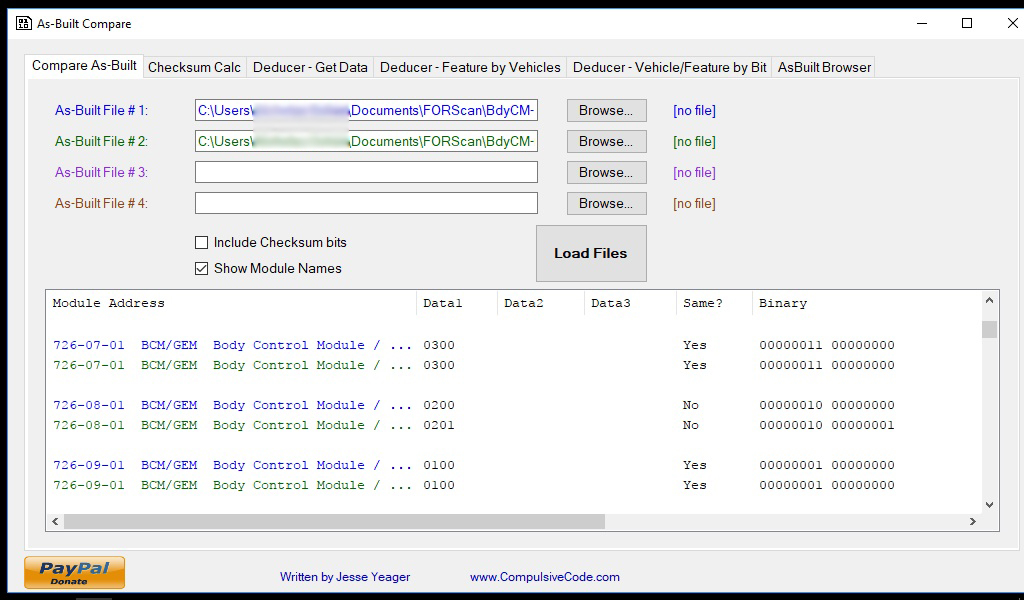
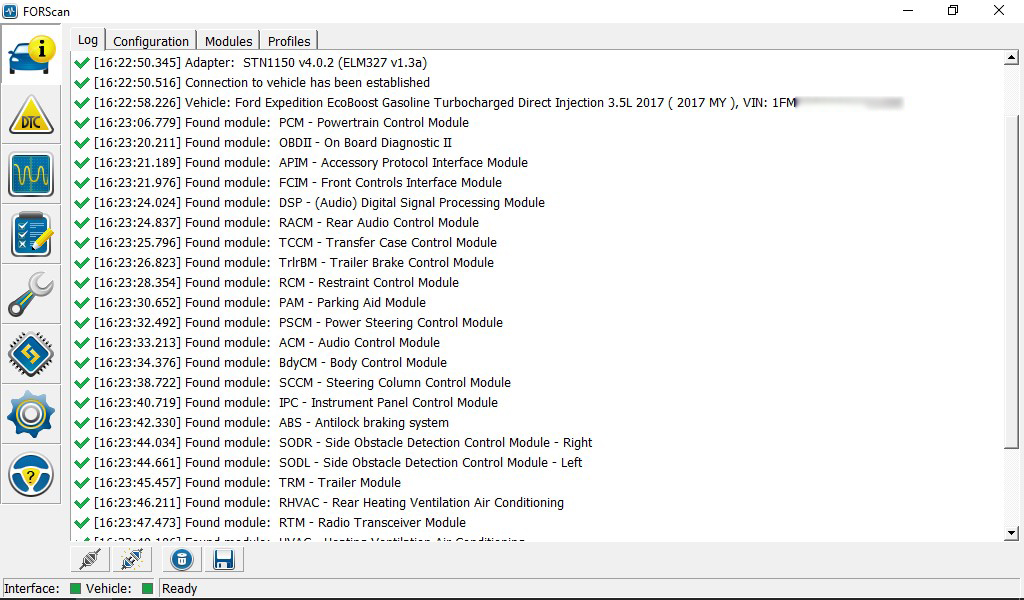
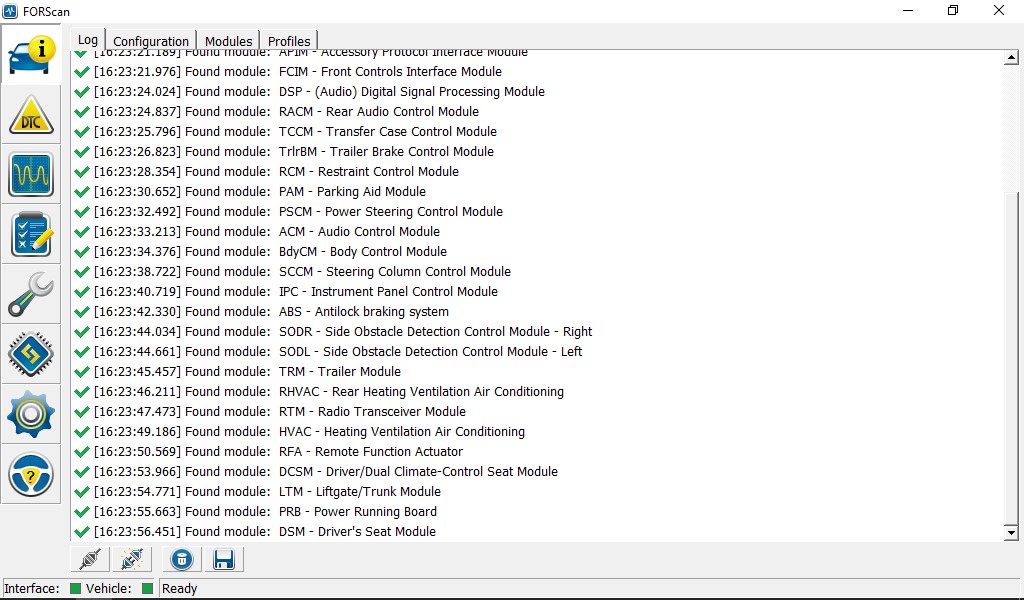
Spent a good couple of hours in the truck today getting familiar with the OBDLink, FORScan, backing up all my modules and then making a few changes. I'm really impressed with the functionality and capabilities of this system! Finally, after almost a year with this truck, the double horn honk is gone. So wonderful! I also enabled bambi mode, increased the number of lane change flashes to 5 and enabled dark mode. ads245, just as you suggested, it did show up in the plain english format. Since I saved my original and modified modules, I ran them thru the compare software that Jesse Yeager wrote and it seems the address for it is 726-08-01. I'm totally new at all this so I could very well be wrong. I'm attaching a few screen grabs that show the compare data as well as what modules I have on this rig.
mmm
On the wish list is figuring out 2-press panic alarm, secure idle and then a real doozy: I'm wondering if the limited machines actually have a heated steering wheel already installed and if we can enable it via a code change? The wheel seems identical to a platinum model, but would love to hear if I'm wrong about all of that.

I did notice in the plain english BdyCM module there is mention of global open and global close 1 thru 5. Have not messed with that yet but can't help but wonder if it would open/close all windows and either the sunroof or vents? Much more to explore in all this...

A really big thanks to all the pioneers and folks who blazed the way so that people like me can actually do this stuff!

ABCR.jpg


1st page of modules
modules_1.jpg


2nd page of modules
modules_2.jpg


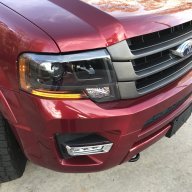
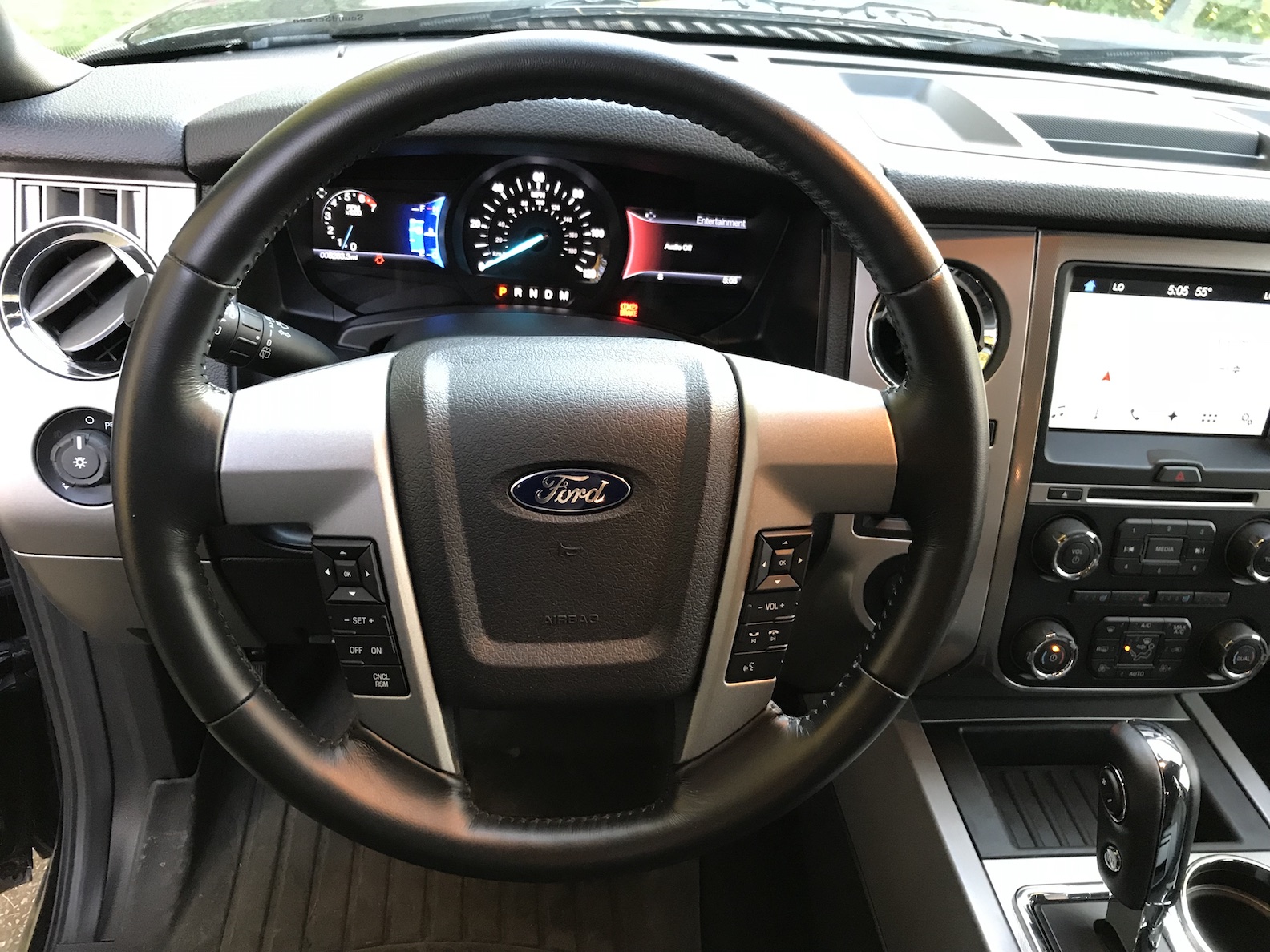
Wonder if this steering wheel has the heater element already?
IMG_0504.jpg
 
Last edited by a moderator:
OP
OP
LokiWolf

LokiWolf

Staff member
Moderator
Joined
Apr 2, 2016
Posts
3,971
Reaction score
2,837
Location
Richmond VA
I know what Dark Mode is. But can it be turned on and off via the left display once enabled? Not sure why you wouldn’t want the lights to come on when you open the doors(Does it do more than that). If you don’t, there is a switch for that...
 

flexitis

Active Member
Joined
Oct 3, 2017
Posts
39
Reaction score
14
Location
US
I know what Dark Mode is. But can it be turned on and off via the left display once enabled? Not sure why you wouldn’t want the lights to come on when you open the doors(Does it do more than that). If you don’t, there is a switch for that...
On the flex/mkt and a few other ford/Lincoln vehicles there is no way to keep the lights from turning on with a door open so dark car is the alternative.

Sent from my Z982 using Tapatalk
 

mossback

2017 Limited EL
Joined
Oct 9, 2017
Posts
359
Reaction score
176
Location
WA state
I know what Dark Mode is. But can it be turned on and off via the left display once enabled? Not sure why you wouldn’t want the lights to come on when you open the doors(Does it do more than that). If you don’t, there is a switch for that...

No menu item that I can find.
 

ExpeditionAndy

Full Access Members
Joined
Aug 31, 2013
Posts
3,708
Reaction score
1,130
Location
Fort Wayne, Indiana
I know what Dark Mode is. But can it be turned on and off via the left display once enabled? Not sure why you wouldn’t want the lights to come on when you open the doors(Does it do more than that). If you don’t, there is a switch for that...
I guess if you want to be stealthy or if you are doing something illegal and you don't want your interior lights to give a way your position. :secret::secret:
 

ads245

Full Access Members
Joined
Jul 24, 2017
Posts
80
Reaction score
47
Location
Tampa
I know what Dark Mode is. But can it be turned on and off via the left display once enabled? Not sure why you wouldn’t want the lights to come on when you open the doors(Does it do more than that). If you don’t, there is a switch for that...

It's an option enabled on the SSV or police vehicles as far as I know.
 
Top