ForScan Tweaks - 2015+

Disclaimer: Links on this page pointing to Amazon, eBay and other sites may include affiliate code. If you click them and make a purchase, we may earn a small commission.

ads245

Full Access Members
Joined
Jul 24, 2017
Posts
80
Reaction score
47
Location
Tampa
I'm not sure what the Auto Lock or Auto Unlock feature is, or what the Global Close or Global Open feature is.

Interesting. I don't have either of those options. If you still have FORScan up, if you can, try enabling Global Open 1. Once you have, hit the unlock button on the key fob once, and then press it again and hold it for 3 seconds. Hopefully, the driver's door window rolls down!

 

ExpeditionAndy

Full Access Members
Joined
Aug 31, 2013
Posts
3,708
Reaction score
1,130
Location
Fort Wayne, Indiana
Interesting. I don't have either of those options. If you still have FORScan up, if you can, try enabling Global Open 1. Once you have, hit the unlock button on the key fob once, and then press it again and hold it for 3 seconds. Hopefully, the driver's door window rolls down!
I don't have it up right now but I will try it tomorrow. Getting ready for Trick or Treaters. It starts here in 45 minutes.
 

AllBoostNoEco

Full Access Members
Joined
May 2, 2017
Posts
328
Reaction score
196
Location
GA
Isn't the Auto Lock and Auto Unlock the setting to lock the doors when you put it in drive and unlock when you go back to park? And each of the numbers references a key? I thought Ford limited it to 4 keys being programmed at one time, though?
I'll check my truck on Friday evening when I get home, but I know I didn't have either of those options in the plain English menu using the previous version of FORScan. My truck is also a '15, so perhaps that is the deciding factor. We need a '16 to add to the mix and compare with.
 

ads245

Full Access Members
Joined
Jul 24, 2017
Posts
80
Reaction score
47
Location
Tampa
Isn't the Auto Lock and Auto Unlock the setting to lock the doors when you put it in drive and unlock when you go back to park? And each of the numbers references a key? I thought Ford limited it to 4 keys being programmed at one time, though?
I'll check my truck on Friday evening when I get home, but I know I didn't have either of those options in the plain English menu using the previous version of FORScan. My truck is also a '15, so perhaps that is the deciding factor. We need a '16 to add to the mix and compare with.

I'd assume the same in regards to what Auto Lock and Auto Unlock is. I'm thinking the 5 options corresponds to the four doors and liftgate.
 

chuck s

Full Access Members
Joined
Dec 20, 2006
Posts
1,990
Reaction score
753
Location
Chesterfield, VA (that's south of Richmond, y'all)
There's a dash option to have either just the driver's door lock/unlock with the key button. I only want the driver's door to unlock with one button press, not all of them. Some areas are sketchy. Easy enough to press twice. I don't mind all the doors locking at 10mph (or whenever it happens) but for the same reasons as the key button don't want all the doors unlocking when I open the driver's door. Pretty sure the dash options cover all this so not sure what the Forscan settings are.

-- Chuck
 

ExpeditionAndy

Full Access Members
Joined
Aug 31, 2013
Posts
3,708
Reaction score
1,130
Location
Fort Wayne, Indiana
There's a dash option to have either just the driver's door lock/unlock with the key button. I only want the driver's door to unlock with one button press, not all of them. Some areas are sketchy. Easy enough to press twice. I don't mind all the doors locking at 10mph (or whenever it happens) but for the same reasons as the key button don't want all the doors unlocking when I open the driver's door. Pretty sure the dash options cover all this so not sure what the Forscan settings are.

-- Chuck
On my truck one button press unlocks the driver's door and 2 unlocks all, but when I open the driver's door all are unlocked. If the front passenger unlocks their door only their door is unlocked. I wonder of those settings allow more finite control of which doors unlock.
 

ExpeditionAndy

Full Access Members
Joined
Aug 31, 2013
Posts
3,708
Reaction score
1,130
Location
Fort Wayne, Indiana
Interesting. I don't have either of those options. If you still have FORScan up, if you can, try enabling Global Open 1. Once you have, hit the unlock button on the key fob once, and then press it again and hold it for 3 seconds. Hopefully, the driver's door window rolls down!

@ads245

Okay I just went out and tried it. It doesn't work or I should say it doesn't do anything. I updated it wrote it to the database, shut everything off, got out of the truck locked the doors, unlocked the doors then pressed and held the unlock button but nothing happened. Now that I think about it. The only thing that I didn't do was one press and hold of the unlock button.
 

ads245

Full Access Members
Joined
Jul 24, 2017
Posts
80
Reaction score
47
Location
Tampa
@ads245

Okay I just went out and tried it. It doesn't work or I should say it doesn't do anything. I updated it wrote it to the database, shut everything off, got out of the truck locked the doors, unlocked the doors then pressed and held the unlock button but nothing happened. Now that I think about it. The only thing that I didn't do was one press and hold of the unlock button.

That's a bummer. However, I have seen other plain English options for other vehicles where even though FORScan shows the option, it doesn't work because the vehicle hardware isn't set up/present.
 

ExpeditionAndy

Full Access Members
Joined
Aug 31, 2013
Posts
3,708
Reaction score
1,130
Location
Fort Wayne, Indiana
That's a bummer. However, I have seen other plain English options for other vehicles where even though FORScan shows the option, it doesn't work because the vehicle hardware isn't set up/present.
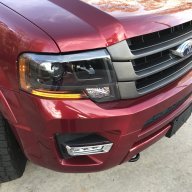
That's a problem I have right now. I activated the DRLs using the plain English menu but it turned on the turn signal and not the parking light so my DRLs are showing amber instead of white. Now I need to figure out the line and the code to change it to parking lights instead of turn signals.

Has anybody figured out that part of it?
 

flexitis

Active Member
Joined
Oct 3, 2017
Posts
39
Reaction score
14
Location
US
Check out the Flex sheet linked in one of my posts for the DRL.

Sent from my Z982 using Tapatalk
 

ExpeditionAndy

Full Access Members
Joined
Aug 31, 2013
Posts
3,708
Reaction score
1,130
Location
Fort Wayne, Indiana
Check out the Flex sheet linked in one of my posts for the DRL.

Sent from my Z982 using Tapatalk
Flex,

Okay I found t his on your spreadsheet.

DRL 726-11-01 xXxx xxxx xx 0=disabled 1=headlight at reduced output 2=fog lights 3=front turn signal only top bulb on each side

I'm confused what to set this too because I want to enable DRL but I don't want the headlights, fog lights or turn signals. Can I activate them using the plain English menu?

DRL (more options) 726-12-01 xxxx xXxx xx 0=disabled (default) 1=parking lights (must set 726-11-01 xXxx xxxx xx to enable

If I set this to 1 does that mean it will enable the the parking lights (white lights in my switch backs)?
 

flexitis

Active Member
Joined
Oct 3, 2017
Posts
39
Reaction score
14
Location
US
Flex,

Okay I found t his on your spreadsheet.

DRL 726-11-01 xXxx xxxx xx 0=disabled 1=headlight at reduced output 2=fog lights 3=front turn signal only top bulb on each side

I'm confused what to set this too because I want to enable DRL but I don't want the headlights, fog lights or turn signals. Can I activate them using the plain English menu?

DRL (more options) 726-12-01 xxxx xXxx xx 0=disabled (default) 1=parking lights (must set 726-11-01 xXxx xxxx xx to enable

If I set this to 1 does that mean it will enable the the parking lights (white lights in my switch backs)?
Basically 726-12 is for the parking lights so if you have switchbacks it would shine white.
But in order to set parking lights as DRL you must 726-11 to headlight or fog light.
Also when you set parking light as DRL your tail lights will be on as well.
On my Flex the DRL is setup as Fog and white switchback parking lights in the front and the taillights in the rear.

Sent from my Z982 using Tapatalk
 

ExpeditionAndy

Full Access Members
Joined
Aug 31, 2013
Posts
3,708
Reaction score
1,130
Location
Fort Wayne, Indiana
Basically 726-12 is for the parking lights so if you have switchbacks it would shine white.
But in order to set parking lights as DRL you must 726-11 to headlight or fog light.
Also when you set parking light as DRL your tail lights will be on as well.
On my Flex the DRL is setup as Fog and white switchback parking lights in the front and the taillights in the rear.

Sent from my Z982 using Tapatalk
Okay, I remember seeing somewhere that there is a way to turn on the parking lights but keep the tail lights off. I just don't recall where I saw it right now.
 

flexitis

Active Member
Joined
Oct 3, 2017
Posts
39
Reaction score
14
Location
US
Okay, I remember seeing somewhere that there is a way to turn on the parking lights but keep the tail lights off. I just don't recall where I saw it right now.
The way I understand it is that turns as DRL the tails is off parking as DRL the tails are on.

Sent from my Z982 using Tapatalk
 

ExpeditionAndy

Full Access Members
Joined
Aug 31, 2013
Posts
3,708
Reaction score
1,130
Location
Fort Wayne, Indiana
Update, all setting (726-12-01 xxxx xXxx xx 0=disabled (default) 1=parking lights) to "1" does is turn on the tail lights if you have the the turn signals set for DRL

Does anybody know how to enable the parking lights without turning on the tail lights. I know that I have read it somewhere but I don't recall where.
 

flexitis

Active Member
Joined
Oct 3, 2017
Posts
39
Reaction score
14
Location
US
Try setting your DRL to fogs and than do the 726-12 change and see if it helps.

Sent from my Z982 using Tapatalk
 

ExpeditionAndy

Full Access Members
Joined
Aug 31, 2013
Posts
3,708
Reaction score
1,130
Location
Fort Wayne, Indiana
Try setting your DRL to fogs and than do the 726-12 change and see if it helps.

Sent from my Z982 using Tapatalk
I suspect that all it will do is turn on the parking (white) lights in the front and the back tail lights like when you pull out the switch and the the fogs will stay on. I may go out and try it later. I'll report back.
 

gixer2000

Retrofit or Bust
Joined
Oct 13, 2015
Posts
1,467
Reaction score
644
Location
Massachusetts
I suspect that all it will do is turn on the parking (white) lights in the front and the back tail lights like when you pull out the switch and the the fogs will stay on. I may go out and try it later. I'll report back.
Have You asked in the Forscan help form on Facebook? They got some smart people over there

I just added you so the approval will come soon
 
Last edited:
Top