ForScan Tweaks - 2015+

Disclaimer: Links on this page pointing to Amazon, eBay and other sites may include affiliate code. If you click them and make a purchase, we may earn a small commission.

OP
OP
LokiWolf

LokiWolf

Staff member
Moderator
Joined
Apr 2, 2016
Posts
3,971
Reaction score
2,837
Location
Richmond VA
I tried it on the Expedition and couldn’t make it work even with the splash screens confirmed on my Sync update. Changing it in FORScan didn’t produce any results.

Well that is annoying! I never actually tried it on the Expedition, cause the wife didn't want it changed, but I saw the settings. Just assumed it would work. You rebooted the unit after the programming change? Not just turn the car off and back on, but held Eject and the Next Track button to do a reboot.
 

AllBoostNoEco

Full Access Members
Joined
May 2, 2017
Posts
328
Reaction score
196
Location
GA
Well that is annoying! I never actually tried it on the Expedition, cause the wife didn't want it changed, but I saw the settings. Just assumed it would work. You rebooted the unit after the programming change? Not just turn the car off and back on, but held Eject and the Next Track button to do a reboot.

No, I didn’t reboot it. I assumed the hard reset that FORScan does with modules was enough. I’ll try it later on today when I haven’t been up for 22 hours.
 
OP
OP
LokiWolf

LokiWolf

Staff member
Moderator
Joined
Apr 2, 2016
Posts
3,971
Reaction score
2,837
Location
Richmond VA
No, I didn’t reboot it. I assumed the hard reset that FORScan does with modules was enough. I’ll try it later on today when I haven’t been up for 22 hours.

All good! Get some rest. Sometimes an extra reboot is needed. Especially when Sync is involved. Just has been my experience.
 

AllBoostNoEco

Full Access Members
Joined
May 2, 2017
Posts
328
Reaction score
196
Location
GA
Tried it again, no change. I’m also on Sync 2, not 3, so maybe that’s making the difference. Also, holding eject and next track took me to a diagnostics screen, but couldn’t tell if that was the actual reset or not.
 
OP
OP
LokiWolf

LokiWolf

Staff member
Moderator
Joined
Apr 2, 2016
Posts
3,971
Reaction score
2,837
Location
Richmond VA
Tried it again, no change. I’m also on Sync 2, not 3, so maybe that’s making the difference. Also, holding eject and next track took me to a diagnostics screen, but couldn’t tell if that was the actual reset or not.

That is the Issue. Sync 2 can have a JPG file loaded from a Flash Drive to the internal storage, and then switched via the Settings on the Radio. I did this for the wife on our 15.

Sync 3 can only pull from the built in ones.
 

AllBoostNoEco

Full Access Members
Joined
May 2, 2017
Posts
328
Reaction score
196
Location
GA
That is the Issue. Sync 2 can have a JPG file loaded from a Flash Drive to the internal storage, and then switched via the Settings on the Radio. I did this for the wife on our 15.

Sync 3 can only pull from the built in ones.

That JPEG file is only for the background though. Does splash screen not refer to the startup animation?
 

wrc7732

Active Member
Joined
Oct 14, 2017
Posts
27
Reaction score
9
Location
Kennesaw
I ordered the OBD adapter today. In addition to some tweaks I've seen you all have got working, I'm hoping to be able to tweak the rear HVAC controls. Apparently in upper trim packages, the rear system can be "auto" as well, maybe following the front temp setting. As-is, my kids are too little to control the system themselves via rear controls, so I'm stuck guessing at what is too hot or too cold of a setting and/or fan speeds. I have to uncomfortably try to reach back over the seat and feel the air coming out of the ceiling vent and my wife is too short to reach when she's driving. Not a very family friendly setup...

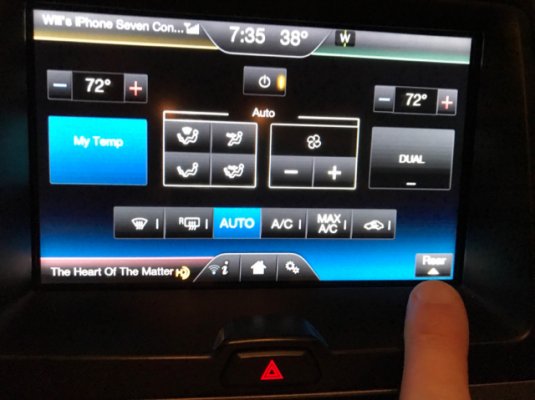
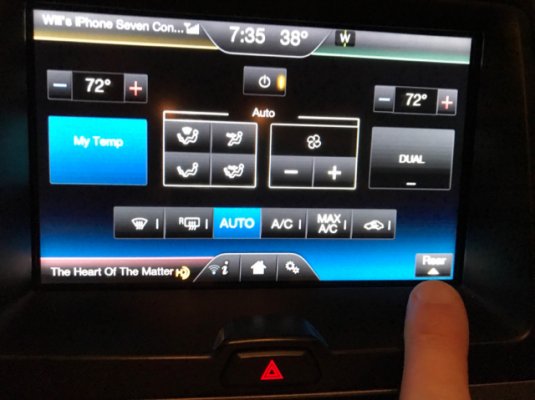
You should be able to control rear air from the Navi screen. Select climate control, then in the bottom right it should say ‘rear’ with an arrow under it pointing up. Press that and then you can control temp and fan speed for the rear ac.

0f0dd651faf7446188c547bba58213a8.jpg08429eea5c490df08002c7706f9a35f2.jpg

Granted it’s a line scale and by numbered temp, but still gives you control from the front.


Sent from my iPhone using Tapatalk
 
OP
OP
LokiWolf

LokiWolf

Staff member
Moderator
Joined
Apr 2, 2016
Posts
3,971
Reaction score
2,837
Location
Richmond VA
That JPEG file is only for the background though. Does splash screen not refer to the startup animation?

Yes, it does. That is the Splash screen. I never got it to work on the 15, but assumed it only worked on the Sync 3 units. That being said, I miss the ability to change the background!
 

flexitis

Active Member
Joined
Oct 3, 2017
Posts
39
Reaction score
14
Location
US
The splash screen works for sync 2 but you’ll have to find and install the splash screen pack files in order for it to work.


Sent from my iPhone using Tapatalk
 

ynpmoose

Well-Known Member
Joined
Jan 27, 2017
Posts
97
Reaction score
32
Location
Berks County, PA
You should be able to control rear air from the Navi screen. Select climate control, then in the bottom right it should say ‘rear’ with an arrow under it pointing up. Press that and then you can control temp and fan speed for the rear ac.

0f0dd651faf7446188c547bba58213a8.jpg08429eea5c490df08002c7706f9a35f2.jpg

Granted it’s a line scale and by numbered temp, but still gives you control from the front.


Sent from my iPhone using Tapatalk

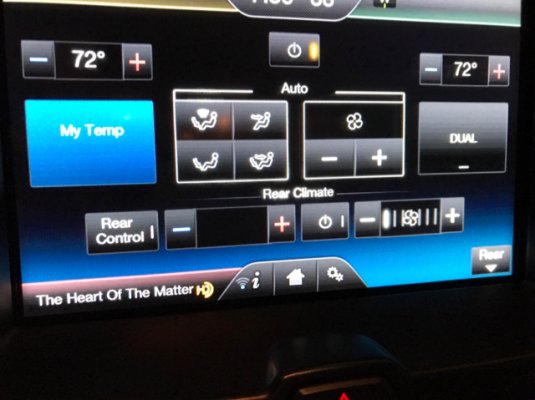
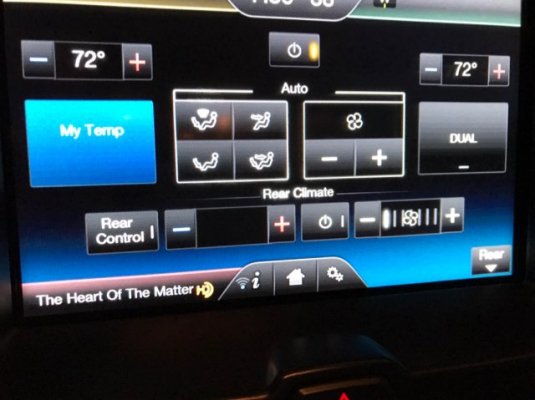
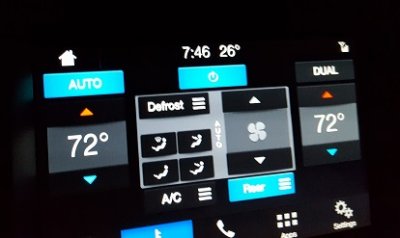
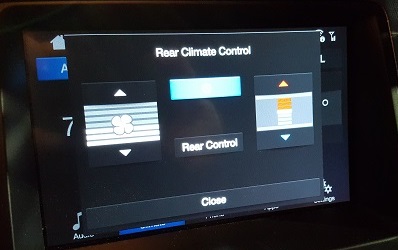
Yours looks way different, but mine currently operates with the same functional concept:
20180115_194627.jpg
20180115_172915.jpg

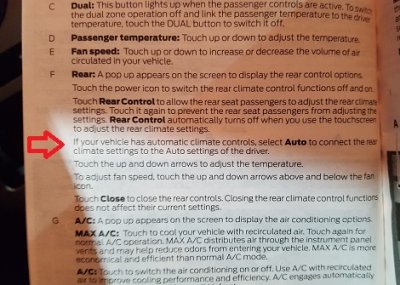
What I want to do is what is mentioned in the Sync 3 User Manual, having the rear auto-follow the front. Apparently there can be an "Auto" button on the Rear control screen. I called Ford support about it and they confirmed it is only available on upper trims.

20180115_172849.jpg

So.... does anyone have as-built Forscan backups for Limited, King Ranch, or Platinum that they would be willing to share with me for comparison purposes?
 

East-TN

Full Access Members
Air Force
Joined
Jan 4, 2018
Posts
533
Reaction score
269
Location
TN
@ads245 On the 2GFusion spreadsheet, they list the "Secure Idle" as 726-42-01 *X** **** **** as well. The Explorer spreadsheet doesn't list it for anything built before MY16, which makes me wonder if even SSV Expy's had it as a feature. Was push-button start an option on 15-17 SSV Expy's or 11-15 Explorers? If not, it may not be programmed into the firmware just like the climate menu on the IPC is not.

My 15 Explorer does have Push-Button Start
 

AllBoostNoEco

Full Access Members
Joined
May 2, 2017
Posts
328
Reaction score
196
Location
GA
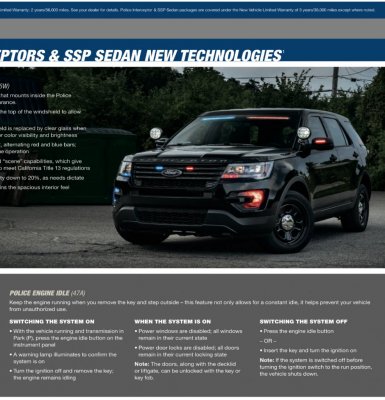
C96E29EE-EC50-4DAE-B187-0B8F389706E5.jpeg
So I found a 2017 brochure describing the “Police Engine Idle” feature on Explorer and Sedan Interceptors.
It mentions a button you have to push, and scrolling down to the Expedition SSV there is no mention of it as an option.
 

mossback

2017 Limited EL
Joined
Oct 9, 2017
Posts
359
Reaction score
176
Location
WA state
@AllBoostNoEco after looking more at the fleet and SSV brochures I can't find any specific mention of it for the Expedition either. But I'm not sure that means it's not possible. I say that because it doesn't mention it for the F150's either (that I can see) but we know it is possible for them.

I'm going to look thru the BCM one more time today...
 

ExpeditionAndy

Full Access Members
Joined
Aug 31, 2013
Posts
3,708
Reaction score
1,130
Location
Fort Wayne, Indiana
Yours looks way different, but mine currently operates with the same functional concept:

What I want to do is what is mentioned in the Sync 3 User Manual, having the rear auto-follow the front. Apparently there can be an "Auto" button on the Rear control screen. I called Ford support about it and they confirmed it is only available on upper trims.


So.... does anyone have as-built Forscan backups for Limited, King Ranch, or Platinum that they would be willing to share with me for comparison purposes?
I can send you my backups for my Limited, but I can tell you that my Limited does not have automatic rear climate control, its only manual. I was really surprised by that. The new 18 Expedition Limited that I test drove on Thursday had auto rear climate control.
 

East-TN

Full Access Members
Air Force
Joined
Jan 4, 2018
Posts
533
Reaction score
269
Location
TN
Yours looks way different, but mine currently operates with the same functional concept:
View attachment 23358
View attachment 23360

What I want to do is what is mentioned in the Sync 3 User Manual, having the rear auto-follow the front. Apparently there can be an "Auto" button on the Rear control screen. I called Ford support about it and they confirmed it is only available on upper trims.

View attachment 23361

So.... does anyone have as-built Forscan backups for Limited, King Ranch, or Platinum that they would be willing to share with me for comparison purposes?

Where did you find this info on the Auto function working with the rear? I’ve looked through all 3 printings of the 2017 Expedition Owners Manual and that sentence is not in any of them.

Never mind...I found the text in the Sync 3 Supplement.
 
Last edited:

East-TN

Full Access Members
Air Force
Joined
Jan 4, 2018
Posts
533
Reaction score
269
Location
TN
Thanks to all for the great info on here about making Forscan changes. After I downloaded the proper driver for my device, I made the following changes to 17 Expy:

Disable Fog Light on Dash
Disable Double Honk
Modified Lane Change to 5 Flashes
Modified Sync 3 to show Heated/Cooled Seats and Heated Steering Wheel on screen
Turned on Fog Lights as DRL
 

mossback

2017 Limited EL
Joined
Oct 9, 2017
Posts
359
Reaction score
176
Location
WA state
Thanks to all for the great info on here about making Forscan changes. After I downloaded the proper driver for my device, I made the following changes to 17 Expy:

Disable Fog Light on Dash
Disable Double Honk
Modified Lane Change to 5 Flashes
Modified Sync 3 to show Heated/Cooled Seats and Heated Steering Wheel on screen
Turned on Fog Lights as DRL

What happens when you press the heated steering wheel icon?
 

East-TN

Full Access Members
Air Force
Joined
Jan 4, 2018
Posts
533
Reaction score
269
Location
TN
What happens when you press the heated steering wheel icon?

It has an on indicator and the Heated Steering Wheel emblem shows up at the top of the screen next to the Home button. I only checked it for a minute or so, but did not feel the wheel heating up...I will check it longer later today.
 

rcompart

Full Access Members
Joined
Sep 7, 2014
Posts
216
Reaction score
179
Location
IL
Unless you have a Platinum (which would have already had the heated steering wheel button displayed) you’ve only enabled the APIM to send the HSW_On command over CAN but your truck doesn’t have anything else necessary for steering wheel heat.
 
Top