
Heated Steering Wheel - Installation on my 2017

Disclaimer: Links on this page pointing to Amazon, eBay and other sites may include affiliate code. If you click them and make a purchase, we may earn a small commission.

OP
OP
East-TN

East-TN

Full Access Members
Air Force
Joined
Jan 4, 2018
Posts
533
Reaction score
269
Location
TN
Now that you have the red locking cover up and removed, turn the plug around so that you can see the back of the connector with the wires going into the plug, like this:
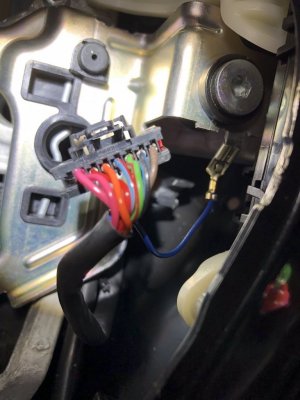
Explorer Right Sw Connector.jpg

Look closely and you will see a small opening at the top right of each opening where the wires go into the connector...this is where you will insert one of the paperclips (see pics below)
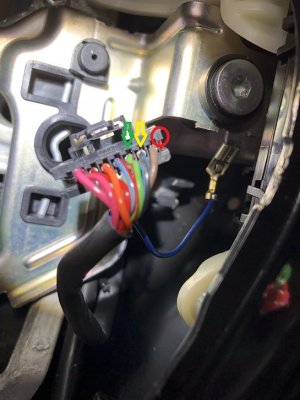
Explorer Connector - Backside with arrows.jpg

The red circle shows you the #8 that's marked on the connector...then it's simple to find pins #6 (green arrow) and #7 (yellow arrow)
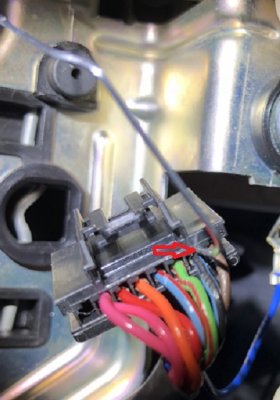
Explorer Connector Back with Paperclip.jpg

Insert one paperclip into the opening at the top right of the pin you want to remove...here, I have the paperclip inserted into the lock/unlock opening for pin # 7...insert the paperclip until you feel a 'click'. Then insert the other paperclip (this is why I recommend 2 paperclips) into pin #7 on the front side of the plug...use the paperclip on the front side of the plug to push the pin/wire out the back of the connector.

If the pin doesn't move, push against the two paperclips...you may not have unlocked the pin from the connector.

This part of the pin swap is a little hard to describe, but essentially you unlock the pin from the back, then push against the 2 paperclips to move the pin out/to the back of the connector. If the pin is unlocked, it requires very little effort to push the pin back.

Once you have both pins pushed out...swap them into the appropriate opening. Pin #6 goes into the #7 opening, and vice-versa...just slide the pin into the back of the plug until you again, feel a 'click'...once it's locked into position give a slight tug on the wire to ensure it's fully seated/locked...then insert #7 wire into the #6 plug opening.

Reattach the red locking cover, push it fully down and reconnect the plug to the right switch on the new HSW...you are complete.
 
Last edited:
OP
OP
East-TN

East-TN

Full Access Members
Air Force
Joined
Jan 4, 2018
Posts
533
Reaction score
269
Location
TN
The most expensive part of the upgrade - the airbag for the steering wheel:

You can choose any of the airbags that fit the 11-17 Explorer or 13-15 Taurus steering wheels, but you have 2 different airbag options to think about.

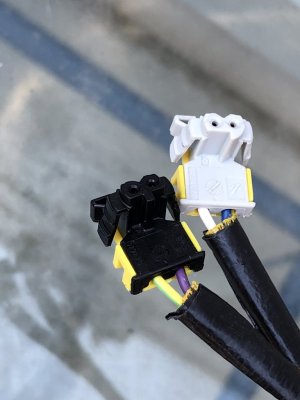
The airbags for the 2015’s and older Taurus/Explorer use the same connectors as our 2015-2017 Expys...see pic below:

D14CFB3A-4F18-4AF0-892E-C72CBE13EA8C.jpeg

2016 and newer Taurus/Explorer airbags use a different set of connectors.

Some may ask why does it matter? 2 reasons:

1. The airbag you choose determines which clockspring you’ll need, and...
2. I chose the older airbag because it’s compatible with our Expy steering wheel and it gave me the option to easily return my Expy to stock (remove Explorer airbag and steering wheel, install original Expy airbag and steering wheel...do not need to change clockspring)
 
OP
OP
East-TN

East-TN

Full Access Members
Air Force
Joined
Jan 4, 2018
Posts
533
Reaction score
269
Location
TN
Hey, now that you're done with the HSW, can you take a look at world hunger?

It’s hard to tell humor from sarcasm when there’s only written words.

;)
 
OP
OP
East-TN

East-TN

Full Access Members
Air Force
Joined
Jan 4, 2018
Posts
533
Reaction score
269
Location
TN
If you've been collecting parts in anticipation of getting this project started/finished, you may be looking at Clocksprings right now:

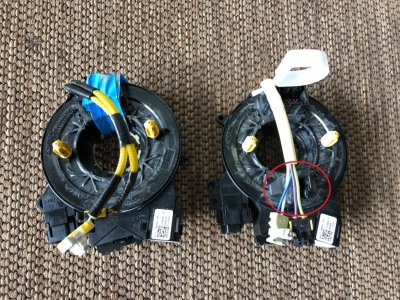
Here's a pic of the 15 Explorer clockspring I chose - Expy original clockspring on the left, new Explorer clockspring on the right...notice red circle shows the connector on the clockspring for the heated steering wheel...make sure you purchase a clockspring that has this connection.

Clockspring w-red circle.jpg
 
OP
OP
East-TN

East-TN

Full Access Members
Air Force
Joined
Jan 4, 2018
Posts
533
Reaction score
269
Location
TN
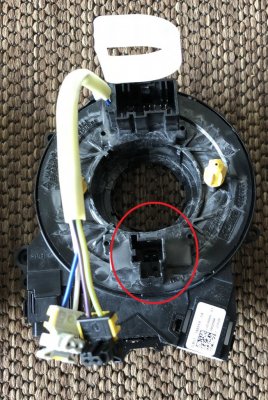
Here's a better pic of what the new clockspring looks like...with the red circle around the heated steering wheel connector

Clockspring w-circle for heat connector.jpg
 
OP
OP
East-TN

East-TN

Full Access Members
Air Force
Joined
Jan 4, 2018
Posts
533
Reaction score
269
Location
TN
If you choose to go the route of using the newer airbag connectors (see post #42), then I recommend you get a newer (17-18) F-150 heated steering wheel clockspring...this clockspring works perfectly with the Expy turn signal mechanism and requires no changes.

However, if you go the route I did by using the older (15 and older) airbag, then I recommend you get a 15 Explorer heated steering wheel clockspring. With the Explorer clockspring, you will need to transfer the Expy turn signal cam from your original clockspring to the new Explorer clockspring...very easy to do.

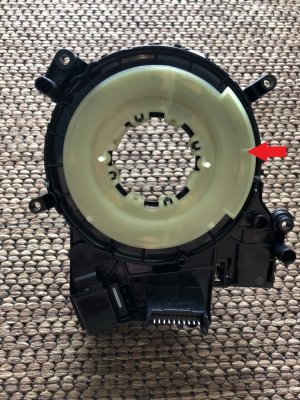
Here are a few pics to help illustrate...the turn signal cam (this cancels your turn signal after you turn) is on the backside of the clockspring and looks like this on the Expy (red arrow points to the white turn signal cam):

Clockspring back view - red arrow.jpg

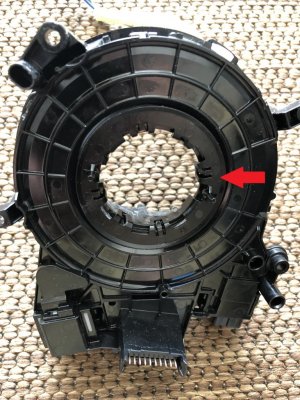
The new Explorer turn signal cam looks like this:

Clockspring Explorer with wrong turn cam.jpg
 
OP
OP
East-TN

East-TN

Full Access Members
Air Force
Joined
Jan 4, 2018
Posts
533
Reaction score
269
Location
TN
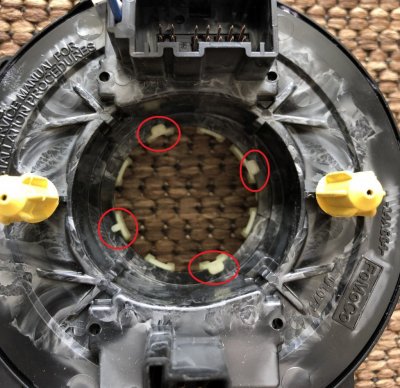
To remove the turn signal cam from the clockspring, just unclip the 4 clips (circled in red) and remove the cam from both clocksprings (NOTE: before you remove the Expy cam take note/mark the cam so you can install it in the exact same position on the new clockspring...I marked the Expy cam at the very top so I knew to install the cam in that position on the heated steering wheel clockspring):

Clockspring front view - clips with red circles.jpg

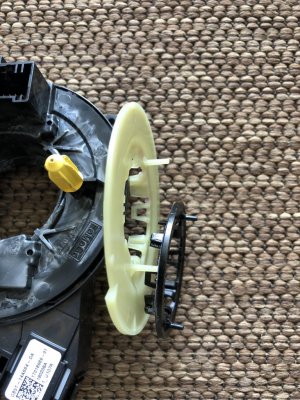
Here's a side-by-side comparison of the two turn signal cams, Expy on the left/Explorer on the right:

IMG_0519.jpg
 
Last edited:
OP
OP
East-TN

East-TN

Full Access Members
Air Force
Joined
Jan 4, 2018
Posts
533
Reaction score
269
Location
TN
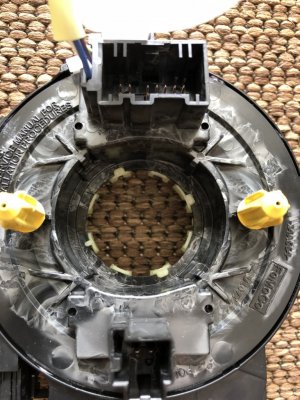
Install the Expy turn signal cam onto your new Explorer clockspring with the finished result like this (NOTE: ensure you install the cam in the same position as when it was removed from your Expy clockspring):

IMG_0521.jpg
 
Last edited:
OP
OP
East-TN

East-TN

Full Access Members
Air Force
Joined
Jan 4, 2018
Posts
533
Reaction score
269
Location
TN
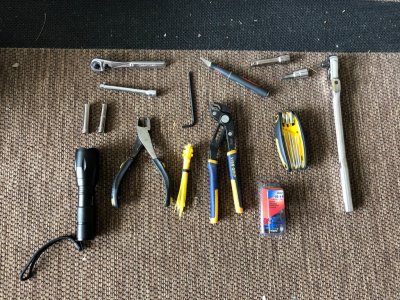
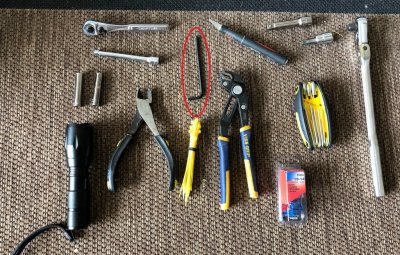
Now you have all your parts and they are prepared/ready for installation. Here are the tools you'll need for the removal of your Expy steering wheel/clockspring and the installation of your heated steering wheel/components:

IMG_0497(Edited).jpg

You'll need:

Large ratchet w/extension and T50 torx (this is what you'll use to remove/install steering wheel)
T10 torx (to remove/install clockspring)
Small ratchet w/extension and two sockets (5/16 and 7mm)
Exacto/utility knife (cut back wraps around wire bundles)
Zip ties - as needed
Wire cutters - as needed
Pliers (I used channel lock-type pliers) - to close wire splices
Flashlight - as needed

And finally, you will need a tool to remove the airbag...I used a small allen wrench (circled in red):

Tools Image-Airbag Tool.jpg
 
Last edited:

star-art

Full Access Members
Joined
Aug 23, 2010
Posts
539
Reaction score
156
Location
Pacific Northwest
Thank you so much for this! I am reading all this carefully and taking notes. Hoping to do this upgrade on my '17 later this year. . . :)
 
OP
OP
East-TN

East-TN

Full Access Members
Air Force
Joined
Jan 4, 2018
Posts
533
Reaction score
269
Location
TN
The first step in beginning this 2-3 hour swap is to disconnect your vehicle's battery...wait at least 15 minutes before you try to remove the airbag from the steering wheel...if you're conservative/safety minded like me, then you wait 30 minutes.

I recommend you disconnect the battery, then while you are waiting the 15 minutes; collect all the tools and parts you need...then watch a video on line for how to remove the airbag/steering wheel from the Expedition/F-150...there are several videos to choose from if you use Google...here's one example:


The video isn't specifically about the Expedition, but gives you very clear instructions of how to use the allen wrench to release the airbag from the steering wheel.

Remember - sit the removed airbag facing up (Ford logo facing up)...this way if the airbag decides to randomly fire, it won't launch the airbag unit flying across your garage.
 
Last edited:
OP
OP
East-TN

East-TN

Full Access Members
Air Force
Joined
Jan 4, 2018
Posts
533
Reaction score
269
Location
TN
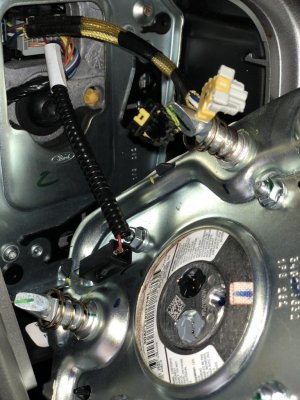
Once you have the airbag released, you will see the 3 connectors you will disconnect to remove the airbag:

IMG_0454.jpg

2 connectors to the airbag itself - the gray and black connectors at the top of the pic, and the single black connector (for the horn) on the lower left in the pic
 
OP
OP
East-TN

East-TN

Full Access Members
Air Force
Joined
Jan 4, 2018
Posts
533
Reaction score
269
Location
TN
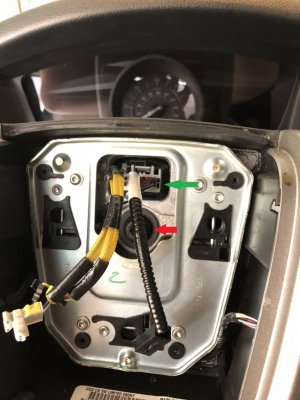
With the airbag removed you should see something like this:

Airbag removed-with arrows showing bolt and connector.jpg

Disconnect the gray connector (green arrow) from the clockspring.

Use the T50 Torx to remove the nut (red arrow) holding the steering wheel in place...once you remove the nut, the steering wheel will easily pull straight out toward you for removal.
 
OP
OP
East-TN

East-TN

Full Access Members
Air Force
Joined
Jan 4, 2018
Posts
533
Reaction score
269
Location
TN
Carefully pull the steering wheel off and feed the airbag connectors thru the steering wheel opening so that you finish with this:

IMG_0457.jpg
 
OP
OP
East-TN

East-TN

Full Access Members
Air Force
Joined
Jan 4, 2018
Posts
533
Reaction score
269
Location
TN
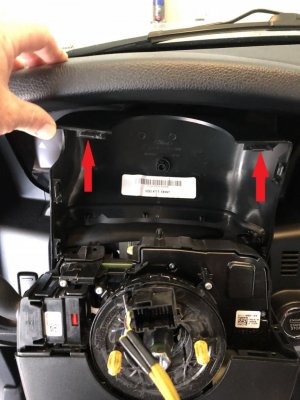
Next, you'll remove/reposition the cover around the steering column so that you'll have access to the clockspring.

Push in (toward the front of the vehicle) on the top cover and lift the top cover up...you'll free the cover clips (see red arrows) and can lay the cover freely on the column.

See pic below:

Steering Column Cover Removal.jpg
 
OP
OP
East-TN

East-TN

Full Access Members
Air Force
Joined
Jan 4, 2018
Posts
533
Reaction score
269
Location
TN
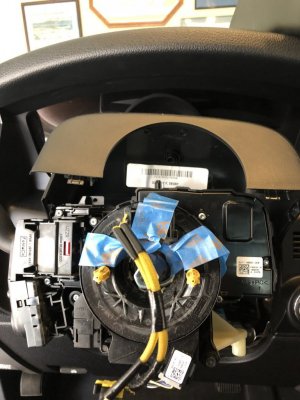
Use the 7mm socket to remove the 3 bolts holding the bottom cover to the column...you can then remove the bottom cover and end up with this:

Steering Column Cover Removed.jpg

Notice I've used some tape to hold the clockspring in place so that it will not turn once I remove it...you can skip this step if you plan to discard/throw away the old clockspring.
 
OP
OP
East-TN

East-TN

Full Access Members
Air Force
Joined
Jan 4, 2018
Posts
533
Reaction score
269
Location
TN
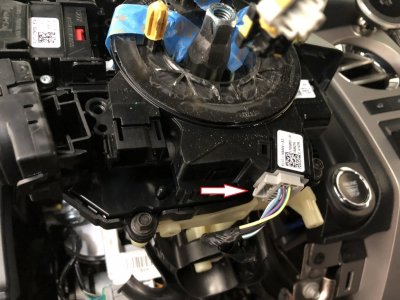
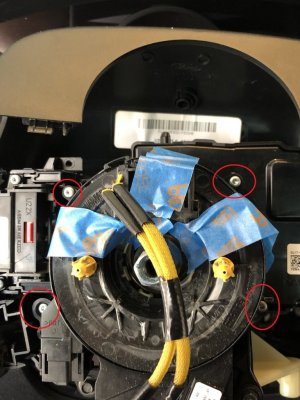
To remove the clockspring, you'll disconnect the 1 gray connector (white arrow) and remove 4 small torx screws (red circles). See pics below:

Clockspring Connector Removal.jpg Clockspring removal with red circles.jpg
 
OP
OP
East-TN

East-TN

Full Access Members
Air Force
Joined
Jan 4, 2018
Posts
533
Reaction score
269
Location
TN
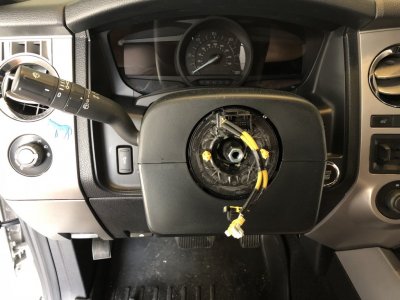
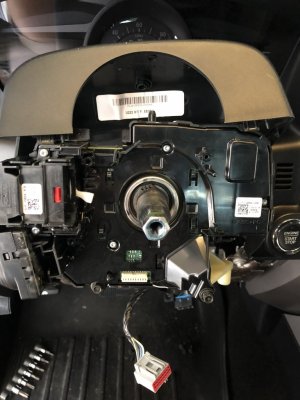
Once you remove the clockspring, you should see this:

IMG_0478.jpg

Reminder: Depending on the new clockspring you have, you may need to swap over the turn signal cancel cam...see previous posts about prepping your parts.
 
Top