Reverse camera distortion

Disclaimer: Links on this page pointing to Amazon, eBay and other sites may include affiliate code. If you click them and make a purchase, we may earn a small commission.

JasonH

Full Access Members
Joined
Nov 12, 2018
Posts
1,557
Reaction score
895
Location
Houston, TX
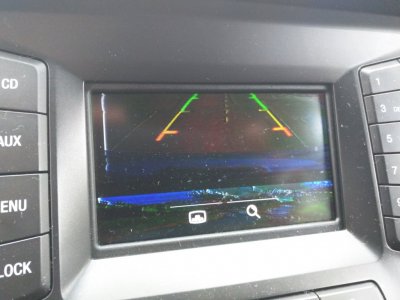
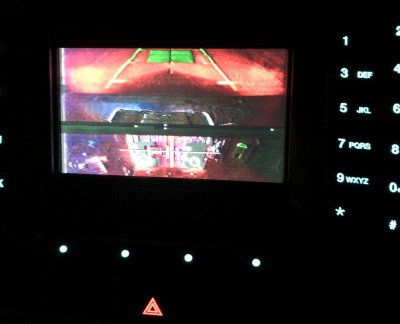
Good evening everyone. A strange problem cropped up with the reverse camera in my 2017 EL. When I shift into reverse, the picture is now badly distorted. I am unsure what may have caused the problem. Has anyone ever seen this issue?


jeff kushner

Full Access Members
Joined
Nov 30, 2014
Posts
2,330
Reaction score
1,276
Location
North of Annapolis
Hate to say this.....but reboot and see what happens. It might be a one time thing or you have gotten some moisture at a connection.....the vid appears to show a failing/faulty transmission/connection rather than a failing camera itself?

jeff
 

Steve Tanner

Member
Joined
Apr 5, 2019
Posts
17
Reaction score
14
Location
Arizona
Had the exact same issue with my 2017 EL about 6 months ago. It would come and go if the back was shut hard.The dealer said it was caused by "moisture in one of the connections" (in Phoenix...riiiight), but I'm not sure which as they opened and cleaned all of them between the front and back under warranty. It hasn't happened since.

2018-11-29 14.11.02.jpg

You might try banging/shutting the back while watching the display to see if it changes any. I've also read (on this forum I think) that the cameras can get moisture in them.

The bad news is, if you have to replace the module they're about $250 OEM, or $160 aftermarket on amazon. The part number is FL1Z-19G490-B. I have no idea how hard they are to change or where the connectors the dealer cleaned are. Someone here probably knows though :biggrin:.
 
OP
OP
JasonH

JasonH

Full Access Members
Joined
Nov 12, 2018
Posts
1,557
Reaction score
895
Location
Houston, TX
This problem seemingly resolved itself. I was checking the fuse box for a blown fuse, and accidentally removed and dropped the unused CCD suspension fuse (I have the fuse, but not the feature). The camera begin working again. I suspect the camera cord plugs into the fuse box, and I jostled the cord while inspecting the fuses. But for now, it has been resolved.
 

Munkiebunz3

Full Access Members
Joined
Sep 20, 2018
Posts
261
Reaction score
95
Location
Soviet Monica, Kommiefornia
I fixed this myself today. Such a pain in the butt to make sure that nothing breaks upon removal. I will say that I will not ever remove the trim that says "expedition" because there are so many holes that would have to be patched...
I ended up removing the electrical tape at the camera connector and re-doing it. Did not clean the connector since it was clean to start. Just seems to be needing a disconnect and reconnect. As a side note, I'll be taking the next failure to install a rocker switch to allow me to pop the glass or door from the inside.
 

Phil M

New Member
Joined
Aug 15, 2019
Posts
1
Reaction score
1
Location
Youngwwod, Pa 15697
I have the exact same issue with my 2017 Expedition. The distortion comes and goes. I never know when it's going to work or not. Sometimes I will open and close the back hatch and that seems to fix the problem. I assume it's a loose connection inside the back hatch. The only way I can see to get to the actual camera is to pull off the inside trim cover. Correct me if i'm wrong . Are there any videos out there on how to remove that cover? Any help is greatly appreciated.
 

Munkiebunz3

Full Access Members
Joined
Sep 20, 2018
Posts
261
Reaction score
95
Location
Soviet Monica, Kommiefornia
I didn't take pictures or video but I posted a walk through of the process somewhere on the forum.
Hey guys, so I just had this same issue. It went from sporadic snow on the screen to "not available". I was able to fix it with just reseating the connection and re-wrapping the cable at the connection. I didn't take pics since I had a time constraint & I'm doing this by memory here.

You first will need to remove the panel on the inside of the door.
Door panel removal:
1. Pop the glass open. Remove the screw push pins behind the glass latch. Open the hatch (keep the glass open) then use a screwdriver to close the main gate latch so you can freely manipulate the door without closing it & having the motor activate every time.
2. Pop the side trim off the sides of the door where the glass goes. I think they slide towards the middle of the opening? Just keep them loose.
3. Remove the grab handle. T27 torx bit I believe.
4. From the main latch, pry down a bit on the panel to peek inside and find the stupid plastic nipples held in by the metal barbs. Use a long screwdriver (I mean long like over 18" long) or panel popper to pop out those barbs without breaking the nipples. This is hard but possible. The barbs will need to be bent back in order to pop the panel back on.
4. After releasing all the barbs, (the side trim needs to be loose here) slide the panel "upwards" to slide over the glass latch. Then it drops free.
5. Remove the top half of the plastic. Don't use a razor, just a smooth round metal shaft like that of a screwdriver and use quick motions to rip the adhesive from the metal without stretching it. Then disconnect the electrical connector that feeds the camera.

Get at least 2 wedges, a bent nose plier or a hose plier, and a 10mm socket with an extension.
6. Back out but do not fully remove the 4 10mm bolts from the outer trim that are on the inside of the door.
7. Push on the bolts to lift the trim so you can stick the wedge between the trim and the door.
8. Use the pliers to squeeze the plastic retention clips.
9. Remove the bolts all the way once all the clips are released.
10.Squeeze the rubber grommet & remove the trim.
11. Torx 20? For the camera bracket.

I got a quote for the harness for about $90. I did nothing other than re-wrapping the harness at the camera connector and reseating the connections. My camera is working well.

Mine was very dusty and dirty behind the panel and the harness was aged despite also being a 2016.

 

Michael McC

Well-Known Member
Joined
Oct 14, 2017
Posts
96
Reaction score
42
Location
Corpus Christi

Michael McC

Well-Known Member
Joined
Oct 14, 2017
Posts
96
Reaction score
42
Location
Corpus Christi
Instead of taking apart the inside of the tailgate, I keyed on someone's observations that there was a lot of dust in there. I used compressed air to blow out the area around the camera while hitting it with my palm. I did it with all systems on and the car in reverse but not running. I was able to look through the back window and see when the camera lost its distortion. It has been a few weeks, and the distortion has not returned. If you have a compressor with air jet attachment you might try this before taking apart the tailgate.
 

Adieu

Full Access Members
Joined
Dec 22, 2016
Posts
3,717
Reaction score
798
Location
SoCal
When wiring an aftermarket camera, I had similar crap with loose/exposed reverse wire connection during test fit

I suspect securing and taping off all wiring should do the trick
 

rndlmn4

Member
Joined
Jan 19, 2015
Posts
23
Reaction score
1
Location
Illinois
I have a 2015, and it does the same thing. There’s no rhyme or reason to when it shows a staticky negative image, or when it looks perfectly normal. It’s good a lot more often than it’s bad, but I would really appreciate it working correctly all the time. I will consider the replies above and decide how to approach the problem.
 
OP
OP
JasonH

JasonH

Full Access Members
Joined
Nov 12, 2018
Posts
1,557
Reaction score
895
Location
Houston, TX
For future searchers, I used the instructions from Munkiebunz3 to fix the camera. The distortion eventually became continuous, which is dangerous in a vehicle this size.

Disconnecting the camera and cleaning everything, then reconnecting several times and ensuring the connector latch was locked fixed the issue.

I suggest a helping hand when making this repair. The white clips holding the rear trim on were difficult to access and remove without applying some leverage to the trim. The area behind the trim was filthy.

My camera is now working properly!
 
Last edited:

Ktay219

New Member
Joined
Jul 9, 2020
Posts
1
Reaction score
0
Location
Sarasota
So glad I found this forum! I also have camera distortion that comes and goes.Started when it was under warranty so Ford actually replaced my whole camera and harness last yr....now it is out of warranty and the problem came back. I will try all these suggestions.
Also have a sync issue with phone button not even responding,so that another problem to troubleshoot
Never have these fancy issues with my '03 Lightning...
 
OP
OP
JasonH

JasonH

Full Access Members
Joined
Nov 12, 2018
Posts
1,557
Reaction score
895
Location
Houston, TX
Bumping this. The issue is back. I suspect the contacts have been sullied again. Thinking of using a combination of dielectric grease and liquid electrical tape to seal off the connector from moisture and dirt. I've never used liquid electrical tape before, and I'm concerned how permanent it would be. If it needs to be removed, will I be able to get it off? Should I put some conventional electric tape underneath and seal over with the liquid tape?
 

ManUpOrShutUp

Full Access Members
Joined
Mar 27, 2016
Posts
2,113
Reaction score
1,157
Location
PA
Liquid electrical tape is similar to conventional electrical tape in that it bonds well to itself, but not so much to whatever you're attaching it to. You will be able to peel off the liquid tape should you ever need to do so. That said, it's also similar to conventional tape in that it doesn't hold up particularly well to the elements, so use it only where there's not going to be a lot of direct exposure.
 
OP
OP
JasonH

JasonH

Full Access Members
Joined
Nov 12, 2018
Posts
1,557
Reaction score
895
Location
Houston, TX
Fixed this again this weekend. It's a silly design. The rubber seal in the connecter degraded substantially and the connector keeps working loose. I picked out much of the rubber seal and packed the connector with dielectric grease, then coated the entire connector in liquid electrical tape. The underside of that trim piece was filthy (just like last time).

Ford really should've molded a lip or something into it to keep dirt and debris from accumulating beneath the trim. I was going to apply caulk to the top edge of the trim but could not find my caulk. The last repair held for a year. Hopefully this one will last the duration of my ownership.
 
Last edited:

Hal Flynt

New Member
Joined
Mar 20, 2021
Posts
3
Reaction score
0
Location
Land O Lakes, FL
Fixed this again this weekend. It's a silly design. The rubber seal in the connecter degraded substantially and the connector keeps working loose. I picked out much of the rubber seal and packed the connector with dielectric grease, then coated the entire connector in liquid electrical tape. The underside of that trim piece was filthy (just like last time).

Ford really should've molded a lip or something into it to keep dirt and debris from accumulating beneath the trim. I was going to apply caulk to the top edge of the trim but could not find my caulk. The last repair held for a year. Hopefully this one will last the duration of my ownership.

JasonH - any chance you took any pictures of yours? I've got a 2017 Ltd with this issue - sporadic, at times seems weather related like when hot - seems to happen more (live in FL) and cooler/cold less likely. All suggests loose connection somewhere - I tried these suggestions a few months ago and it worked for about a week or so then started back up. I've left off all the inside trim in my garage and am about ready to take the camera back out to reexamine everything. I'd appreciate any more suggestions or description of what you saw and did to stabilize this.

I examined the connection from the camera inside the door panel. That looks good. The cable coming out from the left of that merges with another bundle that wraps up around the outside of the window to an opening in the top corner where it feeds into the roof of the car. All that wiring looks clean and wrapped nicely. Can we assume the issue resides in the last foot - from the connector and the harness through the door to the camera? Like a ft of cable and the connections to the camera.

My wife is about to take this to the dealership and I would hate to go down that $$$ route. Is there ANY chance the camera has some faults of its own - like something with bad voltage or something where a replacement would resolve this? Not sure how to test this cause the darn thing does work...just when it wants to. Such a PIA. Appreciate any feedback.
 
OP
OP
JasonH

JasonH

Full Access Members
Joined
Nov 12, 2018
Posts
1,557
Reaction score
895
Location
Houston, TX
Sorry you're having this issue, it's really frustrating. I think I posted a photo of what my screen looked like earlier in the thread, but no pictures of the connector.

Both times that I experienced the issue, it was because the connector in rear beneath the trim was filthy and likely had some corrosion or contamination. I noticed the rubber seal degraded and basically disintegrated the last time I cleaned it out. I suggest starting there, as it shouldn't take more than an hour to disassemble. The hardest part is reaching all the plastic panels clips in the rear. To fix the issue, I packed the connector with dielectric grease then sealed it with a liquid tape product to prevent water from getting into it. Make sure both ends are secure. There's a plastic tab to lock both halves together. Good luck.
 
Last edited:
Top