The Waze update is out, who is using it instead of the native navigation?

Disclaimer: Links on this page pointing to Amazon, eBay and other sites may include affiliate code. If you click them and make a purchase, we may earn a small commission.

woody929

Active Member
Joined
Mar 2, 2018
Posts
27
Reaction score
12
Location
Texas
Duh, I see the problem now. Waze is only supported on iOS. In fact, according to this link, neither Spotify nor Waze look like they're supported on Android (!), which are precisely the apps I spent two hours trying to get working yesterday. I have an iPhone so it's not completely useless to us, but this is my wife's car.

Are you doing this only via BT, or hard wired? AFAIK, these only work over the USB connection.
 

Aquineas

Well-Known Member
Joined
Jul 3, 2018
Posts
49
Reaction score
14
Location
Texas
Are you doing this only via BT, or hard wired? AFAIK, these only work over the USB connection.

I've owned my Expedition all of 24 hours, so whatever I say is likely wrong :). But if I'm understanding it correctly, the iPhone needs to connect via USB for Applink and CarPlay while Android phones can connect with Android Auto over BlueTooth. I also found a few Google search hits which indicated that Spotify is no longer supported by Ford Sync on Applink or Android Auto (as of late last year); you can still play music via a straight bluetooth connection, but the Spotify Android interface no longer works with Sync. I'm not sure who made that decision, but if true it's a horrible one. In any case, I'll try it connected via USB tomorrow.

In the meantime, I'll throw the question to the forum: Are any Android users currently able to use Spotify or Waze on Sync? And by use, I mean fully integrate with the Sync interface?

From what I can tell, I see lots of iOS mentions, but no Android mentions.
 

aggiegrad05

Full Access Members
Joined
Nov 6, 2017
Posts
1,834
Reaction score
1,392
Location
North Texas
Upgraded to the iOS beta 12 and couldn’t get Waze to work with CarPlay on.

Just got the expy so maybe I am missing something?

As I said above, I’d bet my next paycheck the Waze app has not been updated to run CarPlay with iOS 12. We need to wait until iOS 12 is in full release and Waze updates the app to support that version and all the tweaks that come with it.
 

Aquineas

Well-Known Member
Joined
Jul 3, 2018
Posts
49
Reaction score
14
Location
Texas
Update:

Short Version: I was wrong. Both Waze and Spotify work on Android in CarPlay, but NOT over BT (contrary to everything I've read), the phone has to be connected via USB. Sorry for the previous inaccurate reporting of info.

(Not-as-short version): I was talking with my wife about pairing her phone and I mentioned Waze, and she said: "Yeah it came right up for me." I said, "Whoa, wait what? I spent two hours trying to get those to work over BT!" She smiled confidently but lovingly (though that could have been pity), shrugged, and walked away.
 

dhal22

Active Member
Joined
May 13, 2018
Posts
26
Reaction score
6
Location
Milton, Ga
Does the Waze app lock the nav screen? I tried the app briefly back in March when my Expedition was brand new but did not like the screen locking. Haven't tried it sense so wondering.
 

Randy Schmidt

Full Access Members
Joined
May 15, 2018
Posts
446
Reaction score
198
Location
Illinois
Waiting for the release of ios12... Waze is way too glitchy when used on Sync 3. Hopefully it will be improved when using it with Apple CarPlay.
 

DogDad

Active Member
Joined
Jun 16, 2018
Posts
41
Reaction score
14
Location
Mechanicsville, VA
I use iPhone and Waze works okay on the Expy. You need latest Sync version and it is NOT through CarPlay. Activate Waze on your phone then plug phone in. You will then have option to use Waze or Ford’s nav. On occasion it gets a little finicky, but I’m sure it will get better with updates.
 

Fordalways

Full Access Members
Joined
May 10, 2010
Posts
61
Reaction score
28
Location
North Central Texas
I use iPhone and Waze works okay on the Expy. You need latest Sync version and it is NOT through CarPlay. Activate Waze on your phone then plug phone in. You will then have option to use Waze or Ford’s nav. On occasion it gets a little finicky, but I’m sure it will get better with updates.

I must be missing a step. I've yet to get Waze or GasBuddy to come up on the screen. I have an iPhone, latest version of iOS and the Waze app installed. The Expy reports that I have Sync 3.0. I plug the iPhone into the usb port in the charging station. I'm logged into Waze and Waze is on my phone's screen. When I plug the phone in, it launches CarPlay and Waze is not one of the choices. The Apple Maps replace the Ford satnav. I've removed the Apple Maps to my phone and CarPlay still clobbers the satnav, but now there's no maps and still no Waze on the screen.

Am I missing on how to disable CarPlay with the phone connected?
 

DogDad

Active Member
Joined
Jun 16, 2018
Posts
41
Reaction score
14
Location
Mechanicsville, VA
I must be missing a step. I've yet to get Waze or GasBuddy to come up on the screen. I have an iPhone, latest version of iOS and the Waze app installed. The Expy reports that I have Sync 3.0. I plug the iPhone into the usb port in the charging station. I'm logged into Waze and Waze is on my phone's screen. When I plug the phone in, it launches CarPlay and Waze is not one of the choices. The Apple Maps replace the Ford satnav. I've removed the Apple Maps to my phone and CarPlay still clobbers the satnav, but now there's no maps and still no Waze on the screen.

Am I missing on how to disable CarPlay with the phone connected?

You have to disable car play off in settings.

1. On your iPhone, open the latest version of Waze.
2. Disable Apple CarPlay because SYNC 3 AppLink and Apple CarPlay cannot run simultaneously. SYNC 3 will remember this setting and Apple CarPlay will remain disabled until you activate it again.
• On your SYNC 3 screen, go to Settings > Apple CarPlay Preferences > Disable
3. Connect to SYNC 3 AppLink by connecting your iPhone to the vehicle’s USB port.
4. Ensure mobile apps are enabled within SYNC 3. Go to Settings > Mobile Apps > Enable Mobile Apps > On, then agree to the terms and conditions.
5. Press “Apps” on the SYNC 3 Feature Bar and select the Waze tile. You will be asked, “Please select a default navigation App.” Select the Waze tile. SYNC 3 will remember your preference on future connections.
6. You are now ready to use Waze with SYNC 3 AppLink. You’ll notice the Waze logo has replaced the Navigation arrow on the SYNC 3 Feature Bar.

 

Fordalways

Full Access Members
Joined
May 10, 2010
Posts
61
Reaction score
28
Location
North Central Texas
Thank You Dog Dad. I just made a screen shot of your steps so that I can try this later this morning.

It appears the secret to getting Waze and possibly GasBuddy to work is to disable CarPlay. Reading between the lines, this means I can have Waze as my nav aid, but have to give up listening to podcasts stored on my iPhone through the audio system. Seems like a lot of things work that way lately.
 

Randy Schmidt

Full Access Members
Joined
May 15, 2018
Posts
446
Reaction score
198
Location
Illinois
I must be missing a step. I've yet to get Waze or GasBuddy to come up on the screen. I have an iPhone, latest version of iOS and the Waze app installed. The Expy reports that I have Sync 3.0. I plug the iPhone into the usb port in the charging station. I'm logged into Waze and Waze is on my phone's screen. When I plug the phone in, it launches CarPlay and Waze is not one of the choices. The Apple Maps replace the Ford satnav. I've removed the Apple Maps to my phone and CarPlay still clobbers the satnav, but now there's no maps and still no Waze on the screen.

Am I missing on how to disable CarPlay with the phone connected?
You have to disable CarPlay in the CarPlay menu under the setting tab on the Sync 3.
Hope that helps.
 

Aquineas

Well-Known Member
Joined
Jul 3, 2018
Posts
49
Reaction score
14
Location
Texas
Wife got frustrated by how many times Waze locked up on our cross-country drive (she has a Pixel 2XL). Reverted back to built-in Nav.
 

Fordalways

Full Access Members
Joined
May 10, 2010
Posts
61
Reaction score
28
Location
North Central Texas
Wife got frustrated by how many times Waze locked up on our cross-country drive (she has a Pixel 2XL). Reverted back to built-in Nav.

Once I was pointed in the right direction to enable Waze, I thought this was cool. And then as your wife experienced it also locked up on me after it was running for awhile. Yours is Android mine is Apple. I have the latest iOS and latest Waze. I've given up on Waze for the time. The problem may be with Waze or with Sync3 or even something else. I may try again in 6 months. Your and my experience using different phone platforms would seem to rule out either Android or iOS as the issue.
 

Aquineas

Well-Known Member
Joined
Jul 3, 2018
Posts
49
Reaction score
14
Location
Texas
On the return drive we used the built-in Nav and it worked pretty well. I just had Waze running on my phone below and could hear the Waze warnings. Couple of things I thought would be cool:

1. It definitely would be nice to have a knob to pan and zoom the map (this could just be what I'm used to from my car)
2. If this ability exists, I haven't stumbled across it yet: it would be nice to have the option to show north as up. Again this is personal preference, and my wife doesn't like this, so I realize it's not for everyone, but I like it because it helps with geographic awareness and context.
3. Ability to combine the weather map from Sync with the Navigation map. We were driving through Arkansas yesterday and I knew we were going to hit some bad weather so I kept switching between the Nav map and the Sync map.
 

aggiegrad05

Full Access Members
Joined
Nov 6, 2017
Posts
1,834
Reaction score
1,392
Location
North Texas
1. While there is no knob, you can pinch and zoom to get in and out. But maybe you knew that and it's just the lack of a physical button/knob that irks you.

2. There is the option to do that. I don't remember what it is, but I know it's there. Maybe in the map settings/controls (don't remember what the menu is called). I will check at lunch and update when I figure it out.
 

aggiegrad05

Full Access Members
Joined
Nov 6, 2017
Posts
1,834
Reaction score
1,392
Location
North Texas
1. While there is no knob, you can pinch and zoom to get in and out. But maybe you knew that and it's just the lack of a physical button/knob that irks you.

2. There is the option to do that. I don't remember what it is, but I know it's there. Maybe in the map settings/controls (don't remember what the menu is called). I will check at lunch and update when I figure it out.

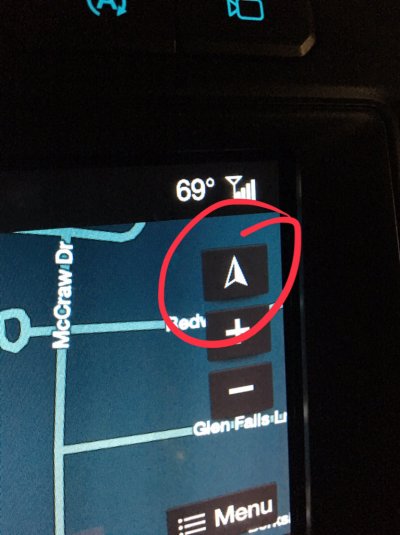
It’s this button. Hit it once and you get a 3D map, hit it again and you get it locked with North as up, hit it again and you’ll have it change with your heading. 9fa21ae0614621763b8f8c6a353fb704.jpg
 

DogDad

Active Member
Joined
Jun 16, 2018
Posts
41
Reaction score
14
Location
Mechanicsville, VA
Thank You Dog Dad. I just made a screen shot of your steps so that I can try this later this morning.

It appears the secret to getting Waze and possibly GasBuddy to work is to disable CarPlay. Reading between the lines, this means I can have Waze as my nav aid, but have to give up listening to podcasts stored on my iPhone through the audio system. Seems like a lot of things work that way lately.

You can still listen to your music and podcasts through Ford’s Sync system, just not in CarPay mode. It may be a moot point soon anyway. Rumor has it Waze will be available on CarPlay with next major iOS release.
 
Top