Update all versions of Ford Sync 3 to the latest Sync 3.4

Disclaimer: Links on this page pointing to Amazon, eBay and other sites may include affiliate code. If you click them and make a purchase, we may earn a small commission.

LokiWolf

Staff member
Moderator
Joined
Apr 2, 2016
Posts
3,971
Reaction score
2,837
Location
Richmond VA
Waze froze up on me twice today while using via CarPlay on 20282. After 3-4 mins of it thinking I was stationary it started working again on its own. This version doesn't have the long black screen at startup like 20237 did.

I think most of the Waze issues are Waze. I always have better luck with it if I completely close it(swipe up in task switcher), then open from CarPlay. Then it behaves MUCH better.


Sent from my iPhone using Tapatalk Pro
 

DWs-TTEB

Full Access Members
Joined
Jul 19, 2020
Posts
746
Reaction score
449
Location
Evans, GA
I think most of the Waze issues are Waze. I always have better luck with it if I completely close it(swipe up in task switcher), then open from CarPlay. Then it behaves MUCH better.


Sent from my iPhone using Tapatalk Pro

Agreed Loki, normally when I'm parked entering the destination into the iPhone I find I must kill & relaunch the Waze app for it to respond. Today, was the first time I saw the map just show that I was on a on ramp for 2-3 miles. Taping the screen & hitting re-center did nothing it was stuck. I did not kill & relaunch the app today so maybe that's the culprit.
 

Big H

Full Access Members
Joined
Feb 27, 2020
Posts
136
Reaction score
97
Location
New Jersey
Anybody here in the NJ/Phila area that can help me do the upgrade properly? I have no idea how to lol and would greatly appreciate the help.

-H


Sent from my iPhone using Tapatalk
 

Lou Hamilton

Full Access Members
Joined
Nov 28, 2019
Posts
939
Reaction score
640
Location
Maryland
Same here. Has only happened a few times to me in the 100+ I have done. All were formats, not updates.


Sent from my iPhone using Tapatalk Pro

Hopefully, it won't happen again. It did not mess with any ForScan changes, just the setting input via SYNC -- wifi, bluetooth, radio stations, etc. I mean, it was only an inconvenience, not a detrimental situation. Bricking the system is always my biggest concern.
 

Jabberwocq1

New Member
Joined
Jan 8, 2021
Posts
1
Reaction score
1
Location
Mechanicsville, VA
Just found this forum this evening. Gotta say my initial experience with the upgrade process (Manual Method) went without issue. Very pleased.
Wanted to say Thank You to everyone (especially LokiWolf) who spent time and energy helping others here.
 

NewExpyDriver

Member
Joined
Jan 24, 2020
Posts
12
Reaction score
7
Location
USA
So I started the update from 3.4 19200 up to 20282 (non nav) exactly an hour ago and it still says UPDATING SYSTEM SOFTWARE...

I created the new USB with the Automated version from the Sync 3 updater. Truck is running and it does not seem to be doing anything. All looks normal, as it did before I inserted the USB. Is this normal?


Here is the Log Report
CYANLABS - SYN3 UPDATER - V2.0.4.0
Operating System: Microsoft Windows 7 Professional ()
PREVIOUS CONFIGURATION
Version: 3.4.19200
Region: NA
Navigation: False
Mode: autoinstall
USB DETAILS
Model: General USB Flash Disk USB Device 14.9GB
FileSystem: exFAT
Partition Type: MBR
AUTOINSTALL.LST
; CyanLabs Syn3Updater 2.x - Autoinstall Mode - Sync 3.4.20282 NA
[SYNCGen3.0_ALL_PRODUCT]
Item1 = VOICE - 5U5T-14G391-CM_1598635923000.TAR.GZ
Open1 = SyncMyRide\5U5T-14G391-CM_1598635923000.TAR.GZ
Item2 = APPS - 5U5T-14G381-EK_1606255141000.TAR.GZ
Open2 = SyncMyRide\5U5T-14G381-EK_1606255141000.TAR.GZ
Options = AutoInstall
[SYNCGen3.0_ALL]
Item1 = GRACENOTES - 4U5T-14G423-CA_123766.tar.gz
Open1 = SyncMyRide\4U5T-14G423-CA_123766.tar.gz
Options = Delay,Include,Transaction
SYNCMYRIDE FILES (3)
4U5T-14G423-CA_123766.tar.gz (724.2MB)
5U5T-14G391-CM_1598635923000.TAR.GZ (385.4MB)
5U5T-14G381-EK_1606255141000.TAR.GZ (848.6MB)
LOG
1/9/2021 1:24:42 PM 4U5T-14G423-CA_123766.tar.gz is missing or invalid, downloading
1/9/2021 1:29:08 PM 4U5T-14G423-CA_123766.tar.gz matches known good checksum
1/9/2021 1:29:08 PM downloaded 4U5T-14G423-CA_123766.tar.gz and successfully validated
1/9/2021 1:29:08 PM 5U5T-14G391-CM_1598635923000.TAR.GZ is missing or invalid, downloading
1/9/2021 1:31:27 PM 5U5T-14G391-CM_1598635923000.TAR.GZ matches known good checksum
1/9/2021 1:31:27 PM downloaded 5U5T-14G391-CM_1598635923000.TAR.GZ and successfully validated
1/9/2021 1:31:27 PM 5U5T-14G381-EK_1606255141000.TAR.GZ is missing or invalid, downloading
1/9/2021 1:37:58 PM 5U5T-14G381-EK_1606255141000.TAR.GZ matches known good checksum
1/9/2021 1:37:58 PM downloaded 5U5T-14G381-EK_1606255141000.TAR.GZ and successfully validated
1/9/2021 1:37:58 PM Preparing USB drive
1/9/2021 1:37:58 PM Formatting USB drive
1/9/2021 1:37:58 PM Re-creating partition table as MBR and formatting as ExFat on selected USB drive
1/9/2021 1:38:10 PM Generating Autoinstall.lst
1/9/2021 1:38:10 PM 4U5T-14G423-CA_123766.tar.gz is missing or invalid, copying
1/9/2021 1:39:05 PM 4U5T-14G423-CA_123766.tar.gz matches known good checksum
1/9/2021 1:39:05 PM copied 4U5T-14G423-CA_123766.tar.gz and successfully validated
1/9/2021 1:39:06 PM 5U5T-14G391-CM_1598635923000.TAR.GZ is missing or invalid, copying
1/9/2021 1:39:32 PM 5U5T-14G391-CM_1598635923000.TAR.GZ matches known good checksum
1/9/2021 1:39:32 PM copied 5U5T-14G391-CM_1598635923000.TAR.GZ and successfully validated
1/9/2021 1:39:32 PM 5U5T-14G381-EK_1606255141000.TAR.GZ is missing or invalid, copying
1/9/2021 1:40:20 PM 5U5T-14G381-EK_1606255141000.TAR.GZ matches known good checksum
1/9/2021 1:40:20 PM copied 5U5T-14G381-EK_1606255141000.TAR.GZ and successfully validated
1/9/2021 1:40:20 PM All files downloaded and copied to USB successfully!

 
Last edited:

NewExpyDriver

Member
Joined
Jan 24, 2020
Posts
12
Reaction score
7
Location
USA
3 hours and still no action....Getting worried here.


just removed the USB and nothing changed. Only activity was at the top of the screen, it said the updating software thing. Seems all is still ok. going to reformat the USB redownload and try again, unless....
 
Last edited:

5280tunage

Full Access Members
Joined
Sep 17, 2019
Posts
1,875
Reaction score
1,154
Location
colorado
that seems pretty long, the longest for me was the full format from 3.3 to 3.4. My recent 20282 update probably took about 20 minutes. I've had one freeze early on though, I ended up having to pull it and thank god it didn't brick anything. I tried a better quality usb stick and it seemed to go a lot smoother.
 

LokiWolf

Staff member
Moderator
Joined
Apr 2, 2016
Posts
3,971
Reaction score
2,837
Location
Richmond VA
Very hard to brick these things.

Before you insert the Update drive, reboot Sync 2 times in a row using the Power Button/Next Track method. Wait for it to come all the way back up both times. After the 2nd reboot insert the update flash drive.


Sent from my iPhone using Tapatalk Pro
 

5280tunage

Full Access Members
Joined
Sep 17, 2019
Posts
1,875
Reaction score
1,154
Location
colorado
that's a great reminder, i definitely do that before any update. Also, 20282 rebooted twice for me during the update, before telling me it was done and to remove the USB.
 

NewExpyDriver

Member
Joined
Jan 24, 2020
Posts
12
Reaction score
7
Location
USA
Well, I reformatted the disc uninstalled the updated and tried to do the whole process over again but it wont let me start from the 19200 build as the current version. it keeps preloading with the 20282 version preloaded as the current version. What am I doing wrong?

Figured it out, I hope
 
Last edited:

NewExpyDriver

Member
Joined
Jan 24, 2020
Posts
12
Reaction score
7
Location
USA
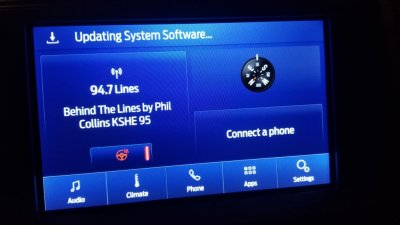
Ok, I dont understand what is going wrong here. Have tried 3 times with 3 different USB sticks to update from 19200 to the new 20282 with no luck. I have done multiple master resets as per instructed above. All down loads to the USB's have said it was completed correctly, and I have followed all the steps. This current attempt to update has been ongoing for an hour n 10 minutes now and nothing is happening. The USB ports are working g and the top of the screen says updating system software.

What gives?

20210110_191131.jpg
 

LokiWolf

Staff member
Moderator
Joined
Apr 2, 2016
Posts
3,971
Reaction score
2,837
Location
Richmond VA
Ok, I dont understand what is going wrong here. Have tried 3 times with 3 different USB sticks to update from 19200 to the new 20282 with no luck. I have done multiple master resets as per instructed above. All down loads to the USB's have said it was completed correctly, and I have followed all the steps. This current attempt to update has been ongoing for an hour n 10 minutes now and nothing is happening. The USB ports are working g and the top of the screen says updating system software.

What gives?

View attachment 39722

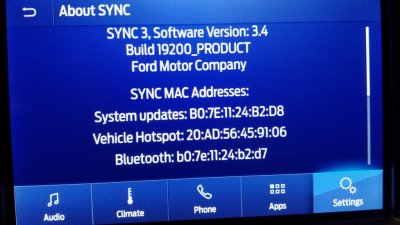
Take a picture of your about Sync Screen. I need to see the whole version number...


Sent from my iPhone using Tapatalk Pro
 

Jace

Full Access Members
Joined
Feb 24, 2018
Posts
206
Reaction score
95
Location
Utah
That is definitely a possibility! Hard to imagine them coming loose with 6k on the clock but anything is possible haha.


Yeah I think that's gonna be my next step. I tried getting the system to recognize the update USB drive and nothing happened unfortunately

FYI All... the USB module was dead. All is well now, just debating whether to upgrade sync or not now =)

Thanks for the help.
 

LokiWolf

Staff member
Moderator
Joined
Apr 2, 2016
Posts
3,971
Reaction score
2,837
Location
Richmond VA
FYI All... the USB module was dead. All is well now, just debating whether to upgrade sync or not now =)

Thanks for the help.

DO IT! Sorry. 3.4.20282(Most Current) is a good one. Stable, and quicker than previous versions.
 
Joined
Nov 10, 2016
Posts
13
Reaction score
5
Location
Lancaster, PA
I am sure this questions came up before but I just can't find it, and I don't know that I have time to go through all 52 threads. Anyways, I was playing on the ford website and If you enter a vin number for a 2020 expedition, you can get 3.4 directly from them can't you? Will that be locked to that specific Vin and that's why we need to get the files from other places? I assume their update won't come with maps? Can you drive while the update is happening?
 

5280tunage

Full Access Members
Joined
Sep 17, 2019
Posts
1,875
Reaction score
1,154
Location
colorado
I believe 20282 just launched public so yes, you might be able to get that. But 3.4 versions have been accessible via cyanlabs for a long time. Ford could do hundreds of minor versions before releases a public version.
 
Top