

You are using an out of date browser. It may not display this or other websites correctly.
You should upgrade or use an alternative browser.
You should upgrade or use an alternative browser.
Distance Indication Feature
- Thread starter jgudnason
- Start date
Disclaimer: Links on this page pointing to Amazon, eBay and other sites may include affiliate code. If you click them and make a purchase, we may earn a small commission.
aggiegrad05
Full Access Members
It's the arrows on the steering wheel.
All the way up is max distance, all the way down will turn it off.
Thanks! I’ll check it out tomorrow. As it’s not a menu option anywhere, that may just be the ticket. I wouldn’t have thought to push the adaptive cruise following distance buttons with the adaptive cruise off. Although the + and - button near the shifter turn the transmission display on and off, so it certainly makes sense.
Blackscreen67
Born to spool
Thanks! I’ll check it out tomorrow. As it’s not a menu option anywhere, that may just be the ticket. I wouldn’t have thought to push the adaptive cruise following distance buttons with the adaptive cruise off. Although the + and - button near the shifter turn the transmission display on and off, so it certainly makes sense.
I'll pass the thanks on to my wife. It's her seemingly never-ending grocery store parades that leaves me fiddling with controls and such while waiting in the parking lot.
She was all excited the first time she saw the red hud lights.... I explained those are built in female driver alarms for the people in front of them.
aggiegrad05
Full Access Members
It's the arrows on the steering wheel.
All the way up is max distance, all the way down will turn it off.
Nope. Doesn’t work. Pushing the arrows has absolutely no effect whatsoever. Thanks tho.
aggiegrad05
Full Access Members
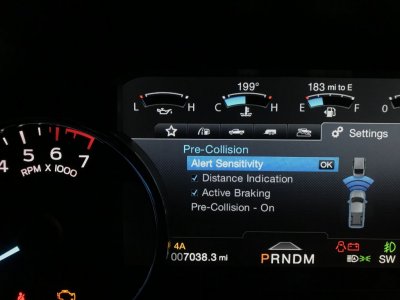
Mines under pre-collision- distance indication. Again, this is on my 18 F150. That said, maybe I can look at ForScan to find the values for it.
View attachment 27394
Well shucks. Yeah, that’s what the manual says is supposed to be there, but as you can see in the shot of my dash above (post #29, above) it’s just not there. Very strange.
And it ****** me off. Not because I need a little colored screen to tell me I’m following too close, but that there is something I paid for but didn’t get! Oh well.
jgudnason
Full Access Members
hey everyone.. Just so we are all clear, most posts i have made anywhere regarding this feature start getting confused, like this thread.
I've explained what I'm looking for in a couple different posts, but most people seem to be confusing this with the collision avoidance system. So Trying to compile everything I can find around this particular feature, despite the fact it doesn't seem to be enabled on my vehicle currently.
First, the three similar systems are:
Adaptive cruise I think everyone is familiar with, so wont go into great detail, expect the fact it uses front radar to sense distance, and display that following distance in the console. Adjustable with the steering wheel button.
- Adaptive Cruise Control
- Collision avoidance system
- Distance Alert System
View attachment 23432
Collision avoidance system is what most people above are talking about. This is where the vehicle will basically scream at you that you are about to hit something, flash the HUD red, and big warning in console. Hard to trigger, although the case of someone turning in front of you as you approach their rear end does seem to trigger (at least it did for me). The collision avoidance system also includes the pedestrian detection, and I've never had that successfully trigger.
the Distance Alert system is what i am wondering if anyone has seen working on their vehicles. It is a part of the collision avoidance system. It uses the same part of the console as adaptive cruise, but only works when cruise if OFF (it uses the same radar sensors).
if the following distance gap is 09 -.6 seconds, it displays yellow, and if following distance is < 0.6 seconds, it goes red, and also apparently will flash a few of the red pixels on the HUD (not the entire bar, just like three of em)
View attachment 23433
The menu option to turn this feature on and off is supposed to be under the Pre-Collision menu, but on my vehicle it isn't there.
I've identified the bit in the IPC module which should enable this menu, and on my vehicle, the bit is turned off, Have tried to change, but unfortunately, the 2018 Exped has a new IPC, and currently it cannot be written to by FORScan
here is a Car thread also talking about the feature (Ford Fusion)
http://www.2gfusions.net/showthread.php?tid=4573&pid=126174#pid126174
and here is the IPC address.
values 8-B have FCW + FDA enabled (Forward Collision Warning, Forward Distance Alert)
View attachment 23434
So with the recent updates to Forscan, i was able to make this change to the IPC, and can confirm it does work as described in the manul.
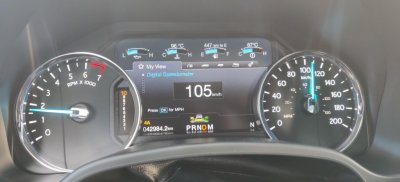
So with the recent updates to Forscan, i was able to make this change to the IPC, and can confirm it does work as described in the manul.
View attachment 34792
can you post the code changes to make it work??
jgudnason
Full Access Members
it's in post #10can you post the code changes to make it work??
Johnb21
Well-Known Member
Gee, I don't have coolant temp in my '18 Expy Lmtd., just the gauge without an actual temp. Is this a setting somewhere? Thanks.
jgudnason
Full Access Members
Gee, I don't have coolant temp in my '18 Expy Lmtd., just the gauge without an actual temp. Is this a setting somewhere? Thanks.
That's also an IPC setting:

also another one if you are usually travelling with a passenger / cold / remote start. you can heat the passenger seat too:
720-02-02 - 1st digit of second block:
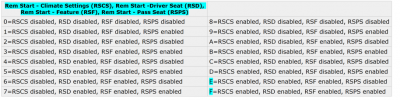
scottdm
Full Access Members
I'm also pleased that the IPC can now be modified in Forscan. In the table below, any idea what FFV means? The other acronyms seems to be explained in the post #10 except for FFV. I think I need option "B" to enable Forward Distance Alert but wanted to confirm what FFV meant.Thanks for posting this. I didn't know that Forscan was updated and could now write to IPC. Now I have everything like I want it!
I'm also pleased that the IPC can now be modified in Forscan. In the table below, any idea what FFV means? The other acronyms seems to be explained in the post #10 except for FFV. I think I need option "B" to enable Forward Distance Alert but wanted to confirm what FFV meant.

I wasn’t sure what it meant either, but mine was set at 7 originally so I used B to keep them both enabled.
scottdm
Full Access Members
I wasn’t sure what it meant either, but mine was set at 7 originally so I used B to keep them both enabled.
Ok. Thanks. I'll give it a try and see how it goes.
I cant get this to work on my 2018 Platinum. Any ideas? Changed 7 to B and nothing...Forscan gave me a checksum error but I hit yes anyway.
*Update: Duh. Got it going. I forgot to go in the settings on the dash and select distance indication under the pre-collision settings.
Not sure if I'll keep this enabled as it doesn't seem to work well. Maybe why it's disabled from the factory? I had the yellow color show up a couple of times after riding the ass of the car in front of me, but it doesn't seem very consistent. I tried it a few times from the same distance and the same speed, but the yellow color didn't show up unless I let off the gas pedal.
I need to test it out on the highway. I was only going about 45-50 mph on some smaller neighborhood roads for the above test.
*Update: Duh. Got it going. I forgot to go in the settings on the dash and select distance indication under the pre-collision settings.
Not sure if I'll keep this enabled as it doesn't seem to work well. Maybe why it's disabled from the factory? I had the yellow color show up a couple of times after riding the ass of the car in front of me, but it doesn't seem very consistent. I tried it a few times from the same distance and the same speed, but the yellow color didn't show up unless I let off the gas pedal.
I need to test it out on the highway. I was only going about 45-50 mph on some smaller neighborhood roads for the above test.
Last edited:
scottdm
Full Access Members
Anybody have a 5 Star tune loaded and had success with Forscan updates? I loaded Forscan 2.3.29 with the extended license and when I try to connect to my PCM it says it doesn't recognize the PCM and to enter the PCM part number, etc. Hoping I don't have to revert to the stock tune file before being able to make Forscan updates.
Johnb21
Well-Known Member
That's also an IPC setting:
View attachment 34808
also another one if you are usually travelling with a passenger / cold / remote start. you can heat the passenger seat too:
720-02-02 - 1st digit of second block:
View attachment 34809
Sorry newbie here to Forscan. I have downloaded the beta version, have the obdlinkEX cable and connected to the truck...just not sure how to get to the menu option you have screen captured above. thank you for the help!!
Sorry newbie here to Forscan. I have downloaded the beta version, have the obdlinkEX cable and connected to the truck...just not sure how to get to the menu option you have screen captured above. thank you for the help!!
Click on IPC (AS BUILT Format) hit the play button GREEN ARROW at the bottom of forscan. Not my pictures below but this it what it should look like.
The remote start climate changes are in APIM
Read this: https://docs.google.com/document/d/1-8dKaS_Spu4Zw4hV_CrKC4tLoP9G8yejqegF1wxIqxY/edit

Last edited:
Johnb21
Well-Known Member
Click on IPC (AS BUILT Format) hit the play button GREEN ARROW at the bottom of forscan. Not my pictures below but this it what it should look like.
The remote start climate changes are in APIM
Read this: https://docs.google.com/document/d/1-8dKaS_Spu4Zw4hV_CrKC4tLoP9G8yejqegF1wxIqxY/edit
Oh thank you! The tutorial is very helpful. I was only able to get into the "easy programming" mode yesterday. I will try again tonight, now that I better understand how to open up configurations. Appreciate it!!!
Similar threads
- Replies
- 0
- Views
- 1K
- Replies
- 5
- Views
- 1K
- Replies
- 0
- Views
- 228

- Replies
- 26
- Views
- 5K

