Adding BLIS

Disclaimer: Links on this page pointing to Amazon, eBay and other sites may include affiliate code. If you click them and make a purchase, we may earn a small commission.

star-art

Full Access Members
Joined
Aug 23, 2010
Posts
539
Reaction score
156
Location
Pacific Northwest
While I'm not new to the Expedition (on my second truck now, been an owner since 2010) I'm still learning about how to do work on it. I'm a complete newbie when it comes to the programming side of things. It's thanks to forums like this that I can even consider attempting a project like this one.

The amount of info shared by people here is incredible. If it weren't for the fact many of us work together, few of these projects would ever get completed. I am very thankful to those who know much more about this than I do and are willing to share some of their experience and expertise. :D

 

LokiWolf

Staff member
Moderator
Joined
Apr 2, 2016
Posts
3,971
Reaction score
2,837
Location
Richmond VA
Excellent work!

I would have just bought an Expy with BLIS, which I did, twice, but I get it.

While BLIS wasn’t standard on the Limited it was pretty common. Our 15 had it, and so does our 17. There was an option pack, like 301a, that added Nav and a few other things. BLIS wasn’t included, but I never saw one with 301a that did not have BLIS. 301a included the power running boards. Maybe find a wrecked one with boards to get all the donor modules you need.

Also, just PM me the module you want the programming from and I can pull it via FORSCAN and send the file.


Sent from my iPhone using Tapatalk Pro
 

star-art

Full Access Members
Joined
Aug 23, 2010
Posts
539
Reaction score
156
Location
Pacific Northwest
Hey there! I did send you a PM (at least as best I can understand how those work on this site). It was about tire pressure display. :)

When I was shopping for my current truck, I looked at a lot of different 2015-17 models. I found only one or two Limited models that had BLIS. At least where I am, it was as rare an option as the CCD suspension. I never once saw BLIS on an XLT.

I find it pretty irritating when Ford offers certain convenience and/or safety features on much cheaper vehicles (Focus, Fusion, etc.) but won't make them available on the top-of-the-line Expedition. We had a tire pressure display on our 2015 Explorer but you can't have this on Expedition? Something like BLIS can save you from getting into an accident so at the price point for these trucks it should be standard equipment. We have it on our '18 Expy and it's great feature.

I guess it's one of those things where you might not really need it but, once you have it, you can't live without it. LOL
 

LokiWolf

Staff member
Moderator
Joined
Apr 2, 2016
Posts
3,971
Reaction score
2,837
Location
Richmond VA
I will take a look at my messages.

Good luck in the BLIS. Keep us in the loop.


Sent from my iPhone using Tapatalk Pro
 

JExpedition07

That One Member
Joined
Mar 30, 2017
Posts
6,530
Reaction score
3,140
Location
New York
On the 15-17 can you have both the blind spot mirrors and BLIS mirrors or just one or the other? On the earlier 3rd gens no BLIS but there were optional blind spot mirrors which help a bit. This wasn’t available in my model year and I find myself double checking often. I find BLIS is especially useful in the condition I drive someone else’s vehicle that’s not adjusted for my height since it catches what you can’t see when driving blind lol.
 
Last edited:

star-art

Full Access Members
Joined
Aug 23, 2010
Posts
539
Reaction score
156
Location
Pacific Northwest
The BLIS mirror glass is different from the blind spot mirrors so no you can't have both. BLIS was a standalone option even on XLT but required the 202A package. That means it came on mirrors that were power with memory and had heated glass and integrated turn signals.

On 2015-17 Limited models, you get power memory, heated, auto-dim, turn-signal and power-folding mirrors with blind spot glass as standard. Adding BLIS, though, deletes the blind spot glass as far as I know.

2015-17 King Ranch and Platinum models had BLIS as standard equipment.
 

star-art

Full Access Members
Joined
Aug 23, 2010
Posts
539
Reaction score
156
Location
Pacific Northwest
BTW, if anyone wants to tackle taking their mirrors apart, you could install your own BLIS LED pretty much anywhere you want. This way you could have your blind spot glass *and* BLIS at the same time.

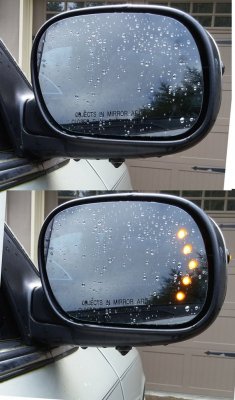
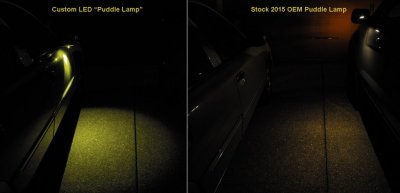
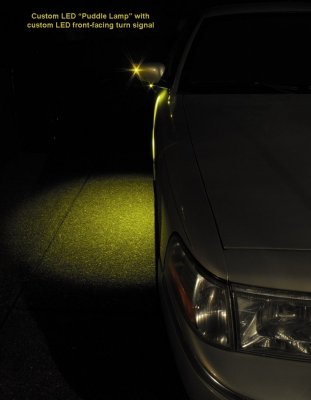
I installed my own LEDs on a 2005 Grand Marquis where I added turn signal glass and also custom puddle lamps and forward-facing turn signal LEDs. It was a LOT of work but it was also a fun little project. The hardest part was getting the mirror glass out without breaking it. That was not easy!

Here are some pics of my custom mirrors:

SignalMirror-Daytime_72dpi.jpg CustmPuddleVsNewOEM_Annotated72dpi.jpg CustomPuddleFwdTurn_Annotated72dpi.jpg

The LEDs are called "bolt" LEDs. They are weatherproof and pretty much bullet proof but they aren't very small. They go in a 1/4-inch hole. I installed one facing down for the puddle lamp and another facing forward to make a front-facing turn signal.

These things are bright! You can control that by controlling the voltage and current flowing through them. So, you could have max brightness for a forward-facing turn signal and then whatever brightness level you want for BLIS. The advantage of doing this is your BLIS warning would be easier to see. The factory LED doesn't really get your attention -- especially during the day.

If I were going to do this I'd isolate the ALERT output from the SOD module and use that to drive another circuit. You can do this with something like an transistor or an optocoupler. It would allow you to have as much current as you wanted in the alert LED without overloading the module.
 

chuck s

Full Access Members
Joined
Dec 20, 2006
Posts
1,990
Reaction score
753
Location
Chesterfield, VA (that's south of Richmond, y'all)
When backing into my driveway I sometimes get an audible "cross traffic alert" coming from my left or right behind me. That would be a good trick. It's the small bushes that mark the driveway entrance. I pay more attention to the alert backing out of parking spaces. I habitually back in everywhere if I don't need to access the rear hatch for bulky items or groceries.

Lights in the mirrors are redundant to proper mirror adjustment.

-- Chuck
 

star-art

Full Access Members
Joined
Aug 23, 2010
Posts
539
Reaction score
156
Location
Pacific Northwest
Yes, we lived for decades without something like this and most of us survived. LOL But, there were still plenty of mishaps. Always good to have a backup in case you aren't paying attention or miss something! :)
 

Ken Speulstra

Member
Joined
Feb 29, 2020
Posts
16
Reaction score
0
Location
Maryland
Concur with the above, ... I just finished adding BLIS to my 2013 Fusion ... works like a charm !

In regards to the BLIS Module part numbers themselves. The two numbers above will get you the exact same thing.

- The "DG1T" ending in "EA" will commonly be for used Modules as most junkyards don't usually take the time to lookup catalog part numbers. They just go with whatever they see listed on the part.

- Whereas Online Catalogs will list the "DG1Z" ending in "B"
For some reason for a lot of Ford parts, the number listed on the part itself is slightly different from what's listed on the parts catalog online. I speak from experience.

Reference to wiring, I make my own Harnesses. ... like Star-Art mentioned above, one just have to tie into the existing vehicle wiring; not a concern on that front.

There will be some programming required in order for this to work. Each modules will require the vehicle's VIN to be changed to match. Then the IPC hex bit changes to enable BLIS & Cross Traffic Alert in the menu. If you've used Forscan before, that part is easy.

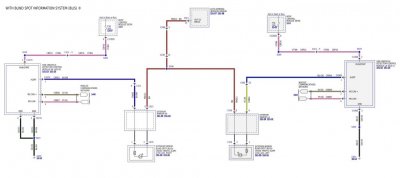
Here are the modules connectors Pinouts, if interested:

View attachment 33504 View attachment 33505

I just wanted to chime in as I am attempting to add this to my 2017 Limited. I have both modules and hooked them up to the truck. I haven't got them to work yet but I have some observations.
1) I have been looking at the AS-Built information for several platinum models and they don't seem to have the VIN number stored in the module. (I looked at this for 4 different VIN's and the As-Built configuration is identical) I did look up your 2013 Fusion and it does show the VIN in the AS-Built.
2) When you hook up the module to the truck, it only shows the SODR no matter if you have the ground on pin 6 or not. And this is the same for both my modules. This seems to lead to a Left and Right module, not address strapped based of the ground pin.

Another question, your attached images are for what vehicle? The diagrams I have do not reflect your images.

Any thoughts?
 

TXFRDOwner

Full Access Members
Joined
Jan 21, 2010
Posts
410
Reaction score
208
Location
Texas
I just wanted to chime in as I am attempting to add this to my 2017 Limited. I have both modules and hooked them up to the truck. I haven't got them to work yet but I have some observations.
1) I have been looking at the AS-Built information for several platinum models and they don't seem to have the VIN number stored in the module. (I looked at this for 4 different VIN's and the As-Built configuration is identical) I did look up your 2013 Fusion and it does show the VIN in the AS-Built.
2) When you hook up the module to the truck, it only shows the SODR no matter if you have the ground on pin 6 or not. And this is the same for both my modules. This seems to lead to a Left and Right module, not address strapped based of the ground pin.

Another question, your attached images are for what vehicle? The diagrams I have do not reflect your images.

Any thoughts?


the diagrams are for the Expedition ... If you compare post#32 diagrams and post#36 pinouts they'll match
 

Ken Speulstra

Member
Joined
Feb 29, 2020
Posts
16
Reaction score
0
Location
Maryland
the diagrams are for the Expedition ... If you compare post#32 diagrams and post#36 pinouts they'll match

Under connector c4369 on your image, the circuit function for pin 1 says "ctrl mod. - actuator pedestrian...." and under c4370 pin 1 says "#N/A" but the pinouts for the wiring diagram show connections for the LED's in the mirror.

Any thoughts on my observations 1&2?
 

TXFRDOwner

Full Access Members
Joined
Jan 21, 2010
Posts
410
Reaction score
208
Location
Texas
Under connector c4369 on your image, the circuit function for pin 1 says "ctrl mod. - actuator pedestrian...." and under c4370 pin 1 says "#N/A" but the pinouts for the wiring diagram show connections for the LED's in the mirror.

Any thoughts on my observations 1&2?

The way the manual describes the wire function sometimes throws me off too, but if you compare the electrical diagram, ... bounce wire colors and pin numbers you're good to go.

You're correct .... I noticed the same, unlike the Fusion there's no VIN built in for the Expedition's BLIS modules.

I'm not clear on exactly what you mean in your observation on #2, Care to elaborate, .. sorry :(
 

TXFRDOwner

Full Access Members
Joined
Jan 21, 2010
Posts
410
Reaction score
208
Location
Texas
I took the two wiring diagrams on Post #32 and combined them.

Driver Side Module is on the right, I know ;)

BlindSpot System.jpg
 

Ken Speulstra

Member
Joined
Feb 29, 2020
Posts
16
Reaction score
0
Location
Maryland
The way the manual describes the wire function sometimes throws me off too, but if you compare the electrical diagram, ... bounce wire colors and pin numbers you're good to go.

You're correct .... I noticed the same, unlike the Fusion there's no VIN built in for the Expedition's BLIS modules.

I'm not clear on exactly what you mean in your observation on #2, Care to elaborate, .. sorry :(

Sorry, When using forscan to display all the modules, I only see the SODR module. According to the wiring diagram, grounding pin 6 on the module should designate an SODR module and leaving pin 6 unconnected should designate an SODL module. What I am experiencing is with pin 6 grounded or not, the module still shows up as an SODR. Additionally, if both modules are plugged in, I can't read the configuration data. This would seem to imply that the CAN address is the same and the grounded pin is just a status bit that is passed by the module to the computer to determine left or right.
 

TXFRDOwner

Full Access Members
Joined
Jan 21, 2010
Posts
410
Reaction score
208
Location
Texas
Sorry, When using forscan to display all the modules, I only see the SODR module. According to the wiring diagram, grounding pin 6 on the module should designate an SODR module and leaving pin 6 unconnected should designate an SODL module. What I am experiencing is with pin 6 grounded or not, the module still shows up as an SODR. Additionally, if both modules are plugged in, I can't read the configuration data. This would seem to imply that the CAN address is the same and the grounded pin is just a status bit that is passed by the module to the computer to determine left or right.

So the BCM is not recognizing the difference between Left and Right modules. Could it be that the BCM needs an AsBuilt change to recognize that both modules are wired in !
 

TXFRDOwner

Full Access Members
Joined
Jan 21, 2010
Posts
410
Reaction score
208
Location
Texas
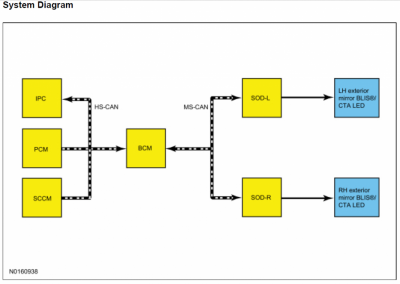
here's a description of BLIS & CTA operation from the Service manual if that helps
 

Attachments

  • BLIS & CTA Operation.pdf
    300 KB · Views: 11

Ken Speulstra

Member
Joined
Feb 29, 2020
Posts
16
Reaction score
0
Location
Maryland
here's a description of BLIS & CTA operation from the Service manual if that helps

Thanks, I have that document and read it over a couple of times. I suppose it is possible the BCM needs bits activated but seems strange to me that you would need to do that. When you installed your modules into the Fusion, you could still see left and right before changing the BCM correct? Or even before changing the VIN?
 
Top