Ford finally fixed all of the crazy issues they caused with Sync 3

Disclaimer: Links on this page pointing to Amazon, eBay and other sites may include affiliate code. If you click them and make a purchase, we may earn a small commission.

PharmerBrown

Member
Joined
Jul 10, 2020
Posts
13
Reaction score
6
Location
PA
For those of you that have been suffering with Sync issues over the past several months, the end is in sight. Starting the car to have a blank AM station blasting, or maybe Sirius channel 0; voice commands telling you your phone is not connected; all of your settings reverting back every time you shut off the car; and many other issues.

Ford finally released the update to correct these, but you won't see it when trying to update over wifi. You'll have to download the update onto a USB drive from the Ford website and install it.

I was so frustrated over this, and am very happy Ford fixed it, but I'm not going to forget they caused the issue in the first place.
 

99WhiteC5Coupe

Full Access Members
Joined
Jun 3, 2015
Posts
3,410
Reaction score
1,991
Location
USA
For those of you that have been suffering with Sync issues over the past several months, the end is in sight. Starting the car to have a blank AM station blasting, or maybe Sirius channel 0; voice commands telling you your phone is not connected; all of your settings reverting back every time you shut off the car; and many other issues.

Ford finally released the update to correct these, but you won't see it when trying to update over wifi. You'll have to download the update onto a USB drive from the Ford website and install it.

I was so frustrated over this, and am very happy Ford fixed it, but I'm not going to forget they caused the issue in the first place.

Remember when Ford used to promote itself with the phrase, “Quality is Job 1”?

Anyone wonder why they no longer self-promote quality?
 

gtr09

Well-Known Member
Joined
Oct 3, 2021
Posts
80
Reaction score
55
Location
Midwest
I'm sure this is an idiotic question (because expecting any secretive, legacy company like Ford to behave appropriately is just a bridge too far) but do they publish any version notes that shows what changes or fixes are present in a given version?
 

Rob6805

Full Access Members
Joined
Mar 25, 2021
Posts
818
Reaction score
532
Location
49735
Just did the update on mine via USB. The new version is 3.4.23188. I also did a Nav update to NA 2.22. And FYI, the system update was available via wifi download. I had already downloaded the USB file and when I got in the veh I connected to our wifi and checked for updates and it was there too. I ended up plugging in the USB because it's way faster.
 

Mr Big

Full Access Members
Joined
May 29, 2023
Posts
1,012
Reaction score
588
Location
Tampa Bay, Florida USA
I went to Ford's website and did not see any new update for my 2019 Expedition. I do have 3.4.23188 already installed for about a month. It's very stable.
 

sixstring

Full Access Members
Joined
May 13, 2020
Posts
188
Reaction score
129
Location
Florida
>>>> pharmerbrown

THanks so much for letting me know about this sw upgrade.

I've had my vehicle in the shop with MANY problems related a bad APIM module and the dealer has one on order/backorder to replace the one in my vehicle.

This sw upgrade fixed all the problems i was having with the sync 3.

Thanks again for posting this information.

The sw version that fixed the problems is 3.4.23188

Easy to install if you follow the directions.
 

wakeboarder

Full Access Members
Joined
Nov 16, 2019
Posts
811
Reaction score
468
Location
Fort Lauderdale, FL

Mr Big

Full Access Members
Joined
May 29, 2023
Posts
1,012
Reaction score
588
Location
Tampa Bay, Florida USA
huh, my 2019 has 3.0.20204 according to Ford and that's the latest.
I contacted Ford directly and it appears 2019 Expedition updates may have been discontinued. There is no info available for ANY future updates.
With that said, I already posted I have been running the latest firmware, (3.4.23188), for some time now. I downloaded and installed it, via USB, from a site posted in one of these forums. This procedure requires some technical skills, or one risks bricking their unit. I had no problem updating, but I am a tech.
So, if anyone, who cannot update through normal channels, decides to update their older model Expedition, to the latest firmware, DO SO AT YOUR OWN RISK.
 

Woodwolf

Well-Known Member
Joined
Jul 16, 2023
Posts
97
Reaction score
43
Location
MI & ON
huh, my 2019 has 3.0.20204 according to Ford and that's the latest.
just checked my 2019 Platinum:
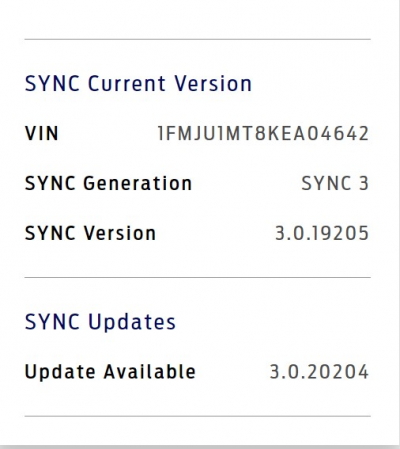
installed is: 3.0.19205
Update available: 3.0.20204
From Ford.ca1695044298489.png

UPDATE: downloaded latest version , exfat32 thumb drive, install started fine with "updating Sync" finished after about 4 minutes, message "safe to eject USB drive", .XML file from vehicle is on USB drive as described, uploaded it. EXP still shows 19205 version. So nothing updated. What happened?
 
Last edited:

chuck s

Full Access Members
Joined
Dec 20, 2006
Posts
1,990
Reaction score
753
Location
Chesterfield, VA (that's south of Richmond, y'all)
3.4.23188 and NA 2.22 both show as available via CyanLabs Sync Updater 2.12.2.0. 2.22 maps are STILL a year out of date based on the maps in my pair of Garmin GPS units

Downloading these now for installation in my 2017 which has 3.4.22110 and NA 2.21. When I look for "maps only" all I get is NA 2.21.

Anyone know if the CyanLabs update still wipes all the trip data, saved phone numbers, etc? I'd like some newer maps but hate the hassle of starting from Zero.

-- Chuck
 

Mr Big

Full Access Members
Joined
May 29, 2023
Posts
1,012
Reaction score
588
Location
Tampa Bay, Florida USA
3.4.23188 and NA 2.22 both show as available via CyanLabs Sync Updater 2.12.2.0. 2.22 maps are STILL a year out of date based on the maps in my pair of Garmin GPS units

Downloading these now for installation in my 2017 which has 3.4.22110 and NA 2.21. When I look for "maps only" all I get is NA 2.21.

Anyone know if the CyanLabs update still wipes all the trip data, saved phone numbers, etc? I'd like some newer maps but hate the hassle of starting from Zero.

-- Chuck
If you use them to upgrade to the latest firmware, there is a chance a full factory reset or downgrade, then install requirement will happen. I did lose all settings, stations, stored numbers, trip data, etc. But for me it was worth it.
 

Rob6805

Full Access Members
Joined
Mar 25, 2021
Posts
818
Reaction score
532
Location
49735
3.4.23188 and NA 2.22 both show as available via CyanLabs Sync Updater 2.12.2.0. 2.22 maps are STILL a year out of date based on the maps in my pair of Garmin GPS units

Downloading these now for installation in my 2017 which has 3.4.22110 and NA 2.21. When I look for "maps only" all I get is NA 2.21.

Anyone know if the CyanLabs update still wipes all the trip data, saved phone numbers, etc? I'd like some newer maps but hate the hassle of starting from Zero.

-- Chuck
FYI. Garman does not do the maps for Sync 3. Telenav does. When I did the 3.4.23118 update a few days ago after I download the USB files I clicked on the check for map updates button on the Ford website. It took me to a different page where I had to input my VIN again and it told me I had a complementary Nav update available. I downloaded that and now I am on NA 2 22. ( from 2 21). The Nav took almost an hour to install.
 

chuck s

Full Access Members
Joined
Dec 20, 2006
Posts
1,990
Reaction score
753
Location
Chesterfield, VA (that's south of Richmond, y'all)
Only pointing out the Garmin maps picked up the new traffic roundabouts within months of their completion while it took a year or more for the Sync maps to show them. "Turn left at the stop sign" is a little confusing when there is no stop sigh and there a roundabout where it used to be and "Take the third exit" is more appropriate.

County opened another one a couple miles from here a couple weeks ago. Will see how quickly the Garmins (I have two) pick it up. Sync will show them in 2024 or 2025 only if I want to have my system reset and lose all my saved data. No question while there's a Garmin on top of my dash right over Sync.

-- Chuck
 

Rob6805

Full Access Members
Joined
Mar 25, 2021
Posts
818
Reaction score
532
Location
49735
Only pointing out the Garmin maps picked up the new traffic roundabouts within months of their completion while it took a year or more for the Sync maps to show them. "Turn left at the stop sign" is a little confusing when there is no stop sigh and there a roundabout where it used to be and "Take the third exit" is more appropriate.

County opened another one a couple miles from here a couple weeks ago. Will see how quickly the Garmins (I have two) pick it up. Sync will show them in 2024 or 2025 only if I want to have my system reset and lose all my saved data. No question while there's a Garmin on top of my dash right over Sync.

-- Chuck
You should just use Android Auto and Google Maps.
 

Mr Big

Full Access Members
Joined
May 29, 2023
Posts
1,012
Reaction score
588
Location
Tampa Bay, Florida USA
You should just use Android Auto and Google Maps.
I find any factory installed version of GPS maps, in any brand vehicle to be inferior to Google Maps when traveling. I've ran both at the same time and Google Maps wins every time, for mapping, topography, information, speed traps, accidents, etc.
 

Rob6805

Full Access Members
Joined
Mar 25, 2021
Posts
818
Reaction score
532
Location
49735
I find any factory installed version of GPS maps, in any brand vehicle to be inferior to Google Maps when traveling. I've ran both at the same time and Google Maps wins every time, for mapping, topography, information, speed traps, accidents, etc.
A big difference is that AA and Google Maps don't have access to specific vehicle information such as fuel level, and for EV's battery level (important to find a recharge station). Factory native Nav systems have many features and functions that AA and Google maps don't have. But I do agree that if we are specifically talking about maps and directions then AA and Google maps wins every time.
 

sixstring

Full Access Members
Joined
May 13, 2020
Posts
188
Reaction score
129
Location
Florida
the one thing that i miss with android auto on is outside temp. i know it is just a finger touch away but id rather just glance.

I also dont like how android auto shows recent destinations when the map is on. oh and another thing i dont like about android auto is lack of speed limit signs when not actually navigating a route. oh and another thing i dont like about android auto is that if you are not navigating a route, you dont get the stop light icon on the map where you can judge where you are to intersections. i do like the spotify app with android auto.

the google maps on android auto really needs a lot of work.
 

lobsenza

Full Access Members
Joined
Jun 21, 2018
Posts
329
Reaction score
119
Location
Texas
Are the downloads and updates free? I checked on my 2019 Navigator and I had to pay for updates now. They were free last time I checked. Where can I download updates from?
 
Top