ForScan Tweaks - 2015+

Disclaimer: Links on this page pointing to Amazon, eBay and other sites may include affiliate code. If you click them and make a purchase, we may earn a small commission.

blackhawk2002

Member
Joined
Nov 11, 2020
Posts
7
Reaction score
1
Location
AL
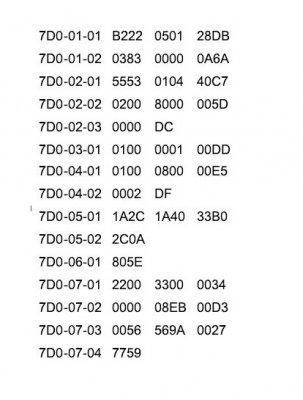
What does yours show on this line 7D0-01-01 (APIM) xx**-xxxx-xxxx ? .... Mine is xx22-xxxx-xxxx

I believe it was 12. I just tired your 22 and it didnt change anything. Would you be willing to share your APIM load out? like a screen shot?
 

TXFRDOwner

Full Access Members
Joined
Jan 21, 2010
Posts
410
Reaction score
208
Location
Texas
I believe it was 12. I just tired your 22 and it didnt change anything. Would you be willing to share your APIM load out? like a screen shot?

Not home right now but this is my APIM_ab downloaded from the motorcraft website. No changes have been made to it since I've had the vehicle.

2016 Expedition Limited (Sync 3)

16Exp_Limited - APIM_ab.JPG


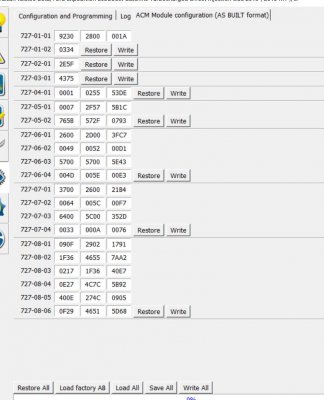
Also, Post a screenshot of your ACM when you get a chance
 

blackhawk2002

Member
Joined
Nov 11, 2020
Posts
7
Reaction score
1
Location
AL
Not home right now but this is my APIM_ab downloaded from the motorcraft website. No changes have been made to it since I've had the vehicle.

2016 Expedition Limited (Sync 3)

View attachment 38887


Also, Post a screenshot of your ACM when you get a chance


So I basically copied exactly what you have there, and now we can talk through the car with normal bluetooth and car play. Now I have to figure out the steering wheel controls next. I apperaicate your help.
Here is my layout for the ACM on Forscan.

Capture.JPG
 

Yosemite Sam

Active Member
Joined
Nov 7, 2020
Posts
37
Reaction score
16
Location
Kansas
I just finished going through 81 pages of posts looking for the current spreadsheet that was relevant
to my 2017 Expy and although I found a number of posts that posted the URL to the spreadsheet every one of them had been deleted at the URL source.

Can someone point me in the right direction with a valid URL address that is current for a copy of the most up-to-date Gen 3 Expedition spreadsheet?
 

Langer

Full Access Members
Joined
Mar 27, 2019
Posts
457
Reaction score
195
Location
Chicago
I just finished going through 81 pages of posts looking for the current spreadsheet that was relevant
to my 2017 Expy and although I found a number of posts that posted the URL to the spreadsheet every one of them had been deleted at the URL source.

Can someone point me in the right direction with a valid URL address that is current for a copy of the most up-to-date Gen 3 Expedition spreadsheet?
 

Attachments

  • FORScan Codes-Expedition - 2015-2017.pdf
    104.2 KB · Views: 179

Anthony DeVor

Full Access Members
Joined
Nov 29, 2020
Posts
303
Reaction score
60
Location
Maryland
HI all, I just got a 2017 Expy EL XLT and was wondering what I needed to change to disable hyperflashing for the rear turn signals, I have resistor switchback leds in the front and can turn that setting off as well. Also I don't remember seeing in the forum here about bambi mode, does anyone know the code or quick config settings for that. Thanks. And thanks for all of the helpful info Loki
 

Yosemite Sam

Active Member
Joined
Nov 7, 2020
Posts
37
Reaction score
16
Location
Kansas
HI all, I just got a 2017 Expy EL XLT and was wondering what I needed to change to disable hyperflashing for the rear turn signals, I have resistor switchback leds in the front and can turn that setting off as well. Also I don't remember seeing in the forum here about bambi mode, does anyone know the code or quick config settings for that. Thanks. And thanks for all of the helpful info Loki

I presume you have already downloaded and installed Forscan?
 

Langer

Full Access Members
Joined
Mar 27, 2019
Posts
457
Reaction score
195
Location
Chicago
HI all, I just got a 2017 Expy EL XLT and was wondering what I needed to change to disable hyperflashing for the rear turn signals, I have resistor switchback leds in the front and can turn that setting off as well. Also I don't remember seeing in the forum here about bambi mode, does anyone know the code or quick config settings for that. Thanks. And thanks for all of the helpful info Loki

I uploaded the spreadsheet a few posts up, it covers everything you’ve mentioned.
 

Anthony DeVor

Full Access Members
Joined
Nov 29, 2020
Posts
303
Reaction score
60
Location
Maryland
Could anyone tell me what version sync they have in their radio? I have a 2017 Expy EL XLT with the sync 3 big touchscreen but it is only version 2.0 and it says it has no updates. Thanks
 
OP
OP
LokiWolf

LokiWolf

Staff member
Super Moderator
Joined
Apr 2, 2016
Posts
3,959
Reaction score
2,815
Location
Richmond VA
Do a search. Several threads on here discussing the Sync 3 updates and how to do them.


Sent from my iPhone using Tapatalk Pro
 

joethefordguy

Full Access Members
Joined
Apr 10, 2017
Posts
741
Reaction score
229
Location
Texas
It's an option enabled on the SSV or police vehicles as far as I know.

FWIW... My 2004 XLT has a control next to the lights on the dash that will turn down brightness for all interior lights, and then just turn them off. This is an SSV, but I've had that same control in all my cars. I've liked to use it because it ensures I won't have some errant light bulb left on draining my battery.
 

joethefordguy

Full Access Members
Joined
Apr 10, 2017
Posts
741
Reaction score
229
Location
Texas
I would think this is only available for police departments and is probably a separate system installed on the vehicle at departments request

my 2004 is an SSV; it has no such control. If I want it to idle, I leave it running and walk away, or just sit back and read a book. As far as i can tell it will idle forever; probably because it has super duper heavy duty extra cooling radiator and tornado fan installed as part of the police package. I do wonder why the plugs didn't foul. I spend a lot of time waiting outside of hospitals, etc., for my wife (they won't let family in because of the scamdemic) so I've been leave it running for the AC.
 

craig72

Well-Known Member
Joined
Mar 9, 2020
Posts
62
Reaction score
22
Location
Midwest
Hey gang,
Anyone know if there is a way to have the console lights (or at least the center console buttons) light all the time? Or maybe change the sensitivity of the photocell on the dash so they come on sooner? I find that in certain low light conditions, the buttons on the console are really hard to read. I've experimented by throwing a rag over the photocell and the lighting really helps. Just wondering if there is a way to force this habit via Forscan (2016 Expedition Platinum 4x4)
Thanks!
 

Anthony DeVor

Full Access Members
Joined
Nov 29, 2020
Posts
303
Reaction score
60
Location
Maryland
Yea let me know if you find anything for the dash lights to always be on. I would really like that feature


Sent from my iPhone using Tapatalk
 
Top