Install OEM brake controller on my 2017 Expy

Disclaimer: Links on this page pointing to Amazon, eBay and other sites may include affiliate code. If you click them and make a purchase, we may earn a small commission.

bjpinub

Member
Joined
Aug 31, 2020
Posts
5
Reaction score
0
Location
New Market, TN
I have a couple of questions for everyone.

Are there any gotchas with putting in the controller? That is, will I have any problems installing the controller and driving it to the dealership to program the TBC? I know I can use ForScan, but I get weary doing that when it is still under extended warranty.

Does anyone have the parts list for converting the factory 4-pin to a factory 7-pin?

Did anyone find a good write-up on converting the 4-pin to a 7-pin?
 

Gidds

New Member
Joined
May 31, 2020
Posts
3
Reaction score
1
Location
Westfield, IN
When I converted mine, there was a blue wire for connecting the brake assist. Everything else was pretty simple as well aside from Ford not having the programming for the computer. I just used Forscan and it set up really easy.

For the 4pin to 7 pin, I bought the converter from O'Reilly and brought the whole thing to a local trailer dealer and they professionally installed it for me for $40.

Sent from my SM-N986U1 using Tapatalk
 

Langer

Full Access Members
Joined
Mar 27, 2019
Posts
458
Reaction score
197
Location
Chicago

bjpinub

Member
Joined
Aug 31, 2020
Posts
5
Reaction score
0
Location
New Market, TN
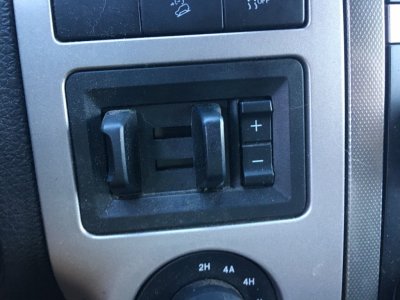
Thank you all for the follow-ups. One more question. When I look for the part number Pyle suggested (FL1Z-2C006-D), it looks different than the one in the pictures. Based on that part number, it looks like the +/- gain buttons are above the slider, not to the right as in the picture. Am I missing something else? Sorry for all the questions. Just trying to make sure to order the correct part.

The image for the part Pyle suggested is: https://www.fairwayfordparts.net/oem-parts/ford-module-fl1z2c006d

Is it possible the part used is the same from an F-150? Even when I look at CarGurus for a 2017 XLT with the towing package it has the same controller Pyle suggested. So I am not sure why I am seeing a different image.
 

Langer

Full Access Members
Joined
Mar 27, 2019
Posts
458
Reaction score
197
Location
Chicago
Thank you all for the follow-ups. One more question. When I look for the part number Pyle suggested (FL1Z-2C006-D), it looks different than the one in the pictures. Based on that part number, it looks like the +/- gain buttons are above the slider, not to the right as in the picture. Am I missing something else? Sorry for all the questions. Just trying to make sure to order the correct part.

The image for the part Pyle suggested is: https://www.fairwayfordparts.net/oem-parts/ford-module-fl1z2c006d

Is it possible the part used is the same from an F-150? Even when I look at CarGurus for a 2017 XLT with the towing package it has the same controller Pyle suggested. So I am not sure why I am seeing a different image.


I ordered that exact part # for my 2017 XLT 4/5/19. Not sure about the discrepancies you’re seeing, but I know it was a plug and play install, and works.
 

bjpinub

Member
Joined
Aug 31, 2020
Posts
5
Reaction score
0
Location
New Market, TN
I ordered that exact part # for my 2017 XLT 4/5/19. Not sure about the discrepancies you’re seeing, but I know it was a plug and play install, and works.
Langer, what does your controller look like? The one Pyle posted for the 2017 had the +/- gain buttons to the right of the slider, but the one I keep finding has the buttons under the slider. Also, where did you get yours from?
 

Langer

Full Access Members
Joined
Mar 27, 2019
Posts
458
Reaction score
197
Location
Chicago
I got mine off fordpartsgiant.com
I believe the buttons are to the left of the slider, I’ll double check and update.
 

chuck s

Full Access Members
Joined
Dec 20, 2006
Posts
1,990
Reaction score
753
Location
Chesterfield, VA (that's south of Richmond, y'all)
That's what it looks like in my '17 with HD Tow.

I read (somewhere :) ) that all the wiring to the back is there, just tucked in behind the panels and bumper and there's a blue wire "blunt cut and dipped" for the brakes. Just need to connect the wires to the right connector at the back of the truck. The white multi-pole connector brake connector where the brake controller plugs in should be behind the lower dash.

-- Chuck
 

bjpinub

Member
Joined
Aug 31, 2020
Posts
5
Reaction score
0
Location
New Market, TN
I have ordered the part Pyle suggested. Here is hoping they send the right one. I guess my next step is to look at 4-prong to 7-prong thread. On a side note, has anyone used a Bluetooth adapter when using Forscan? I purchased one to work with my phone when I made some changes to our BMW. I know I can pair it to my laptop, but I wasn't sure if Forscan would work with a Bluetooth adapter or if it required a USB adapter.
 

Langer

Full Access Members
Joined
Mar 27, 2019
Posts
458
Reaction score
197
Location
Chicago
It’s possible to use, but when changing code everyone I’ve seen on here is generally gun-shy, because of the possibility of connection loss issues.

this is what a lot of people have, I’m sure there are plenty similar.

OHP ELMconfig FORScan OBD2 USB Adapter for Windows, Ford Diagnostic ELM327 Coding Tool with MS-CAN / HS-CAN Switch https://www.amazon.com/dp/B01F0GVBWY/ref=cm_sw_r_cp_api_i_6v5vFbNTNQRQ4
 
As an Amazon Associate we earn from qualifying purchases.

srfrcrux

New Member
Joined
Jan 23, 2024
Posts
3
Reaction score
0
Location
Indiana
2017 Ford Expedition XLT EL.
Looking to install Brake Controller.
Is this the only OEM controller (OEM FL1Z-2C006-D) that will work?
Thank you
 

chuck s

Full Access Members
Joined
Dec 20, 2006
Posts
1,990
Reaction score
753
Location
Chesterfield, VA (that's south of Richmond, y'all)
An aftermarket brake controller should work in theory but the OEM controller is superior in every way in my use plus it's sitting right in front of me and displays useful information on the instrument panel. I believe several folks here have added it seemingly as easily as extracting the coin bin, snapping in the controller, and plugging it in.

Guys who've done it will probably respond. May take Forscan but your dealer can certainly so it with no effort on your part other than handing them your credit card. :)

One handy thing about the Ford controller is it keeps track of the mileage on your trailer and can be set to do this for several trailers.

-- Chuck
 

srfrcrux

New Member
Joined
Jan 23, 2024
Posts
3
Reaction score
0
Location
Indiana
An aftermarket brake controller should work in theory but the OEM controller is superior in every way in my use plus it's sitting right in front of me and displays useful information on the instrument panel. I believe several folks here have added it seemingly as easily as extracting the coin bin, snapping in the controller, and plugging it in.....-- Chuck
Thank you much. I ordered an OEM brake controller today
 

Cyclone

Full Access Members
Joined
Jul 10, 2019
Posts
235
Reaction score
147
Location
Maryland
I installed the OEM brake controller in my 2015 XLT back in July 2019. I used part FL1Z-2C006-D. I activated it with Forscan Its been a while but here are my notes

Installed Trailer Brake Controller (FL1Z-2C006-D), Activated with forscan.
IPC 720-07-01 xxxx x8xx xxxx
IPC 720-04-01 xx4x xxxx xxxx

It looks like I changed the fields with a 4 and a 8. You will have to dig deeper in the forscan areas here becaues I don't remember where in Forscan I made those changes, but I do know that my Brake Controller has been working since 2019. :D
 

chuck s

Full Access Members
Joined
Dec 20, 2006
Posts
1,990
Reaction score
753
Location
Chesterfield, VA (that's south of Richmond, y'all)
The ECU (IPC) data in my 2017 with factory installed HD Tow (which included the brake controller):

IPC 720-07-01 0001 8800 00B8
IPC 720-04-01 0042 0002 0070

The source for the Module Build Data (As-Built) seems to be dead but I'll bet someone has the new, correct link. Just needs your VIN: https://motorcraftservice.com/AsBuilt/Details

-- Chuck
 
Last edited:

chuck s

Full Access Members
Joined
Dec 20, 2006
Posts
1,990
Reaction score
753
Location
Chesterfield, VA (that's south of Richmond, y'all)
That's what I use with Forscan. Clicked the link and Amazon says I "last purchased September 3, 2017."

I didn't need to mess with the brake controller but you can compare my factory settings to yours. I'd only change the single digit on the two lines noted by Cyclone.

I purchased this to turn the fog lights into DRLs during the day and to stay on with the high beams at night (Bambi mode). Later added more lane change flashes, engine hours display on the instrument panel, suppress the headlights On icon since they come on automatically at night and the smaller fog light icon lights, etc.

Just be careful and triple check the data.

-- Chuck
 

daniel209

New Member
Joined
Apr 16, 2026
Posts
3
Reaction score
0
Location
California
Hi all,

Last week when I wanted to install the Ford OEM brake controller (TBC) on my 2017 Expy, I saw a couple of successful cases on this forum. But I could not find a post showing the detail of the steps. So after I did it in this weekend, I want to share it here and hope it will help someone who want to do the same thing. The process is quite simple (screw-free) but it could let you wonder long time on the internet without guidance.

First, the controller for 2017 Expedition is FL1Z-2C006-D. You can find it mentioned on some other posts. When I ordered this from a seller on Ebay, the seller, who is actually a ford dealer, asked my VIN to make sure the part fit my car. Unlike F-150 TBC, which is screwed on after part of the dashboard is dismantled, the Expy TBC is simply clicked on.

Picture 1 shows when you push the cubby inside upward a little bit hard, the upper side will pop out. Then wiggle the front end up and down, you should be able to get it out. This step maybe too simple that I could find a demo from no where, including almighty Youtube.

Picture 2 and 3 show the top and bottom clips of the cubby, which explain how they worked.

Picture 4 and 5 show the TBC connector on the rear end after the cubby is pulled out.

Picture 6 is the front view of the Expy TBC.

Picutre 7 is the clip of the Expy TBC. You remove the connector from the cubby, connect it to the TBC, and you can just put it back in the space. That's it. However, I don't know how/ didn't try to get it back out afterwards. So make sure the connector is conntected before put it back in.

Picture 8, TBC installed.

Picture 9: To enable the TBC feature in the car ECU, I ordered a ODB2 module like someone suggested on this forum from Amazon. The shipping package also has a piece of paper telling you what kind of driver you should install. After that, the tool I need is Forscan (I used version 2.3.17 beta3). The interface is as picture 9. I just modifed two IPC module in the picture. In the back ground, it is the shared google doc someone maintained on this forum too.

Picture 10 is the final result. When I push the plus/minus sign, the trailer brake gain will show up on the display.

I think I don't need to show how to convert the 4-pin connector to 7-pin connector. There are many demos on the internet. I just need to connect the spare blue "brake controller" wire to the new 7-pin connector. The only trick is probably after I drilled holes on the rear bumper, I found the hole could not hold screw because there is no screw thread. So I used plastic anchor.

The total cost is about $150: controller ~$100, 7-pin connector ~$20, and ODB2 module ~$30, plus tax.

View attachment 27187

View attachment 27188

View attachment 27189

View attachment 27190

View attachment 27191
Hey brother where is the blue wire at I’ve done everything else just need the blue wire for the 7pin
 
Top