WiFi Hotspot operation

Disclaimer: Links on this page pointing to Amazon, eBay and other sites may include affiliate code. If you click them and make a purchase, we may earn a small commission.

Edistobob

Full Access Members
Joined
Jan 29, 2018
Posts
119
Reaction score
39
Location
South Carolina
I posted this in the Forscan forum a few weeks ago but no one has come up with an answer yet. Maybe someone here knows the answer:

What is the best way to have the hotspot remain on when you're away from the vehicle? It is a very handy feature when RVing, camping, picnicing, etc., but ideally you could leave the hotspot on for a while without continually having to turn the vehicle back on after it times out. Anyone have any techniques or workarounds for that?

 

rumline

Full Access Members
Joined
Nov 25, 2017
Posts
156
Reaction score
48
Location
Colorado
Sounds like a great way to end up with a dead battery while you're out possibly away from civilization.
 
OP
OP
E

Edistobob

Full Access Members
Joined
Jan 29, 2018
Posts
119
Reaction score
39
Location
South Carolina
Yep, gotta be sure to not leave it on too long. Nevertheless, it is extremely handy when Rving--and if for some reason I accidentally let the battery get too low, I can always start the car from the RV's power source. Power draw shouldn't be much different than from just leaving the radio on to listen to while outside the vehicle.
 
OP
OP
E

Edistobob

Full Access Members
Joined
Jan 29, 2018
Posts
119
Reaction score
39
Location
South Carolina
Ok, I have another question regarding the wifi hotspot. I initially assumed it would operate as long as the radio was on. However, I noticed today that it requires the ignition/accessories power to be on. Even though the radio will continue to operate without the ignition on, the hotspot turns off with the ignition. Does anyone with a wiring diagram know which circuit/fuse controls the hotspot power? The owners manual fuse chart did not give enough detail for me to figure it out. Before I start pulling fuses one-by-one, I was hoping someone could tell for sure how the hotspot receives its power.
 

rumline

Full Access Members
Joined
Nov 25, 2017
Posts
156
Reaction score
48
Location
Colorado
Oh I know...leave the car on ACC and just get a solar panel to keep the car's battery charged up.

It'd be interesting to put a current meter around the battery terminals while you're in ACC and running the WiFi.
 

CobraO

Member
Joined
Feb 23, 2018
Posts
20
Reaction score
8
Location
Houston
I'm wondering if you could back power it through the fuse panel. Find the correct fuse and connect a 12V source, like a jumper pack. That may power just the hot spot and leave the rest of the vehicle off. Might need the wiring schematics to find the correct fuse(s) that would need power. If it worked, you could install an easy plug to use when wanted.
 
OP
OP
E

Edistobob

Full Access Members
Joined
Jan 29, 2018
Posts
119
Reaction score
39
Location
South Carolina
I'm wondering if you could back power it through the fuse panel. Find the correct fuse and connect a 12V source, like a jumper pack. That may power just the hot spot and leave the rest of the vehicle off. Might need the wiring schematics to find the correct fuse(s) that would need power. If it worked, you could install an easy plug to use when wanted.

Thx, good suggestion and something like that is what I’m thinking too. I’m hoping someone can identify the fuse that controls it.
 

CobraO

Member
Joined
Feb 23, 2018
Posts
20
Reaction score
8
Location
Houston
@Edistobob

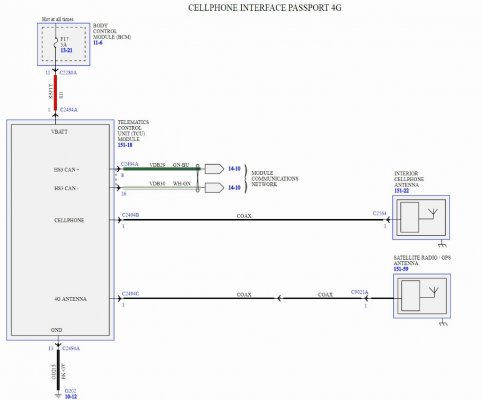
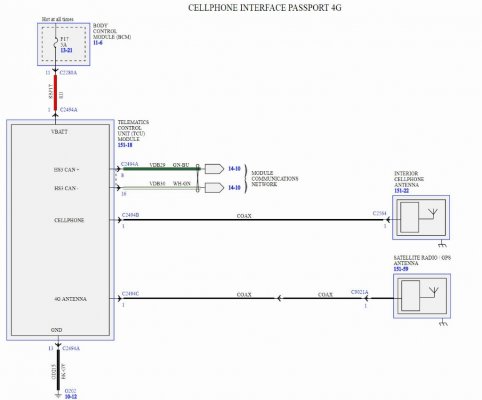
Check this out. Looks like a 5 Amp Fuse 17. Not sure if that is the interior fuse box or the one in the engine bay. See if it has 12V when the vehicle is off, this diagram states it is "Hot at all times". If that is true, we are going to have to keep digging.

full?lightbox=1&last_edit_date=1534365658.jpg
 

CobraO

Member
Joined
Feb 23, 2018
Posts
20
Reaction score
8
Location
Houston
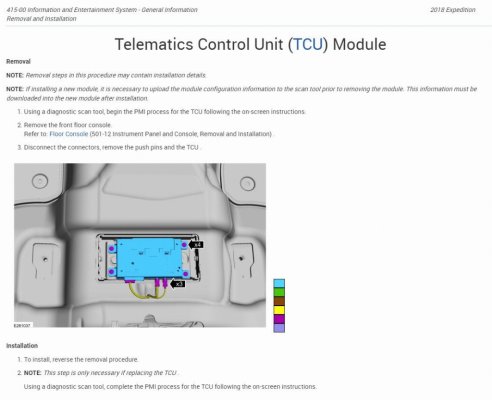
Also found this. You can get to it by removing the center console. Maybe you can back power it directly when the vehicle is off.

full?lightbox=1&last_edit_date=1534366484.jpg
 
OP
OP
E

Edistobob

Full Access Members
Joined
Jan 29, 2018
Posts
119
Reaction score
39
Location
South Carolina
Did some checking this evening; it appears that circuit #12 is the one that controls the hotspot. Getting too dark out to do much more with it this evening. #17 is paired with #18 which controls the ignition switch among other things, so I think it is hot all the time. #12 is paired with #13 and appears to turn on and off with the ignition. I'll verify that probably tomorrow.
 

shane_th_ee

Full Access Members
Joined
Aug 31, 2017
Posts
880
Reaction score
676
Location
Seattle
@Edistobob

Check this out. Looks like a 5 Amp Fuse 17. Not sure if that is the interior fuse box or the one in the engine bay. See if it has 12V when the vehicle is off, this diagram states it is "Hot at all times". If that is true, we are going to have to keep digging.

full?lightbox=1&last_edit_date=1534365658.jpg
That’s the cell phone radio and it’s going to be hot al the time... else how would the FordPass app be able to interact with the vehicle. Do you have a diagram for the WiFi radio?
 

CobraO

Member
Joined
Feb 23, 2018
Posts
20
Reaction score
8
Location
Houston
^^

I think you may be right, but I think this is also running the hot spot. Everything I look up with Wifi or Hotspot points to the Telematics Control Unit (TCU).
 
OP
OP
E

Edistobob

Full Access Members
Joined
Jan 29, 2018
Posts
119
Reaction score
39
Location
South Carolina
What I found out is that both circuits #17 and #12 are hot all the time. #17 is listed as "telematics control unit-modem" and #12 is listed as "Cluster; Electronic control panel; Smart datalink connector logic". Yet, the mobile hotspot will not work if ignition is off--it is listed as "not available at this time" on the touchscreen. So back to the drawing board: something else obviously in play regarding the hotspot operation besides these two circuits. Thanks for your help and any suggestions.
 

benyl

Full Access Members
Joined
Feb 24, 2018
Posts
153
Reaction score
61
Location
Calgary
Likely software.

The cell unit probably has the radios for the wifi hotspot and shuts those down when the ignition it off to conserve battery.

My guess is that the wifi radios are only active when Sync is active.


Sent from my iPhone using Tapatalk
 
OP
OP
E

Edistobob

Full Access Members
Joined
Jan 29, 2018
Posts
119
Reaction score
39
Location
South Carolina
Likely software.

The cell unit probably has the radios for the wifi hotspot and shuts those down when the ignition it off to conserve battery.

My guess is that the wifi radios are only active when Sync is active.


Sent from my iPhone using Tapatalk

That's pretty much the conclusion I've come to, probably a function of the software in the telematics contol unit. Looks like the only way to run the hotspot is with the engine running or with just the ignition/accessories power on. Each method would have to deal with the automatic shutdown timers that exist.
 
OP
OP
E

Edistobob

Full Access Members
Joined
Jan 29, 2018
Posts
119
Reaction score
39
Location
South Carolina
Ok, assuming that the wifi radios are only active when Sync is active: is there any way for Sync to be active unless the ignition/accessories switch is on? It appears that the wifi/Sync goes down after approximately 45 minutes even if the ignition is left on (even though the auto engine shutoff is bypassed). I am assuming that all would stay on if the engine is left running, which I don't want to do. I even tried this today (ignition on, engine not running, auto engine shutoff bypassed) with a battery charger hooked up so that the battery would not significantly drain; however, when 45 minutes passed, the ignition/accessories shut down everything with the message that it was doing so to conserve battery.
 
Top