
ForScan Tweaks - 2015+

Disclaimer: Links on this page pointing to Amazon, eBay and other sites may include affiliate code. If you click them and make a purchase, we may earn a small commission.

East-TN

Full Access Members
Air Force
Joined
Jan 4, 2018
Posts
533
Reaction score
269
Location
TN
From what I’ve found in my earlier posts regarding the DRL Lock.

DRL Lock:
726-49-01 xxxx xxxx x0 DRL Lock ‘ON’
xxxx xxxx x1 DRL Lock ‘OFF’

That’s what I had seen earlier, but the change can’t be in the last two digits...those are the checksums.

 

AllBoostNoEco

Full Access Members
Joined
May 2, 2017
Posts
328
Reaction score
196
Location
GA
That’s what I had seen earlier, but the change can’t be in the last two digits...those are the checksums.

My apologies, the full line is xxxx xxxx xxxx. I never include the checksum digits when talking about changes as they are self-correcting with FORScan.
 

East-TN

Full Access Members
Air Force
Joined
Jan 4, 2018
Posts
533
Reaction score
269
Location
TN
My apologies, the full line is xxxx xxxx xxxx. I never include the checksum digits when talking about changes as they are self-correcting with FORScan.

Now that line looks better...it’s always good to include the checksum digits as xx so everyone can see the full line of code.

I’ll update the spreadsheet.

Thanks.
 

llhoneymoons

Active Member
Joined
Jul 12, 2017
Posts
41
Reaction score
8
Location
us
@ads245

This is my BdyCM. I turned on the Daylight Running lights and set them to turn signal lights I put it in drive and turn signal DRLs came on. That was pretty cool.

View attachment 22076

I noticed this the other day when making some changes and couldn't find anything.

Does anyone know what this does?

Police Trunk/Liftgate Release

5 up from the bottom in the above attached photo.
 

ExpeditionAndy

Full Access Members
Joined
Aug 31, 2013
Posts
3,708
Reaction score
1,130
Location
Fort Wayne, Indiana
I noticed this the other day when making some changes and couldn't find anything.

Does anyone know what this does?

Police Trunk/Liftgate Release

5 up from the bottom in the above attached photo.
It probably does not allow you to open the liftgate from inside the vehicle - to keep a prisoner from escaping.
 

Black

Full Access Members
Joined
Mar 26, 2018
Posts
1,376
Reaction score
640
Location
Kentucky
I just got done reading all 57 pages but am still left with a couple questions as I am not sure they were fully answered.

First I see that enabling remote start is able to be done as long as you buy the proper keyfobs.
Though there is not a mention (unless I missed it) directions on the steps taken in ForScan to enable it.
I found this video on YouTube but could not find mention of the vehicle. So I was wondering if the process was the same for the 2016 Expedition.

2nd no one mentions if one is able to program the rear vents and or moon roof to automatically close on shutdown.

I saw mention that global window close does not seem like a possibility for our vehicles but was not sure if these would fall in the same category or not.
 

kekman

Member
Joined
Mar 30, 2018
Posts
14
Reaction score
4
Location
Ohio
Example pics of what the Sync 3 Diagnostics screen shows you when you Press (and hold) the 'Eject' and 'Next Track' button at same time...around 10-15 seconds.

View attachment 24094 View attachment 24095 View attachment 24096
Really liked the post- great info. It is a little quirky: For me to get this to work, I have to have ignition on; audio on; and let the bluetooth connection complete-> then it will come up. Prior to that you can hold the buttons for a minute and nothing will happen.

Thanks for the post.
 

Black

Full Access Members
Joined
Mar 26, 2018
Posts
1,376
Reaction score
640
Location
Kentucky
How does one actually locate the keyless entry code in ForScan. I see where it reads it in the log but how do I actually find what the code is?
 

East-TN

Full Access Members
Air Force
Joined
Jan 4, 2018
Posts
533
Reaction score
269
Location
TN
Really liked the post- great info. It is a little quirky: For me to get this to work, I have to have ignition on; audio on; and let the bluetooth connection complete-> then it will come up. Prior to that you can hold the buttons for a minute and nothing will happen.

Thanks for the post.

You're welcome.

I probably should have been a little more clear...yes, you have to have the power on and let the vehicle go through it's normal 'startup' process for all of the electronics before you try this feature...it won't work if the vehicle is off.
 

East-TN

Full Access Members
Air Force
Joined
Jan 4, 2018
Posts
533
Reaction score
269
Location
TN
How does one actually locate the keyless entry code in ForScan. I see where it reads it in the log but how do I actually find what the code is?

What happens when you choose the option in FORScan?

If you're wanting to know the factory code, for 2015-2017 (and maybe other years), look behind the passenger kickpanel (where the passenger's right foot would be.) There's a module there that will have the factory code.

Look here:
 

Black

Full Access Members
Joined
Mar 26, 2018
Posts
1,376
Reaction score
640
Location
Kentucky
I have not found the section in ForScan it is just a readout in the startup/connection log. Nothing happens if you click on it.

Thanks for the video. Much easier to get to than my 02 Explorer. It was in the B pillar and took a bunch more effort to get to.
 

East-TN

Full Access Members
Air Force
Joined
Jan 4, 2018
Posts
533
Reaction score
269
Location
TN
I have not found the section in ForScan it is just a readout in the startup/connection log. Nothing happens if you click on it.

Thanks for the video. Much easier to get to than my 02 Explorer. It was in the B pillar and took a bunch more effort to get to.

Also, please put your vehicle(s) in your signature...that makes it easy for others to help when you post any questions.

I’ll have to check my FORScan to see what the code reader function does...I’ve seen it, but didn’t try it yet.
 

deweysmith

Full Access Members
Joined
Nov 8, 2017
Posts
574
Reaction score
206
Location
Montreal, QC
It runs for a second and displays the code.

FORScan is a pain to figure out, it’s not at all user friendly, but once you figure out how it works it’s not that hard
 

East-TN

Full Access Members
Air Force
Joined
Jan 4, 2018
Posts
533
Reaction score
269
Location
TN
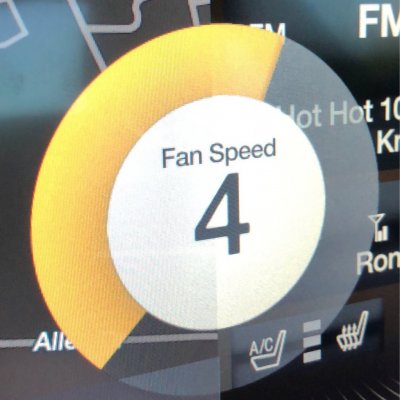
Has anyone discovered how to display your environmental fan speed on your Sync 3 display when you push the fan ‘hard buttons’...see pic, this shows on my Mustang and would like for it to display on my Expy.

B790BBD6-D63B-4C39-A188-F3AC4780496E.jpeg
 
Last edited:

HavasuMike

Full Access Members
Joined
Jan 25, 2018
Posts
102
Reaction score
19
Location
Lake Havasu City, AZ
I'm looking at the speedometer correction line 26 in the spreadsheet, but I can't access the "speedo correction" at the end of the line. How do you get to the calculations?
 

East-TN

Full Access Members
Air Force
Joined
Jan 4, 2018
Posts
533
Reaction score
269
Location
TN
I'm looking at the speedometer correction line 26 in the spreadsheet, but I can't access the "speedo correction" at the end of the line. How do you get to the calculations?

What happens when you click on the ‘speedo correction’ link?
 

thesavo

Full Access Members
Joined
Aug 3, 2016
Posts
165
Reaction score
34
Location
Schenectady, NY
How does one actually locate the keyless entry code in ForScan. I see where it reads it in the log but how do I actually find what the code is?
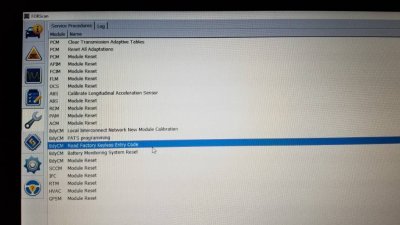
Click the wrench, and then service producedures.
Here's a shot from my Ford edge. 20180506_151658.jpeg

Sent from my SM-N950U using Tapatalk
 
Top