4th Gen Expy FORScan Modifications

Disclaimer: Links on this page pointing to Amazon, eBay and other sites may include affiliate code. If you click them and make a purchase, we may earn a small commission.

Dennis48755

Well-Known Member
Joined
Aug 26, 2017
Posts
61
Reaction score
23
Location
Caseville, MI
jgudnason -

Awesome, updated FORScan and the gauge temps worked for me also.

What does the forward distance alert feature do? I didn't find mention of it in the 2018 Expedition owners manual.

 

Dennis48755

Well-Known Member
Joined
Aug 26, 2017
Posts
61
Reaction score
23
Location
Caseville, MI
Thanks jgudnason, very interesting thread. I did find the Distance Indication in my manual, helps to use good search words or better yet a page number.

What did you conclude from your attempt to turn the feature on with FORScan?
 

tmorris

New Member
Joined
Jul 24, 2019
Posts
4
Reaction score
0
Location
US
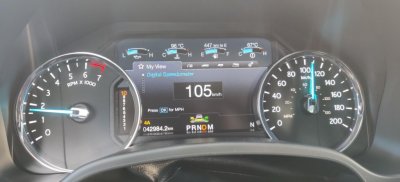
I can confirm that writing to IPC on my 19 Expedition now works using version 2.3.29! Temp above gauge cluster works with the following values:

720-07-01 xxxx xE5x xxxx With Brake Control
720-07-01 xxxx x65x xxxx Without Brake Control

If anyone knows any other changes to IPC that work, please post as I cannot yet find an updated spreadsheet for the Gen 4's
 

tmorris

New Member
Joined
Jul 24, 2019
Posts
4
Reaction score
0
Location
US
Following Changes to IPC all working with FORScan ver 2.3.29 on 2019 Gen 4 Expedition. All working using the available existing Ford/Expedition spreadsheets.

Temps above Gauges
Disable Triple Ding at vehicle start
Disable Door Ajar Chime when vehicle running
Disable Drivers Seat Belt Chime (Did not test passenger seat belt chime which requires a different value change)

If anyone has found a successful way to disable the Auto Start/Stop without getting the Battery Service warning on the display at startup, please post!
 

wakeboarder

Full Access Members
Joined
Nov 16, 2019
Posts
811
Reaction score
468
Location
Fort Lauderdale, FL
Has anybody tried enabling the global windows on the 2018 or 2019 XLT with Forescan? This is a standard feature on the Limited's and Platinum's.

FYI - Global windows is the ability to open or close the windows with the keyfob.

If not, can a Platinum or Limited owner let me know what theirs shows for the following lines so I can check it against the F150 spreadsheet?

BCM 726-17-01
BCM 726-17-02
BCM 726-30-01
DDM 740-05-01
PDM 741-05-01
 

jgudnason

Full Access Members
Joined
Jan 16, 2018
Posts
121
Reaction score
46
Location
Calgary, Ab, Canada
Thanks jgudnason, very interesting thread. I did find the Distance Indication in my manual, helps to use good search words or better yet a page number.

What did you conclude from your attempt to turn the feature on with FORScan?

I conclude that it was successful. Toggling the bit on in the IPC enabled the option in the menu. once checked off this is the result (see picture).

IMG_20200304_085808.jpg
 

jgudnason

Full Access Members
Joined
Jan 16, 2018
Posts
121
Reaction score
46
Location
Calgary, Ab, Canada
Following Changes to IPC all working with FORScan ver 2.3.29 on 2019 Gen 4 Expedition. All working using the available existing Ford/Expedition spreadsheets.

Temps above Gauges
Disable Triple Ding at vehicle start
Disable Door Ajar Chime when vehicle running
Disable Drivers Seat Belt Chime (Did not test passenger seat belt chime which requires a different value change)

If anyone has found a successful way to disable the Auto Start/Stop without getting the Battery Service warning on the display at startup, please post!

one of the first things i did,
I only ever did this one:
Auto Start/Stop Disable; BCM 726-48-02 x0xx xxxx xxxx

I dont get any errors or whatnot from it, just no auto-stop.
 

wakeboarder

Full Access Members
Joined
Nov 16, 2019
Posts
811
Reaction score
468
Location
Fort Lauderdale, FL
Has anybody tried enabling the global windows on the 2018 or 2019 XLT with Forescan? This is a standard feature on the Limited's and Platinum's.

FYI - Global windows is the ability to open or close the windows with the keyfob.

If not, can a Platinum or Limited owner let me know what theirs shows for the following lines so I can check it against the F150 spreadsheet?

BCM 726-17-01
BCM 726-17-02
BCM 726-30-01
DDM 740-05-01
PDM 741-05-01

I tried it today and confirmed that the values in the F150 spreadsheet work for global windows.

Global Window Open/Close
BCM 726-17-01 0101 0101 014A
BCM 726-17-02 0101 0101 014B
BCM 726-30-01 0101 xxxx xxxx
DDM 740-05-01 Dxxx xx
PDM 741-05-01 Dxxx xx

On page 101 of the manual it mentions that the moonroof may have an option to vent using the key fob. Can somebody with a Platinum or limited confirm that the vista sunroof does or does not open with the global windows?
 

st381183

Full Access Members
Joined
Mar 7, 2018
Posts
263
Reaction score
125
Location
New Mexico
I tried it today and confirmed that the values in the F150 spreadsheet work for global windows.

Global Window Open/Close
BCM 726-17-01 0101 0101 014A
BCM 726-17-02 0101 0101 014B
BCM 726-30-01 0101 xxxx xxxx
DDM 740-05-01 Dxxx xx
PDM 741-05-01 Dxxx xx

On page 101 of the manual it mentions that the moonroof may have an option to vent using the key fob. Can somebody with a Platinum or limited confirm that the vista sunroof does or does not open with the global windows?
I used the above setting to finally get the global windows up/down working...but for the front windows only. I went thru and enabled every global window up/down I could find but had to go to the as built to get it to work as you described above.

I would really like all 4 windows to work, is there a setting I’m missing for the rear windows? I’ve been through the DDM and PDM but I can’t find anything else to enable.
 

wakeboarder

Full Access Members
Joined
Nov 16, 2019
Posts
811
Reaction score
468
Location
Fort Lauderdale, FL
I used the above setting to finally get the global windows up/down working...but for the front windows only. I went thru and enabled every global window up/down I could find but had to go to the as built to get it to work as you described above.

I would really like all 4 windows to work, is there a setting I’m missing for the rear windows? I’ve been through the DDM and PDM but I can’t find anything else to enable.

I agree that all 4 windows would be nice. I didn’t try enabling the global windows for the rear.

I don’t have the one touch up and one touch down for the rear windows. I don't think that is an option for the XLT's. According to parts.ford.com, there are different rear window motors for the one touch up and down. If it has one touch up and down rear windows, then it gets rear door modules, also.

I think one touch up and down would be a prerequisite for enabling any sort of global windows on the rear.
 

st381183

Full Access Members
Joined
Mar 7, 2018
Posts
263
Reaction score
125
Location
New Mexico
I agree that all 4 windows would be nice. I didn’t try enabling the global windows for the rear.

I don’t have the one touch up and one touch down for the rear windows. I don't think that is an option for the XLT's. According to parts.ford.com, there are different rear window motors for the one touch up and down. If it has one touch up and down rear windows, then it gets rear door modules, also.

I think one touch up and down would be a prerequisite for enabling any sort of global windows on the rear.
That makes sense. Didn’t think about global windows working due to auto up/down buttons on the inside. I will live with what I got and be happy. Thanks for the response.
 

bushpilot

Full Access Members
Joined
Feb 20, 2020
Posts
375
Reaction score
159
Location
Houston, Tx
on the 2017 F350 - Global Down was available (from the factory), but we had to ADD/Enable the Global UP....at that it only worked fro the front windows and was never available for the rear windows.
 
Last edited:

LokiWolf

Staff member
Moderator
Joined
Apr 2, 2016
Posts
3,971
Reaction score
2,834
Location
Richmond VA
Just for Clarity on the AS/S Disable.

The setting change being made has ALWAYS disabled Battery Voltage Monitoring. Several things are a by product of this. Because the BCM cannot verify your battery has enough charge to restart the truck, it will not turn the Motor off. Another by product, is that it is always charging the battery at FULL voltage. That is not good for the battery or the Charging circuits.

The 19+ vehicles now throw a warning when it is disabled, because, well like I said above it is bad for other reasons.

You want AS/S not working, press the button, or buy the aftermarket module. The solution should not be to disable the Battery Monitoring System. This is a TERRIBLE work around, and always has been.
 

LokiWolf

Staff member
Moderator
Joined
Apr 2, 2016
Posts
3,971
Reaction score
2,834
Location
Richmond VA
Also, If you are messing with a 2020 you need the Test build from support. The published version can’t write to the BCM in the 2020. Will confirm tonight that the Test version allows me to.


Sent from my iPhone using Tapatalk Pro
 

LokiWolf

Staff member
Moderator
Joined
Apr 2, 2016
Posts
3,971
Reaction score
2,834
Location
Richmond VA
Also, If you are messing with a 2020 you need the Test build from support. The published version can’t write to the BCM in the 2020. Will confirm tonight that the Test version allows me to.


Sent from my iPhone using Tapatalk Pro
 

LokiWolf

Staff member
Moderator
Joined
Apr 2, 2016
Posts
3,971
Reaction score
2,834
Location
Richmond VA
I have spent an hour today trying to test settings. The BCM in the 2020 addressing is NOT the same. Nothing works. I stumbled across one thing that did, but it was a previous change I was trying. I think I can map it out, but I need to compare the 2019 file that Wakeboarder sent me line for line...and see if I can find the patterns & similarities. Have a message in to my friend on the FORSCAN dev team to see if he can find the pattern.

All but the Forward Distance Alert worked in the IPC that I tried.

In addition the 2020's only have 1 color LED's installed. I forced the change in the DDM, and they did not change color.
 
Top