4th Gen Expy FORScan Modifications

Disclaimer: Links on this page pointing to Amazon, eBay and other sites may include affiliate code. If you click them and make a purchase, we may earn a small commission.

LokiWolf

Staff member
Moderator
Joined
Apr 2, 2016
Posts
3,971
Reaction score
2,834
Location
Richmond VA
I've got an 18, looking forward to seeing what I can do with Forscan. A few quick questions to start:

- one recommended adapter is $35, one is $150. What's the advantage to getting the more expensive one?

- I noticed in one of the first few posts (5.5 years ago), that the Forscan guys had not yet "hacked" the new generation so many features were not available. Has that been overcome by now?

- I've got the clicking mirror issue. TSB SSM47845. Can I use Forscan to reprogram the power mirror module to stop doing this?
What 2 adapters are you talking about specifically? I recommend both the OBDLink products. EX(USB Wired, only usable with a Computer), MX+(BTLE Wireless, usable with anything). Both can be used for programming with FORSCAN on a Windows Computer. The MX+ can be used for digital gauges, and reading and clearing DTC's with a Mobile device both iOS and Android.

Most of the 4th Gen strategy's up to 2021 are included now in FORSCAN. Limited abilities in the 22+, but more and more things being defined.

Not sure on the Mirror, never needed to, so can neither confirm or deny.
 

seventieslord

Active Member
Joined
Sep 11, 2014
Posts
39
Reaction score
6
What 2 adapters are you talking about specifically? I recommend both the OBDLink products. EX(USB Wired, only usable with a Computer), MX+(BTLE Wireless, usable with anything). Both can be used for programming with FORSCAN on a Windows Computer. The MX+ can be used for digital gauges, and reading and clearing DTC's with a Mobile device both iOS and Android.

Most of the 4th Gen strategy's up to 2021 are included now in FORSCAN. Limited abilities in the 22+, but more and more things being defined.

Not sure on the Mirror, never needed to, so can neither confirm or deny.
OK, so the MX+'s main benefit is that it's wireless and that's it?

Plus it can be used with the Android version and not just PC, but if my plan is to only use the PC version (as the Android version is just a neutered version of PC) then I may as well just get the EX.

Unless when you say this,
The MX+ can be used for digital gauges, and reading and clearing DTC's
You're saying that the EX can't do that at all. Because I want that functionality. Or are you just saying the EX can do it, but just not on mobile devices?
 

LokiWolf

Staff member
Moderator
Joined
Apr 2, 2016
Posts
3,971
Reaction score
2,834
Location
Richmond VA
OK, so the MX+'s main benefit is that it's wireless and that's it?

Plus it can be used with the Android version and not just PC, but if my plan is to only use the PC version (as the Android version is just a neutered version of PC) then I may as well just get the EX.

Unless when you say this,

You're saying that the EX can't do that at all. Because I want that functionality. Or are you just saying the EX can do it, but just not on mobile devices?
EX can only be used with a PC. It is a hard wired connection. USB A. Not something an Android phone comes with. Might be able to use with a USBC adapter, but that seems pointless. The MX+ is a great adapter, and well worth the price.
 

ttimlin08

New Member
Joined
Jan 8, 2023
Posts
3
Reaction score
1
Location
Nashville, TN
Has anyone figured out how to separate the CCD settings from drive modes? I have a 19 with CCDs and would ideally like to have the shocks in sport to firm up the ride.. without the transmission also being in sport mode. On the 3rd gen trucks this was doable through IPC settings where you could display settings in the cluster. Can’t find anything for a 4th gen though.

Thanks in advance if anyone knows!!
 

caddelma

Member
Joined
Dec 27, 2023
Posts
12
Reaction score
7
Location
Ohio
Has anyone figured out how to separate the CCD settings from drive modes? I have a 19 with CCDs and would ideally like to have the shocks in sport to firm up the ride.. without the transmission also being in sport mode. On the 3rd gen trucks this was doable through IPC settings where you could display settings in the cluster. Can’t find anything for a 4th gen though.

Thanks in advance if anyone knows!!
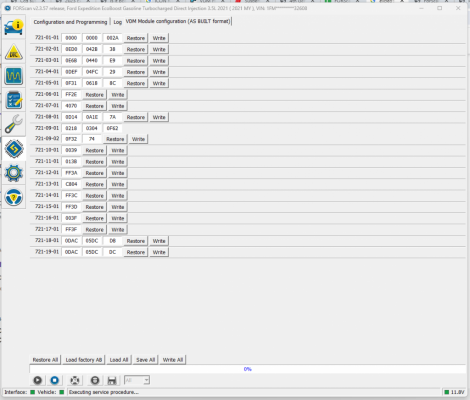
I would love to figure it out as well. In doing some searching, appears some of the F150's have the ability to adjust weight values in the VDM module that change the dampening characteristics. Came across this post https://www.f150ecoboost.net/threads/suspension-tuning-around-fords-active-suspension.85653/ , but did not see a direct correlation on the VDM module on our 2021 to attempt making any adjustments. Personally find the normal drive mode CCD settings to be severely underdamped, although I was used to a lifted 2014 F150 with 10/ply BFG's and now a 2023 F250 so I prefer a firm ride.
 

Attachments

  • 2021_Expy_VDM.png
    2021_Expy_VDM.png
    302.8 KB · Views: 46

WALoeIII

Member
Joined
Sep 6, 2019
Posts
23
Reaction score
8
Location
USA
I would love to figure it out as well. In doing some searching, appears some of the F150's have the ability to adjust weight values in the VDM module that change the dampening characteristics. Came across this post https://www.f150ecoboost.net/threads/suspension-tuning-around-fords-active-suspension.85653/ , but did not see a direct correlation on the VDM module on our 2021 to attempt making any adjustments. Personally find the normal drive mode CCD settings to be severely underdamped, although I was used to a lifted 2014 F150 with 10/ply BFG's and now a 2023 F250 so I prefer a firm ride.
Did you get this to work? I want the equivalent all the time.
 

SLPR

Member
Air Force
Joined
May 10, 2025
Posts
11
Reaction score
2
Location
Charlotte, NC
Hey, so I've spent many days searching this forum and taking notes. 2024 Limited 4x4 HD Tow. Today I plugged in my Forscan, made a backup, and spent about 2 hours going through every submenu and making changes to what I think were clear upgrades as written in the easy-configuration options. Turned off everything labled chimes/minders. Despite all the research, I was unable to find many desired items in the menus, and coming back to the forum I can't find the exact location/names of how to modify the following, hoping some friendly voices might chime in and tell me specifically where to look:

*Disable chime – vehicle running with door open

*Disable seatbelt overview screen on gauge cluster

*When moving turn signal slightly, change from 3 blinker activations to 6

*Possible to have passenger running board come down but disable drivers? If not, has anyone physically unplugged one before?

*Disable, in reverse, "pedestrian/automatic braking turned off" warning

*Disable navigation/screen/app/settings lockout in motion (so passenger can change settings while vehicle is on the road). Android Auto also limits inputs now

*Don’t unfold mirrors when tailgate or other doors unlocked/opened, only unfold on driver door opening

*Remember last drive mode (Sport, Tow, etc)

*Disable auto wipers when transmission in neutral (car wash)


I understand some of these will not be an option, but I think many are and I just am not recognizing the verbage.
 

Mr Big

Full Access Members
Joined
May 29, 2023
Posts
1,003
Reaction score
586
Location
Tampa Bay, Florida USA
I’m using the Bluetooth OBDLink MX. It’s a pretty robust VCI and it communicates on both the MS and HS CAN networks right out of the box x without having to modify anything. It does NOT work with Apple products but it’s much more stable than the wifi version that is and for what I purchased it for, I’ll take stability over versatility. The FORScan software requires a Windows PC to make changes to all the control units.

https://www.amazon.com/ScanTool-426101-OBDLink-Bluetooth-Professional/dp/B006NZTZLQ
That's part of your error issues. The BT model has issues.
 
As an Amazon Associate we earn from qualifying purchases.

Mr Big

Full Access Members
Joined
May 29, 2023
Posts
1,003
Reaction score
586
Location
Tampa Bay, Florida USA
Hey, so I've spent many days searching this forum and taking notes. 2024 Limited 4x4 HD Tow. Today I plugged in my Forscan, made a backup, and spent about 2 hours going through every submenu and making changes to what I think were clear upgrades as written in the easy-configuration options. Turned off everything labled chimes/minders. Despite all the research, I was unable to find many desired items in the menus, and coming back to the forum I can't find the exact location/names of how to modify the following, hoping some friendly voices might chime in and tell me specifically where to look:

*Disable chime – vehicle running with door open

*Disable seatbelt overview screen on gauge cluster

*When moving turn signal slightly, change from 3 blinker activations to 6

*Possible to have passenger running board come down but disable drivers? If not, has anyone physically unplugged one before?

*Disable, in reverse, "pedestrian/automatic braking turned off" warning

*Disable navigation/screen/app/settings lockout in motion (so passenger can change settings while vehicle is on the road). Android Auto also limits inputs now

*Don’t unfold mirrors when tailgate or other doors unlocked/opened, only unfold on driver door opening

*Remember last drive mode (Sport, Tow, etc)

*Disable auto wipers when transmission in neutral (car wash)


I understand some of these will not be an option, but I think many are and I just am not recognizing the verbage.
FYI, I would be careful with a 2025 model, and only use the as but section. You can brick your system and void any warranty.
 

Mr Big

Full Access Members
Joined
May 29, 2023
Posts
1,003
Reaction score
586
Location
Tampa Bay, Florida USA
I just took delivery of my 2018 Expedition Limited MAX this morning and by noon, I was already playing around with FORScan. Here is what I have found works so far.

Everything listed below has been confirmed working. If you find something you think is of interest that you have confirmed working, please feel free to add it here so we can build a google doc of all the available modifications.

Here is what I've come up with so far:

Code:
BdyCM    726-41-02    xxx0 xxxx xxxx    Disable No Key Present Double Honk

BdyCM    726-27-01    xxxx xxx0 xxxx    Enable Fogs On w/ LED headlamps

BdyCM    726-48-02    x0xx xxxx xxxx    Disable Auto Start Stop

APIM     7D0-01-01    xxxx xxxx xExx    Enable On-Screen H/C Seat Buttons

APIM     7D0-01-01    9xxx xxxx xxxx    Disable Sirius As Audio Source

APIM     7D0-02-01    5753 xxxx xxxx    Data Entry While Vehicle Moving


At this time, whenever I try to write anything to the IPC or DDM/PDM, I receive a "Service procedure has been interrupted." error so I will be sending log files to the FORScan people to see if they can resolve the issue.
There's more you can do in the as-built section, if you have the latest version.
 

Dth2Chrm

Member
Supporting Member
Joined
Oct 30, 2025
Posts
20
Reaction score
10
Location
NY

Hey, so I've spent many days searching this forum and taking notes. 2024 Limited 4x4 HD Tow. Today I plugged in my Forscan, made a backup, and spent about 2 hours going through every submenu and making changes to what I think were clear upgrades as written in the easy-configuration options. Turned off everything labled chimes/minders. Despite all the research, I was unable to find many desired items in the menus, and coming back to the forum I can't find the exact location/names of how to modify the following, hoping some friendly voices might chime in and tell me specifically where to look:

*Disable chime – vehicle running with door open

*Disable seatbelt overview screen on gauge cluster

*When moving turn signal slightly, change from 3 blinker activations to 6

*Possible to have passenger running board come down but disable drivers? If not, has anyone physically unplugged one before?

*Disable, in reverse, "pedestrian/automatic braking turned off" warning

*Disable navigation/screen/app/settings lockout in motion (so passenger can change settings while vehicle is on the road). Android Auto also limits inputs now

*Don’t unfold mirrors when tailgate or other doors unlocked/opened, only unfold on driver door opening

*Remember last drive mode (Sport, Tow, etc)

*Disable auto wipers when transmission in neutral (car wash)


I understand some of these will not be an option, but I think many are and I just am not recognizing the verbage.
By chance, have you figured out how to change the blinker count? I’m trying to get from 3 to 5 and it doesn’t seem to work. I’ve managed everything else I needed to do - digital engine temp, Bambi mode, double honk disabled and the “full view not available” box removal. The only other thing I’d be interested in is disabling the screen lockout while in motion, but that only concerns my wife bc she’s the one who’d be using it while I’m driving.
I have a ‘22 Limited Stealth, so I’m hoping if it worked for you, it may work for me also. Thanks in advance!
 

Mr Big

Full Access Members
Joined
May 29, 2023
Posts
1,003
Reaction score
586
Location
Tampa Bay, Florida USA
724-01-01 xxxx x?xx xx
Change ? to: 0=1 Flash, 4=2 Flashes, 6=3 Flashes, 8=4 Flashes, A=5 Flashes, C=6 Flashes, E=7 Flashes
 
Last edited:

Dth2Chrm

Member
Supporting Member
Joined
Oct 30, 2025
Posts
20
Reaction score
10
Location
NY
724-01-01 xxxx x?xx xx
Change ? to: 0=1 Flash, 4=2 Flashes, 6=3 Flashes, 8=4 Flashes, A=5 Flashes, C=6 Flashes, E=7 Flashes
Thank you. That’s what I keep seeing. Mine has an “F” value in that location. I tried “E” and “G” (just cause, why not) and nothing…still 3 flashes. Maybe I’ll try the numbers next.
 

Mr Big

Full Access Members
Joined
May 29, 2023
Posts
1,003
Reaction score
586
Location
Tampa Bay, Florida USA
Thank you. That’s what I keep seeing. Mine has an “F” value in that location. I tried “E” and “G” (just cause, why not) and nothing…still 3 flashes. Maybe I’ll try the numbers next.
Also look in the As-Built section. There may be something there as well. Do you have the latest version of FORScan?
 

Mr Big

Full Access Members
Joined
May 29, 2023
Posts
1,003
Reaction score
586
Location
Tampa Bay, Florida USA
Thank you. That’s what I keep seeing. Mine has an “F” value in that location. I tried “E” and “G” (just cause, why not) and nothing…still 3 flashes. Maybe I’ll try the numbers next.
I assume you are saving properly in FORScan? Are you following the directions, where you have to open the door, shut off Accessories, etc.?
 

Dth2Chrm

Member
Supporting Member
Joined
Oct 30, 2025
Posts
20
Reaction score
10
Location
NY
I assume you are saving properly in FORScan? Are you following the directions, where you have to open the door, shut off Accessories, etc.?
Yes I had the lastest version. I tried again yesterday and no go. I’m going to try again and go through every possible variation. I’ve been successful with everything else with FORScan, except this. If I can’t get it to work, I guess it’s no big deal. I’ll just have to fully engage the stalk lol
 
Top