Disclaimer: Links on this page pointing to Amazon, eBay and other sites may include affiliate code. If you click them and make a purchase, we may earn a small commission.

stamp11127

Full Access Members
Joined
Mar 10, 2012
Posts
6,207
Reaction score
1,246
Location
Temple, Georgia
The black diamond triangles usually contain letters. What letters are in the triangles on 71-5?

Check fuse for main light switch - can't make out the fuse number. If it is good and powered check for voltage out on pin 12? with light in park position and again with headlights on. If power is present check for voltage at illumination dimmer pin 2.
 
Last edited:

OP
OP
03NavigatorGuy

03NavigatorGuy

Full Access Members
Joined
May 9, 2014
Posts
106
Reaction score
5
Location
Memphis TN
I almost gave you that letter, since it was the only letter. The letter inside the arrow is " H " with respect to the diagram 71-1.

The main light switch fuse is: #6

In 71-5, the letters in the up-arrows from left to right are "F", "K", "H", down-arrow end right "L"

In 71-5, the items that currently function are: Clock, traction control switch turns off/on, adjustable pedals.

4WD switch N/A as its a 2WD.

RESULTS:

Fuse #6 has power

Pin 12 has power, in park and in headlight positions

Pin 2 has no power
 
Last edited:

stamp11127

Full Access Members
Joined
Mar 10, 2012
Posts
6,207
Reaction score
1,246
Location
Temple, Georgia
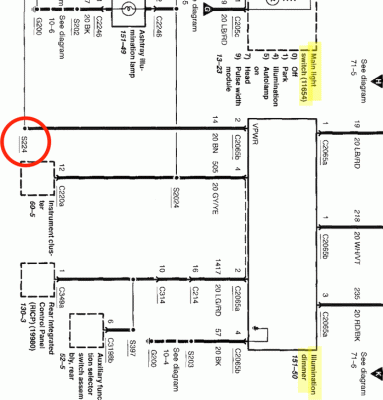
Diagram 71-4 see splice between main light switch and dimmer switch at bottom of page, looks like s124. There will be a diagram locating each splice by number. Check the splice for power with key in run position.
 
OP
OP
03NavigatorGuy

03NavigatorGuy

Full Access Members
Joined
May 9, 2014
Posts
106
Reaction score
5
Location
Memphis TN
Here is a closer look at that area. I think s124 is S224, that I circled in red, yes? I am not sure what signifies a splice in this diagram. My lack of knowledge is showing, can direct me to where the diagram directs me to the "splices"? Thx!103069400-1.gif
 
Last edited:

stamp11127

Full Access Members
Joined
Mar 10, 2012
Posts
6,207
Reaction score
1,246
Location
Temple, Georgia
I looked at the 2003 Navi diagrams and 17-4 is the same as the 2004. The program lists all the diagrams that have s224 on them but not the location. So that means you have to follow the wire until you find it. Or you could use a jumper wire to put power on pin 2 - connector c2065b with the main light switch off. You may want to have a fuse or circuit breaker inline with the jumper if you are coming from the battery. Then see if your dash lights are on. If not check for power at c2065a pin 4 with the jumper in place. You may need to adjust the dimmer switch to get a reading.

This is how your pdf's should look when printed:
 

Attachments

  • 71-4.pdf
    76.5 KB · Views: 4
OP
OP
03NavigatorGuy

03NavigatorGuy

Full Access Members
Joined
May 9, 2014
Posts
106
Reaction score
5
Location
Memphis TN
Okay, I will take a look as see how hard it will be to trace, no doubt a PITA!

Sorry for the quality of my PDF's etc. They look okay on ALLDATA, but when I convert to PDF's they loose significant quality, not sure if this is something ALLDATA does or what, but I have tried multiple things to try and improve their quality, but to no avail.
 

stamp11127

Full Access Members
Joined
Mar 10, 2012
Posts
6,207
Reaction score
1,246
Location
Temple, Georgia
If you are printing as a pdf they are using a setting that bitmaps the image to keep you from providing others with a good copy.
 
OP
OP
03NavigatorGuy

03NavigatorGuy

Full Access Members
Joined
May 9, 2014
Posts
106
Reaction score
5
Location
Memphis TN
I jumped to pin #2 and got interior illumination with all that is to be illuminated EXCEPT for the cluster!
 

stamp11127

Full Access Members
Joined
Mar 10, 2012
Posts
6,207
Reaction score
1,246
Location
Temple, Georgia
Time to pull the cluster so that you have access to the plugs in the back.
Jumper in place, check for power at:
c220a pin 12
c220a pin 15 ign switch in "run" - see diagram 60-5
 
OP
OP
03NavigatorGuy

03NavigatorGuy

Full Access Members
Joined
May 9, 2014
Posts
106
Reaction score
5
Location
Memphis TN
Time to pull the cluster so that you have access to the plugs in the back.
Jumper in place, check for power at:
c220a pin 12
c220a pin 15 ign switch in "run" - see diagram 60-5

Pin 12 has power and pin 15 has power with key on AND with key OFF for some reason.
 

stamp11127

Full Access Members
Joined
Mar 10, 2012
Posts
6,207
Reaction score
1,246
Location
Temple, Georgia
Have you checked the grounds? They are usually located behind the driver and passenger kick panels. Since your air bag light is on that means at least one of the grounds is good.

Another thing to check are the bulbs in the cluster - are they there, good etc?
 
Last edited:
OP
OP
03NavigatorGuy

03NavigatorGuy

Full Access Members
Joined
May 9, 2014
Posts
106
Reaction score
5
Location
Memphis TN
Have you checked the grounds? They are usually located behind the driver and passenger kick panels.
Oh yes, that's the first thing I did. They all 'looked" good, but I still disconnected them, wire brushed them, and tightened them back on.
 

stamp11127

Full Access Members
Joined
Mar 10, 2012
Posts
6,207
Reaction score
1,246
Location
Temple, Georgia
Can't go by looks - can't see breaks inside the insulation.

With the park/headlights on are the radio lights on also and will the dimmer switch work on them?

The illumination circuit runs through the instrument cluster. If everything after the cluster works as it should then the problem is with the cluster.
 
Last edited:

stamp11127

Full Access Members
Joined
Mar 10, 2012
Posts
6,207
Reaction score
1,246
Location
Temple, Georgia
Grounds - disconnect the plug from the cluster, meter to continuity setting, one lead to ground wire in the plug the other to the ground point at the other end of the wire.

Lighting would need to use the jumper as before to power the circuit. You probably have a bad splice.
 
OP
OP
03NavigatorGuy

03NavigatorGuy

Full Access Members
Joined
May 9, 2014
Posts
106
Reaction score
5
Location
Memphis TN
Grounds - disconnect the plug from the cluster, meter to continuity setting, one lead to ground wire in the plug the other to the ground point at the other end of the wire.

Lighting would need to use the jumper as before to power the circuit. You probably have a bad splice.

What setting do I set the meter to in order to get the continuity reading?
 
Top