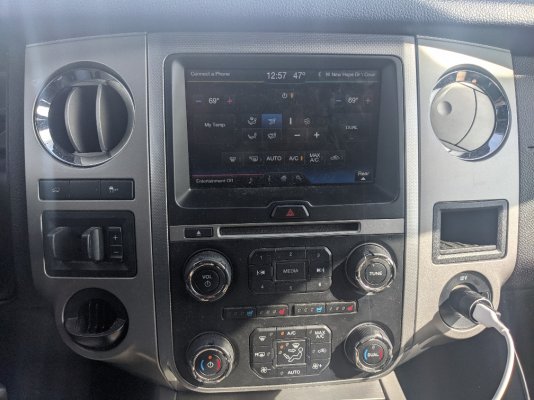
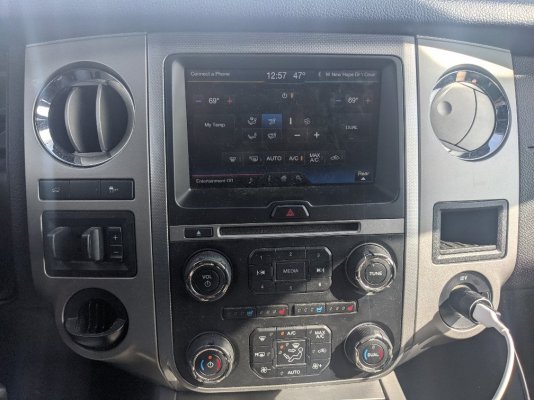
Added USB-C Charger

Disclaimer: Links on this page pointing to Amazon, eBay and other sites may include affiliate code. If you click them and make a purchase, we may earn a small commission.

TXFRDOwner

Full Access Members
Joined
Jan 21, 2010
Posts
410
Reaction score
208
Location
Texas
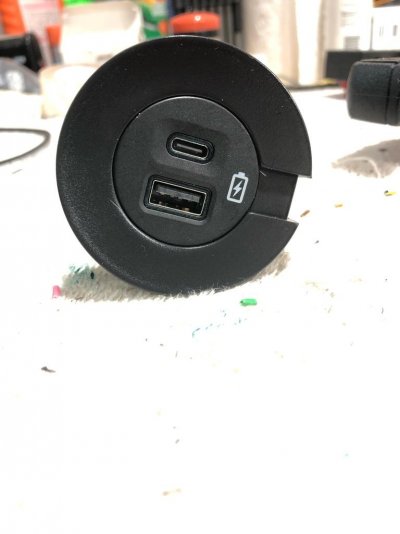
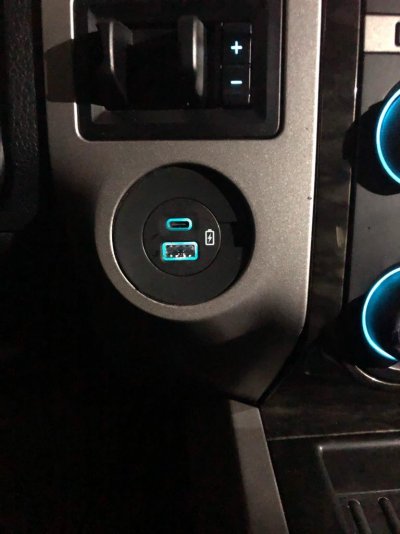
I got this done 2 weeks ago.

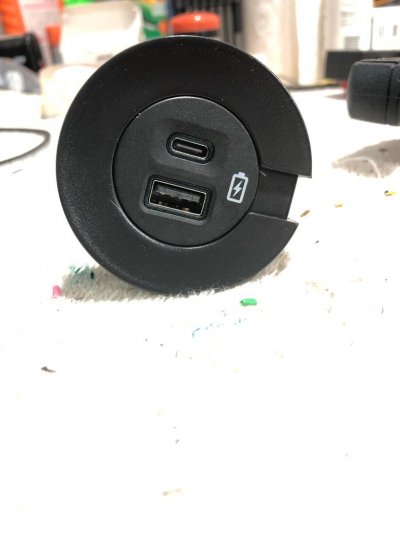
Bought the 12V powerpoint bezel without the cap, The USB-C charger is also an OEM Ford part I bought on eBay.

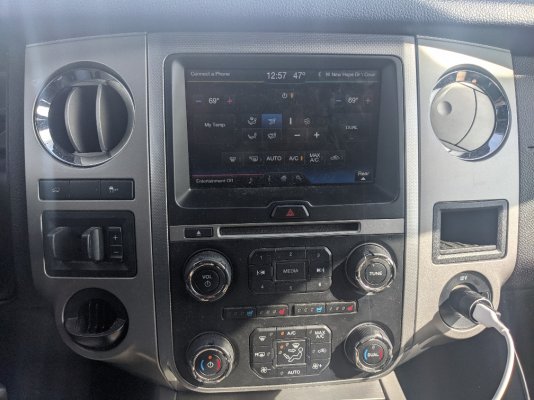
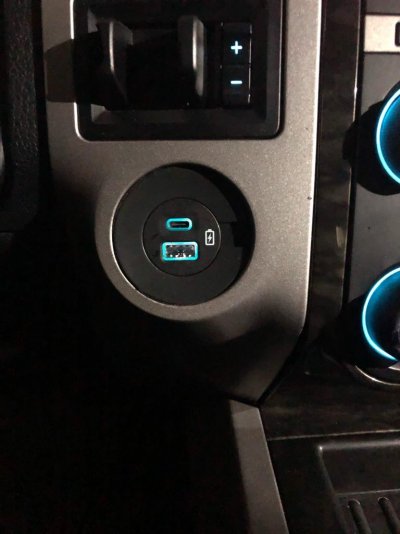
Required a little bit of ingenuity and jerry-rigging to mount it in place of the coin holder but it didn’t turn out half bad.

Wired it to turn on/off with ignition and backlighting is wired to the instrument panel backlighting circuit ( it dims up and down with the rest etc...)
b2016809e5af8e062b14925fb903d3a8.jpg
d64fdc31bfdcdcd227cb15973efec7a5.jpg


Sent from my iPhone using Tapatalk
 
Last edited:
OP
OP
T

TXFRDOwner

Full Access Members
Joined
Jan 21, 2010
Posts
410
Reaction score
208
Location
Texas
Looks good, does it offer fast charge on the type C?

I haven’t measured the amp output but it seems to be faster than the regular USB-A

Update:
USB-C @ 13.6v - 1.48a to 1.56a output
USB-A @ 13.6v - 0.88a to 0.93a output

Sent from my iPhone using Tapatalk
 
Last edited:
jkayca

Full Access Members
Joined
Jul 25, 2017
Posts
185
Reaction score
67
Location
Ottawa, On
Looks nice. You can tell if it is a fast charger by plugging in an Android phone or tablet. It should tell you that it is fast charging or not.
 
OP
OP
T

TXFRDOwner

Full Access Members
Joined
Jan 21, 2010
Posts
410
Reaction score
208
Location
Texas
Looks nice. You can tell if it is a fast charger by plugging in an Android phone or tablet. It should tell you that it is fast charging or not.

Thx, I got an Apple [emoji519]


Sent from my iPhone using Tapatalk
 
Last edited:
Psychobot90

Full Access Members
Joined
Nov 8, 2020
Posts
94
Reaction score
35
Location
Texas
I got this done 2 weeks ago.

Bought the 12V powerpoint bezel without the cap, The USB-C charger is also an OEM Ford part I bought on eBay.

Required a little bit of ingenuity and jerry-rigging to mount it in place of the coin holder but it didn’t turn out half bad.

Wired it to turn on/off with ignition and backlighting is wired to the instrument panel backlighting circuit ( it dims up and down with the rest etc...)

b2016809e5af8e062b14925fb903d3a8.jpg
d64fdc31bfdcdcd227cb15973efec7a5.jpg


Sent from my iPhone using Tapatalk
That's a nice mod @TXFRDOwner. Did you put this in place of the factory 12V outlet, or the other location where the weird coin tray goes? On my '15 the factory 12V is on the opposite side of the console.
I'd love to see the parts list if you can throw it up here. Did you have to add an additional fuse for the USB-C power or is that internal to the part itself? Will the LED color change with the other cabin lights for those of us that have that option?

Great use of space and much cleaner than the 12V adapter I have to use in mine.

Sent from my Pixel 4 using Tapatalk
 
Last edited:
OP
OP
T

TXFRDOwner

Full Access Members
Joined
Jan 21, 2010
Posts
410
Reaction score
208
Location
Texas
That's a nice mod @TXFRDOwner. Did you put this in place of the factory 12V outlet, or the other location where the weird coin tray goes? On my '15 the factory 12V is on the opposite side of the console.

I replaced the coin holder on the side of the radio closer to the driver.

I'd love to see the parts list if you can throw it up here.

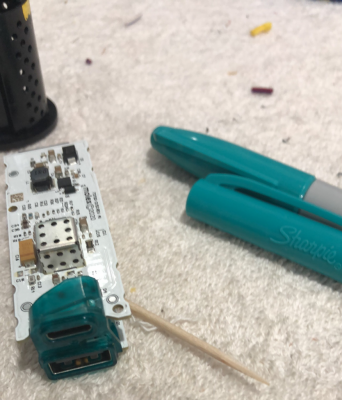
Not sure it's a mod for everyone because it took a lot of tedious fab work to get the USB charger to fit in the 12V bezel. Then to get the 12v bezel mounted in that hole. The backlighting is actually white so I used an aqua marker to color over the LED reflector to match the OEM dash backlighting.

Here are the parts I used:
- USB Charger eBay link
- Power Outlet Bezel P/N 9L3Z-15K040-AA
- Motorcraft WPT-1130 (mating connector to the 4x4 switch connector)
- Molex Parts for the USB Charger: Connector 34791-0040 + Terminals 56002-30448 (Requires terminal crimping)
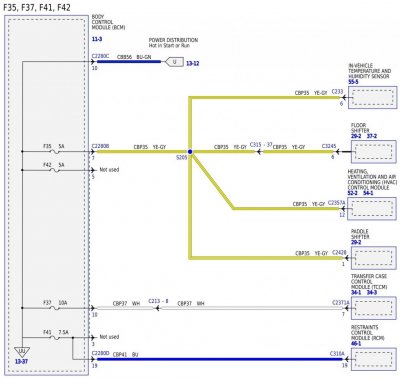
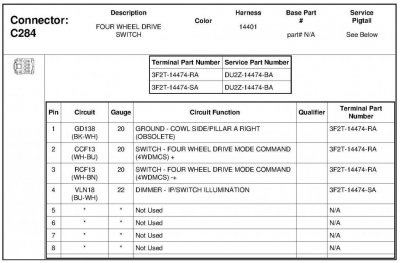
- DU2Z-14474-BA (add terminal in C284 slot 5 for power source)
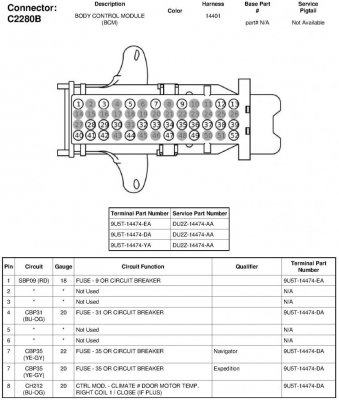
- DU2Z-14474-AA (add terminal in C2280B slot 5 for power source)
- Tesa "cloth" tape (make it purtty)

Sharpie USB Reflector.png


Did you have to add an additional fuse for the USB-C power or is that internal to the part itself?

As I mentioned above, I'm not sure this mod is for everyone; there are a lot of tedious steps not only to make it fit snug in there but also for the wiring. I'm sure there are simpler ways of doing this but this is route I went.

Wiring:
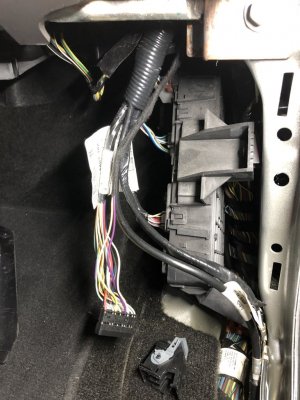
The coin holder has a connector behind it for the 4x4 switch even for the Expys that didn't come with that option. It's an 8-pin connector but only has 4 wires, the other 4 slots are empty. I ran a wire from one of the BCM unused power sources at C2280B pin 5; it already has a pre-existing 5A fuse @ Fuse# 42. Ran that wire to one of the 4 empty slots of the 8-pin connector.

I made my own harness adapter to connect the USB charger to the 4x4 switch connector; so as far as wiring goes, it's a clean plug-n-play install with no splices.

4x4 switch Pinout: (See Thumbnail pics below)
Pin1 - Ground
Pin4 - Inst. Panel backlighting with dim up/dn
Pin5 - (originally empty) Power - from C2280B pin 5

Will the LED color change with the other cabin lights for those of us that have that option?

No it doesn't change colors, it stays the same aqua blue color like the rest of the Radio/HVAC panel, the switches throughout the vehicle, shifter letters, etc ... but it dims with the rest of the dash panel the way I have it wired.

Great use of space and much cleaner than the 12V adapter I have to use in mine.

Sent from my Pixel 4 using Tapatalk

228517189.jpg IMG_4733.JPG C284.jpg C2280B.jpg
 
Last edited:
As an eBay Associate we earn from qualifying purchases.

Psychobot90

Full Access Members
Joined
Nov 8, 2020
Posts
94
Reaction score
35
Location
Texas
I replaced the coin holder on the side of the radio closer to the driver.


Not sure it's a mod for everyone because it took a lot of tedious fab work to get the USB charger to fit in the 12V bezel. Then to get the 12v bezel mounted in that hole. The backlighting is actually white so I used an aqua marker to color over the LED reflector to match the OEM dash backlighting.

Here are the parts I used:
- USB Charger eBay link
- Power Outlet Bezel P/N 9L3Z-15K040-AA


View attachment 39675


As I mentioned above, I'm not sure this mod is for everyone; there are a lot of tedious steps not only to make it fit snug in there but also for the wiring. I'm sure there are simpler ways of doing this but this is route I went.

Wiring:
The coin holder has a connector behind it for the 4x4 switch even for the Expys that didn't come with that option. It's an 8-pin connector but only has 4 wires, the other 4 slots are empty. I ran a wire from one of the BCM unused power sources at C2280B pin 5; it already has a pre-existing 5A fuse @ Fuse# 42. Ran that wire to one of the 4 empty slots of the 8-pin connector.

I made my own harness adapter to connect the USB charger to the 4x4 switch connector; so as far as wiring goes, it's a clean plug-n-play install with no splices.

4x4 switch Pinout: (See Thumbnail pics below)
Pin1 - Ground
Pin4 - Inst. Panel backlighting with dim up/dn
Pin5 - (originally empty) Power - from C2280B pin 5


No it doesn't change colors, it stays the same aqua blue color like the rest of the Radio/HVAC panel, the switches throughout the vehicle, shifter letters, etc ... but it dims with the rest of the dash panel the way I have it wired.


View attachment 39676 View attachment 39677 View attachment 39678
Thanks for the response and for taking time to make this detailed write up!
I'm sure there are more than a few of us here who will want to take this on over a weekend. I'll stock up on some Ranch Water and see if I can't make my install as clean as yours [emoji16]

I honestly hate that little coin train so much. It's pretty useless in my book, and with all the alternatives that Ford could have put in there it's hilarious that they chose a little shelf for what, 5 coins?

This is going on my to do list!

Sent from my Pixel 4 using Tapatalk
 
As an eBay Associate we earn from qualifying purchases.

Anthony DeVor

Full Access Members
Joined
Nov 29, 2020
Posts
303
Reaction score
60
Location
Maryland
Is the 12v connector on the passenger side close to or the same as the 4x4 switch? I’m thinking about doing this to my 12v outlet instead since I have factory 4x4. Or do you know the connector for the 12v plug/socket? And how do I remove the panel the 12v socket is on because i want to add a switch bank where the open cubby is on the passenger side - opposite of the trailer brake controller


Sent from my iPhone using Tapatalk
 

Psychobot90

Full Access Members
Joined
Nov 8, 2020
Posts
94
Reaction score
35
Location
Texas
Here's mine. 12V is opposite the coin tray/4WD selector. The 4-pin connector only exists behind the coin tray. The one on the right has the 12V power wires where the outlet exists or not.
If you don't have the trailer brake control installed already, the wiring is still back there behind the cubby on the Left.eec3caf899780ce28c0a3de287f7129a.jpg

Sent from my Pixel 4 using Tapatalk
 

Psychobot90

Full Access Members
Joined
Nov 8, 2020
Posts
94
Reaction score
35
Location
Texas
Here's mine. 12V is opposite the coin tray/4WD selector. The 4-pin connector only exists behind the coin tray. The one on the right has the 12V power wires whether the outlet exists or not.
If you don't have the trailer brake control installed already, the wiring is still back there behind the cubby on the Left.eec3caf899780ce28c0a3de287f7129a.jpg

Sent from my Pixel 4 using Tapatalk


Sent from my Pixel 4 using Tapatalk
 
OP
OP
T

TXFRDOwner

Full Access Members
Joined
Jan 21, 2010
Posts
410
Reaction score
208
Location
Texas
Is the 12v connector on the passenger side close to or the same as the 4x4 switch? I’m thinking about doing this to my 12v outlet instead since I have factory 4x4. Or do you know the connector for the 12v plug/socket? And how do I remove the panel the 12v socket is on because i want to add a switch bank where the open cubby is on the passenger side - opposite of the trailer brake controller


Sent from my iPhone using Tapatalk

That's just a power and ground there. 3-pin connector ... only 2 wires (power & ground) usually a heavier gauge than normal circuits. might be between 12 to 16 awg
 

Anthony DeVor

Full Access Members
Joined
Nov 29, 2020
Posts
303
Reaction score
60
Location
Maryland
Here's mine. 12V is opposite the coin tray/4WD selector. The 4-pin connector only exists behind the coin tray. The one on the right has the 12V power wires where the outlet exists or not.
If you don't have the trailer brake control installed already, the wiring is still back there behind the cubby on the Left.eec3caf899780ce28c0a3de287f7129a.jpg

Sent from my Pixel 4 using Tapatalk

So mine is that exact dash except I have sync3 - but i have 4x4 switch (no ELOCKER). Does the 12v socket have a light behind “12v”? I never noticed - if not then i might not do the usb conversion. I never use the 12v socket and would rather have usb ports. And what would have been in the cubby above the 12v outlet - A 110v outlet or what?


Sent from my iPhone using Tapatalk
 
OP
OP
T

TXFRDOwner

Full Access Members
Joined
Jan 21, 2010
Posts
410
Reaction score
208
Location
Texas
So mine is that exact dash except I have sync3 - but i have 4x4 switch (no ELOCKER). Does the 12v socket have a light behind “12v”? I never noticed - if not then i might not do the usb conversion. I never use the 12v socket and would rather have usb ports. And what would have been in the cubby above the 12v outlet - A 110v outlet or what?


Sent from my iPhone using Tapatalk

I think so @ above the 12V plug. My F150s has the combined 12V + 110v there

No backlighting on the 12V connector tho


Sent from my iPhone using Tapatalk
 

Psychobot90

Full Access Members
Joined
Nov 8, 2020
Posts
94
Reaction score
35
Location
Texas
So mine is that exact dash except I have sync3 - but i have 4x4 switch (no ELOCKER). Does the 12v socket have a light behind “12v”? I never noticed - if not then i might not do the usb conversion. I never use the 12v socket and would rather have usb ports. And what would have been in the cubby above the 12v outlet - A 110v outlet or what?


Sent from my iPhone using Tapatalk
I beleive the 12V label is illuminated. Hard to tell during the daylight right now though.
Yes, the RH cubby is reserved for the 110 outlet - I can't remember which trim level that's standard on, but the wiring would likely be back there if you already have the inverter. You know you have the inverter if you have a 110 outlet at the back of the center console.

Sent from my Pixel 4 using Tapatalk
 

Anthony DeVor

Full Access Members
Joined
Nov 29, 2020
Posts
303
Reaction score
60
Location
Maryland
Does anyone know the part number for the front 110v outlet? I have an inverter and would like to add the front outlet


Sent from my iPhone using Tapatalk
 
OP
OP
T

TXFRDOwner

Full Access Members
Joined
Jan 21, 2010
Posts
410
Reaction score
208
Location
Texas
Does anyone know the part number for the front 110v outlet? I have an inverter and would like to add the front outlet


Sent from my iPhone using Tapatalk

This is from the F150, dunno for sure if it fits

FL3Z-19A487-B Or FL3T-19G310-BC

EBAY LINK

Sent from my iPhone using Tapatalk
 
Last edited:

As an eBay Associate we earn from qualifying purchases.
Top