send your dump file to the for scan team.Has anyone tried connecting with a ‘19 Expedition? I get a message saying “Unable to identify the vehicle”. I’m using version 2.3.18 beta.
You are using an out of date browser. It may not display this or other websites correctly.
You should upgrade or use an alternative browser.
You should upgrade or use an alternative browser.
4th Gen Expy FORScan Modifications
- Thread starter rcompart
- Start date
Disclaimer: Links on this page pointing to Amazon, eBay and other sites may include affiliate code. If you click them and make a purchase, we may earn a small commission.
send your dump file to the for scan team.
Yep, I did and they sent me a test version. Worked perfectly. Thanks!
scottdm
Full Access Members
I checked my DTC's for the first time today after reviewing this thread, and a DTC for the Image Processing Module (IPMB) shows up. I suspect its related to the 360 camera on my 2018 Limited 302A, but the 360 camera seems to function normally. Has anyone else seen this DTC and should I clear it? I have not modified anything in this module via Forscan, so not sure what the issue is or if I should be concerned.
Code: C1001 - Vision System Camera
Additional Fault Symptom:
- Component Or System Operation Obstructed Or Blocked
Status:
- Previously Set DTC - Not Present at Time of Request
- Malfunction Indicator Lamp is Off for this DTC
- Test not complete
Module: Image Processing Module A
Code: C1001 - Vision System Camera
Additional Fault Symptom:
- Component Or System Operation Obstructed Or Blocked
Status:
- Previously Set DTC - Not Present at Time of Request
- Malfunction Indicator Lamp is Off for this DTC
- Test not complete
Module: Image Processing Module A
scottdm
Full Access Members
Just bumping this post to see if anyone has any perspective on the C1001 - Vision System Camera DTC in FORScan.
rhk118
Member
Need help with 2 things if its possible:
1. Anyone know how to code off the lane assist warning? Thought there was a way through menus to turn it off but alas there is not. Sick of my steering wheel vibrating....feel like its going to give me carpal tunnel!
2. Way to code the car so I can go to a memory setting for the seat while in drive and not in park? I always to forget to change the seat from the wife setting 'till I'm under way then need to stop and go into park to get my memory setting set...
I've coded off auto start/stop, and added the seat controls to the Sync3 screen....but seems that these would be code-able things?
1. Anyone know how to code off the lane assist warning? Thought there was a way through menus to turn it off but alas there is not. Sick of my steering wheel vibrating....feel like its going to give me carpal tunnel!
2. Way to code the car so I can go to a memory setting for the seat while in drive and not in park? I always to forget to change the seat from the wife setting 'till I'm under way then need to stop and go into park to get my memory setting set...
I've coded off auto start/stop, and added the seat controls to the Sync3 screen....but seems that these would be code-able things?
Need help with 2 things if its possible:
1. Anyone know how to code off the lane assist warning? Thought there was a way through menus to turn it off but alas there is not. Sick of my steering wheel vibrating....feel like its going to give me carpal tunnel!
2. Way to code the car so I can go to a memory setting for the seat while in drive and not in park? I always to forget to change the seat from the wife setting 'till I'm under way then need to stop and go into park to get my memory setting set...
I've coded off auto start/stop, and added the seat controls to the Sync3 screen....but seems that these would be code-able things?
Just press this button...
It stays off even with an ignition cycle.
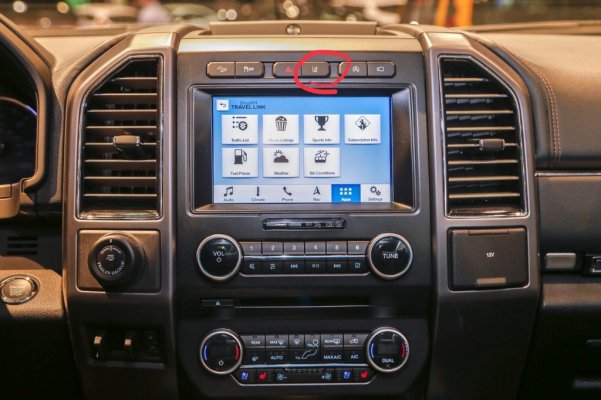
Sent from my iPad using Tapatalk
rhk118
Member
Just press this button...
It stays off even with an ignition cycle.
Sent from my iPad using Tapatalk
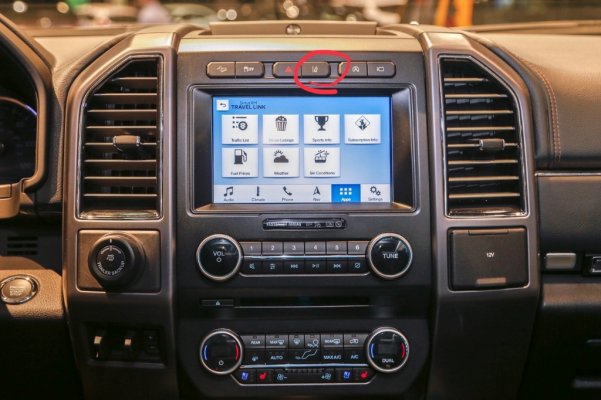
ARRRRRGGGHHHHH.....I'm such a dolt. I don't even think of those buttons anymore now that I programmed engine auto start/stop off...no reason for my finger to go up there! Can't even blame drinking beer/surfing forums on that one...Thanks so much!
I love this thing tho...
jaketime81
New Member
I have a 2018 Expedition Platinum Max with B&O sound system, and I tried to eliminate the ANC/Fake Engine Noise with my forscan,
Code 727-01-01 changed xxxx-x2xx-xxxx to xxxx-x0xx-xxxx and still have Fake Niose? I have done this with other F-150 and Raptors equipt with sony and never had an issue, Any Ideas?
Code 727-01-01 changed xxxx-x2xx-xxxx to xxxx-x0xx-xxxx and still have Fake Niose? I have done this with other F-150 and Raptors equipt with sony and never had an issue, Any Ideas?
jaketime81
New Member
Update, I found the fix: 2018+ found a dsp module, code 783-01-01 and changed ****-xxxx to Cxxx-xxxx.
-Jake
-Jake
Just want to confirm this method does work. I have a 2018 Limited that I just programmed to do this on. Neither of my mirrors tilted at all when I tried the first time. I did notice my passenger side mirror flicker or click like it wanted to move but it never tilted down. My first attempt was on the driver side and it didn't work at all. It just saved the setting in the down position and never went back. I went to try the passenger side with the same instructions from above and it worked. Then when I clicked back to the drivers side, it worked as well.
A little odd but it did finally work. Only thing I hate is that you have to hit the button to get it to lower. It doesn't automatically do it when you put the car in reverse. I'm wondering if there is an override for this in FORSCAN so it will automatically tilt when in reverse without hitting the button?
Hi. I'm curious which Limited package you have the above experience with regarding reverse tilt side mirrors? And did you find a way to make it automatically tilt in reverse?
Also curious if anyone's found reverse tilt to work (or that it can be made to work) with the 18/19 XLT 202A power side mirrors.
Thanks!
Dan
Update, I found the fix: 2018+ found a dsp module, code 783-01-01 and changed ****-xxxx to Cxxx-xxxx.
-Jake
I’ll try this. I tried the other and noticed no difference. Does it also shutdown the active noise cancelling?
Sent from my iPhone using Tapatalk
Has anyone been able to figure out how to disable the chime when you first start the car? The codes on the spreadsheet cannot be applied on the 2018 platform.
In my opinion you need to reference the F-150 form, so far everything i have tried from this spreadsheet has worked on my 2018 expedition https://docs.google.com/spreadsheet...iVSlDFGFHnfeuhb3RTMVz95730/edit#gid=815852466
:edit- that chime is found in the dash module which cannot be changed at this time.
fetasigma
Member
What are the locations for the fake engine noise and what are the settings?Got my cable from Amazon and my extended license from FORScan and as a complete novice was able to:
Disable Auto Start/Stop
Disable double horn honk when I step out vehicle with FOB
Disabled fake engine noise,
(I want to hear the real engine noises and get used to it so
when something isn’t right I can hear it right
away)
Panic Alarm now requires two pushes of the panic button, (Kept going off in my pocket)
All of these functions should be programmable from the driver’s menu IMHO but FORScan did the job for me.
Sent from my SM-G892A using Tapatalk
FYI, I tried disabling ASS (auto start/stop) on a 2019 Expedition Ltd Max that was manufactured just a few weeks ago, and found that doing so produces the following warning on the vehicle on every engine start, and requiring clicking OK to dismiss:
"Charging System Service Soon"
Reverting BdyCM 726-48-02 to the original values prevents the warning from being displayed. Maybe the warning would've been harmless, but it might've annoyed the primary driver.
At least two other folks out there have encountered the same warning on 2019 Expeditions:
https://www.expeditionforum.com/threads/door-automatic-unlocking.38785/page-4
https://forscan.org/forum/viewtopic.php?f=16&t=9320
Of course, if anyone's also encountered this warning screen when disabling ASS, and found a workaround, that would be interested to learn.
Also, I understand that disconnecting the ASS battery sensor wire from the positive battery terminal is another method of easily disabling ASS. I haven't played with that yet to see if it produces warning screens as well. EDIT: It does.
Thanks,
Dan
"Charging System Service Soon"
Reverting BdyCM 726-48-02 to the original values prevents the warning from being displayed. Maybe the warning would've been harmless, but it might've annoyed the primary driver.
At least two other folks out there have encountered the same warning on 2019 Expeditions:
https://www.expeditionforum.com/threads/door-automatic-unlocking.38785/page-4
https://forscan.org/forum/viewtopic.php?f=16&t=9320
Of course, if anyone's also encountered this warning screen when disabling ASS, and found a workaround, that would be interested to learn.
Also, I understand that disconnecting the ASS battery sensor wire from the positive battery terminal is another method of easily disabling ASS. I haven't played with that yet to see if it produces warning screens as well. EDIT: It does.
Thanks,
Dan
Last edited:
Bulockay
Member
Has anyone located the codes to allow a newly installed trailer brake controller to function? Checked Superduty, F150, etc. forums and those codes didn't work. I have an '18 Limited(no trailer tow package).
95cobby
Active Member
Is there a solution to write to the IPC module yet?
Similar threads
- Replies
- 6
- Views
- 1K

- Replies
- 20
- Views
- 19K


- Replies
- 8
- Views
- 11K

- Replies
- 4
- Views
- 3K

