4th Gen Expy FORScan Modifications

Disclaimer: Links on this page pointing to Amazon, eBay and other sites may include affiliate code. If you click them and make a purchase, we may earn a small commission.

bushpilot

Full Access Members
Joined
Feb 20, 2020
Posts
375
Reaction score
159
Location
Houston, Tx
I have spent an hour today trying to test settings. The BCM in the 2020 addressing is NOT the same. Nothing works. I stumbled across one thing that did, but it was a previous change I was trying. I think I can map it out, but I need to compare the 2019 file that Wakeboarder sent me line for line...and see if I can find the patterns & similarities. Have a message in to my friend on the FORSCAN dev team to see if he can find the pattern.

All but the Forward Distance Alert worked in the IPC that I tried.

In addition the 2020's only have 1 color LED's installed. I forced the change in the DDM, and they did not change color.


THANKS!

I was able to get the a few items to work:
  1. numbers over the gauges
  2. Seat Heat/Cool icons on center display
  3. Remove/Skip sirus/xm in audio choices.

I've been unable to get these items working:
  • BAMBI
  • Disable that dbl horn honk (no key present on exit)

I kinda miss the ambient lighting (that I had on the '17 Super Duty)...only because I prefer red interior lighting at night.
When I enabled the Lincoln display - I got all kinds of new "Lincoln" icons on settings....one of which included AMBIENT Lighting/brightness.

I'd much rather prefer "quick boot" screen and an (all) Black background over the gradient color stuff.

the Lincoln (black screen and quick boot) didn't stick for some reason - it had been working all day, took the Expy out to test the homelink on a gate and I noticed ALL the Lincoln stuff was gone....I've got ambient light (full bright, in blue, no colors options)...but the adjustment is gone from the menu too.

Im wondering if an update got slammed on me (ive turned auto updates OFF <again>)

 

bushpilot

Full Access Members
Joined
Feb 20, 2020
Posts
375
Reaction score
159
Location
Houston, Tx
I agree that all 4 windows would be nice. I didn’t try enabling the global windows for the rear.

on our '20 Max I have Global window (up/down) on the advanced menu selection.
I finally tested it the other day and sure enough ALL 4 windows roll down (and up) via the remote.
 

wakeboarder

Full Access Members
Joined
Nov 16, 2019
Posts
811
Reaction score
468
Location
Fort Lauderdale, FL
on our '20 Max I have Global window (up/down) on the advanced menu selection.
I finally tested it the other day and sure enough ALL 4 windows roll down (and up) via the remote.
That’s awesome! I have the XLT so I don’t have the one touch up or down in the rear. I would have to install both rear door modules, new drivers window switch, window motors, harnesses and probably more just to make it a possibility.
 

LokiWolf

Staff member
Moderator
Joined
Apr 2, 2016
Posts
3,971
Reaction score
2,834
Location
Richmond VA
THANKS!

I was able to get the a few items to work:
  1. numbers over the gauges
  2. Seat Heat/Cool icons on center display
  3. Remove/Skip sirus/xm in audio choices.

I've been unable to get these items working:
  • BAMBI
  • Disable that dbl horn honk (no key present on exit)

I kinda miss the ambient lighting (that I had on the '17 Super Duty)...only because I prefer red interior lighting at night.
When I enabled the Lincoln display - I got all kinds of new "Lincoln" icons on settings....one of which included AMBIENT Lighting/brightness.

I'd much rather prefer "quick boot" screen and an (all) Black background over the gradient color stuff.

Correct, All the things you mentioned are NOT in the BCM(Body Control Module). That is where the difference is.

APIM and IPC appear to be the same.

I have a new test build from FORSCAN, and some direction from one of their devs. Going to do some testing in a bit.


Sent from my iPad using Tapatalk Pro
 

CGETX20

Member
Joined
Apr 21, 2020
Posts
14
Reaction score
6
Location
East TX
on our '20 Max I have Global window (up/down) on the advanced menu selection.
I finally tested it the other day and sure enough ALL 4 windows roll down (and up) via the remote.

Hi Don, do you happen to be storing the codes that have worked for you on your 20? I'm having trouble getting anything to work, but I slowed down trying (out of concern) after my first several attempts mostly failed. Only thing I have working is the splash screen changed and I added heated/cooled seat button to the home screen. Any help would be greatly appreciated!
 

LokiWolf

Staff member
Moderator
Joined
Apr 2, 2016
Posts
3,971
Reaction score
2,834
Location
Richmond VA
Hi Don, do you happen to be storing the codes that have worked for you on your 20? I'm having trouble getting anything to work, but I slowed down trying (out of concern) after my first several attempts mostly failed. Only thing I have working is the splash screen changed and I added heated/cooled seat button to the home screen. Any help would be greatly appreciated!

Again, like I said above. The APIM, and IPC settings from 18/19 appear to work.

DO NOT, I repeat, DO NOT make a change in the BCM based on previous years in the 2020. FORSCAN devs have confirmed it is NOT the same.

If you have made changes in the BCM, I suggest you restore ALL stock settings. It might have accepted the change...but you could have changed the default air pressure instead of Fogs on with High for example.


Sent from my iPad using Tapatalk Pro
 

CGETX20

Member
Joined
Apr 21, 2020
Posts
14
Reaction score
6
Location
East TX
Again, like I said above. The APIM, and IPC settings from 18/19 appear to work.

DO NOT, I repeat, DO NOT make a change in the BCM based on previous years in the 2020. FORSCAN devs have confirmed it is NOT the same.

If you have made changes in the BCM, I suggest you restore ALL stock settings. It might have accepted the change...but you could have changed the default air pressure instead of Fogs on with High for example.


Sent from my iPad using Tapatalk Pro


I was concerned about that, so after the first few didn't work I stopped attempting to make changes.

Have you the "Load Factory" feature before? Do you think it would be safe on a 20? Seems like it pulls from a source online, but I'm not sure if that is correct. I'd like to do a full factory restore if its safe. Everything is working fine as far as I can tell, but it would be nice to start from scratch. I backed things up, but I had attempted 4 or 5 changes before doing so (stupid I know), but I only tried changes in the non-as built section. It would just be comforting if the "load factory" feature was reliable, cause then you could really try things out.
 

bushpilot

Full Access Members
Joined
Feb 20, 2020
Posts
375
Reaction score
159
Location
Houston, Tx
Hi Don, do you happen to be storing the codes that have worked for you on your 20? I'm having trouble getting anything to work, but I slowed down trying (out of concern) after my first several attempts mostly failed. Only thing I have working is the splash screen changed and I added heated/cooled seat button to the home screen. Any help would be greatly appreciated!

I got the codes from the 4th gen forum (where theyre talking about upgrading from Sync 3 to 3.4 -

https://www.expeditionforum.com/thr...-of-ford-sync-3-to-the-latest-sync-3-4.42507/
 

LokiWolf

Staff member
Moderator
Joined
Apr 2, 2016
Posts
3,971
Reaction score
2,834
Location
Richmond VA
I was concerned about that, so after the first few didn't work I stopped attempting to make changes.

Have you the "Load Factory" feature before? Do you think it would be safe on a 20? Seems like it pulls from a source online, but I'm not sure if that is correct. I'd like to do a full factory restore if its safe. Everything is working fine as far as I can tell, but it would be nice to start from scratch. I backed things up, but I had attempted 4 or 5 changes before doing so (stupid I know), but I only tried changes in the non-as built section. It would just be comforting if the "load factory" feature was reliable, cause then you could really try things out.

In all of my FORSCAN coding, I have never used the load factory. From years of messing with electronics and cars, I always save the stock Module config before I try a change. So sorry, I have no experience with it. If you have the screwed up version of FORSCAN(Non Test Flavor), and know what you changed in the Easy config area, go change them back. Then save a full copy of your BCM.

After that, load this version. Do not do that until you have flipped the settings you changed back.

http://forscan.org/download/FORScanSetup2.3.33.test20200425.exe

That is the version that has correct info in the Easy config area. I have done the following successfully using it.

Fogs as Cornering
FOgs on with High(Bambi)
Double Honk gone

Changed something else too, but those are the important ones!!
 

bushpilot

Full Access Members
Joined
Feb 20, 2020
Posts
375
Reaction score
159
Location
Houston, Tx
http://forscan.org/download/FORScanSetup2.3.33.test20200425.exe

That is the version that has correct info in the Easy config area. I have done the following successfully using it.

Fogs as Cornering
FOgs on with High(Bambi)
Double Honk gone

Changed something else too, but those are the important ones!!

@LokiWolf -

Thank You!

Bambi (enabled) & Dbl Hork (disabled).

Are there available config changed for:

Fast Boot (infotainment)?
Door Chime (disable when running)?
 

LokiWolf

Staff member
Moderator
Joined
Apr 2, 2016
Posts
3,971
Reaction score
2,834
Location
Richmond VA
@LokiWolf -

Thank You!

Bambi (enabled) & Dbl Hork (disabled).

Are there available config changed for:

Fast Boot (infotainment)?
Door Chime (disable when running)?

3.4 from the factory defaults to Fast Boot if I remember correctly.

The door chime should be in the Config. I didn’t set it, but pretty sure I saw it.


Sent from my iPhone using Tapatalk Pro
 

bushpilot

Full Access Members
Joined
Feb 20, 2020
Posts
375
Reaction score
159
Location
Houston, Tx
3.4 from the factory defaults to Fast Boot if I remember correctly.

The door chime should be in the Config. I didn’t set it, but pretty sure I saw it.
Sent from my iPhone using Tapatalk Pro

mine boots the ford oval (and takes a while).
I thought I had the door chime turned off - but maybe not.
 

LokiWolf

Staff member
Moderator
Joined
Apr 2, 2016
Posts
3,971
Reaction score
2,834
Location
Richmond VA
@LokiWolf - given the issues w/ the '20, which spreadsheet / link should we be using?

None currently. My contact at FORSCAN said I should use the As Built Data from a 2020 F150. He said the BCM's are the same. It looks like the F150 guys haven't really embraced the changes either, with some cursory reading I did.

Use the easy config section in FORSCAN. It has allowed me to make all the changes I currently want.

I will see if I can figure out the "Fast Boot" you are referencing. Not sure it is good for the APIM. Because in order to accomplish it, it is not letting the APIM power down. Basically extending the Sleep vs Shutdown time. Not good for a general PC, isn't good for the units in our cars either.

That is partially what I was talking about before with what some of these changes are called.

AS/S Disable for example should be called "TURN OFF BATTERY MANAGEMENT", it has the secondary product of preventing AS/S, but it also forces the charging circuit to run wide open all the time, since it has no idea what the battery charge is at.

Nav in Motion(NIM) should be called "SET YOUR APIM TO EUROPE", it has the secondary action of allowing you to mess with Nav while moving. It also affects some of the cool SiriusXM travel features we get for free for 5 years, and completely prevents the E911 feature from working. I have seen 1st hand what a great feature E911 is.

The "Fast Boot" feature is most likely extending the sleep vs shutdown time window, but I will look around.
 

bushpilot

Full Access Members
Joined
Feb 20, 2020
Posts
375
Reaction score
159
Location
Houston, Tx
Good info @LokiWolf, thank you again!

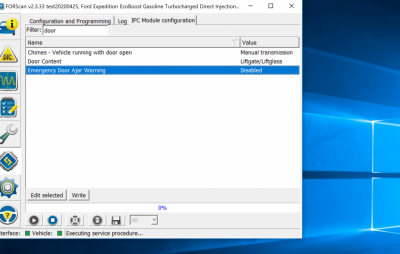
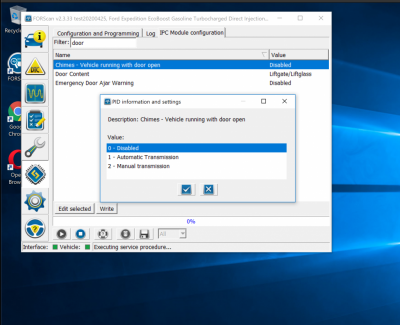
I was able to get the door chime disable now too - using the IPC Easy config by changing

Chimes Vehicle running with door open - from manual trans to disable.

upload_2020-4-28_14-6-12.png

upload_2020-4-28_14-6-32.png
 
Joined
Apr 27, 2020
Posts
7
Reaction score
8
Location
Mansfield, TX
I thought I had backed up before my last update and apparently it didn't save. I tried to remove SiriusXM from sync menu and technically it worked, but it had some other changes that I don't want. I changed the first digit to 9 according to the spreadsheet and I want to put it back to factory. Can someone please share with me what that digit should be? I'm on a 2019 Expedition Max XLT 202A
 

LokiWolf

Staff member
Moderator
Joined
Apr 2, 2016
Posts
3,971
Reaction score
2,834
Location
Richmond VA
I thought I had backed up before my last update and apparently it didn't save. I tried to remove SiriusXM from sync menu and technically it worked, but it had some other changes that I don't want. I changed the first digit to 9 according to the spreadsheet and I want to put it back to factory. Can someone please share with me what that digit should be? I'm on a 2019 Expedition Max XLT 202A

Go Into FORSCAN and that should be part of the APIM Easy Config area in FORSCAN. You should be able to turn SAT back on.


Sent from my iPhone using Tapatalk Pro
 

bushpilot

Full Access Members
Joined
Feb 20, 2020
Posts
375
Reaction score
159
Location
Houston, Tx
screwing around last night I learned some stuff (purely by accident as per usual).
Im struggling to obtain the infotainment fast boot (no splash screen, no ford oval).

specifically (as discussed w/ @Lou Hamilton) from another thread I was wondering what the "C" option did in the APMI settings.

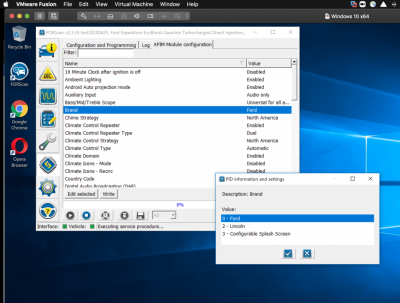
In the EASY config there is BRAND option (Ford, Lincoln or Configurable)....thats where the C bit comes in.
which allows you to select the splash screen you desire.

APIM - 7D0-01-02 **** xxxx xxxx Brand: 0=Ford, 8=Lincoln, C=Configurable Splash Screen (This is actually for the theme)
APIM - 7D0-02-01 xxxx x3xx xxxx Lincoln Black Label start-up screen

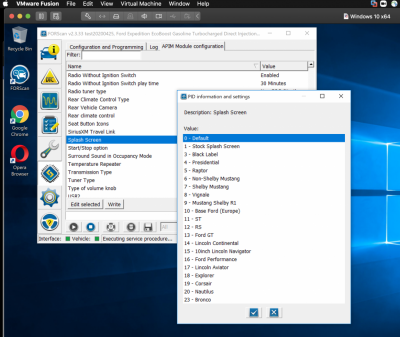
Once the C bit is set you can then go to the SPLASH Screen and change to one of several listed.
Im still struggling to set NO splash screen, always get the ford oval (or something else).

Screenshots as promised -
The bronco them is kinda cool.

upload_2020-4-29_13-20-30.png

upload_2020-4-29_13-20-44.png
 
Last edited:

bushpilot

Full Access Members
Joined
Feb 20, 2020
Posts
375
Reaction score
159
Location
Houston, Tx
so @LokiWolf - I THINK I have fast boot working...BUT...I am not certain.

I maybe confused about what the splash screen IS.

I always get the FORD OVAL logo on shutdown, before starting after opening the door AND when I start the engine.

Is there away to get rid of the blue oval?
 

CGETX20

Member
Joined
Apr 21, 2020
Posts
14
Reaction score
6
Location
East TX
In all of my FORSCAN coding, I have never used the load factory. From years of messing with electronics and cars, I always save the stock Module config before I try a change. So sorry, I have no experience with it. If you have the screwed up version of FORSCAN(Non Test Flavor), and know what you changed in the Easy config area, go change them back. Then save a full copy of your BCM.

After that, load this version. Do not do that until you have flipped the settings you changed back.

http://forscan.org/download/FORScanSetup2.3.33.test20200425.exe

That is the version that has correct info in the Easy config area. I have done the following successfully using it.

Fogs as Cornering
FOgs on with High(Bambi)
Double Honk gone

Changed something else too, but those are the important ones!!


@LokiWolf - any updates to this test version I should know about? I'm about to get it set up and try it out.
 
Top