What am I going to need?

Disclaimer: Links on this page pointing to Amazon, eBay and other sites may include affiliate code. If you click them and make a purchase, we may earn a small commission.

bobmbx

Full Access Members
Joined
Jun 11, 2017
Posts
1,200
Reaction score
627
Location
Virginia
Workin great! Lucked out it was in a truck with no woofer my sound quality is still good.

The wife's Mountaineer has that exact unit. In the console, there is a 3.5mm connector which allowed a phone (music, phone only) to be hooked into the unit. Did you happen to notice that sort of jack on back before you installed it? You would use the "Line In" function for it.

Her Mounty also has the rear audio/DVD player on the ceiling behind the front seats. Thats what the "Rear Zone" function is for.
 
Last edited:
gixer2000

Retrofit or Bust
Joined
Oct 13, 2015
Posts
1,467
Reaction score
644
Location
Massachusetts
The wife's Mountaineer has that exact unit. In the console, there is a 3.5mm connector which allowed a phone (music, phone only) to be hooked into the unit. Did you happen to notice that sort of jack on back before you installed it? You would use the "Line In" function for it.

Her Mounty also has the rear audio/DVD player on the ceiling behind the front seats. Thats what the "Rear Zone" function is for.

The 07 has a line in on the lower portion of the dash. Opposite side of the cig lighter socket
 
OP
OP
JExpedition07

JExpedition07

That One Member
Joined
Mar 30, 2017
Posts
6,530
Reaction score
3,140
Location
New York
The wife's Mountaineer has that exact unit. In the console, there is a 3.5mm connector which allowed a phone (music, phone only) to be hooked into the unit. Did you happen to notice that sort of jack on back before you installed it? You would use the "Line In" function for it.

Her Mounty also has the rear audio/DVD player on the ceiling behind the front seats. Thats what the "Rear Zone" function is for.

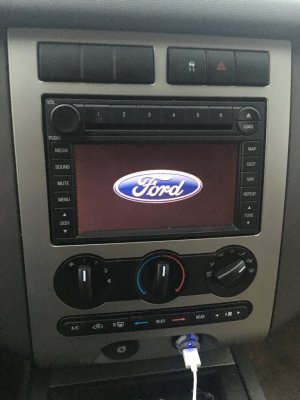
It’s a nice unit. It’s not the most up to date contraption but it’s just what I wanted, looks nicer than the radio and allows for some extra features. Plus I like that it fits the truck and looks in place. What gixer said the line in is low in the dash.
 
Last edited:

deweysmith

Full Access Members
Joined
Nov 8, 2017
Posts
574
Reaction score
206
Location
Montreal, QC
It will correct once you plug the GPS antenna in. Once it knows your location it's will all update. The guy I sold mine to had the same issue.

It’s not just learning your location from the GPS, the signal contains the time and date as well.
 

Trainmaster

Old School Member
Joined
Jun 17, 2017
Posts
3,620
Reaction score
2,123
Location
Rockaway Beach, NY
So happy for you! I always hold my breath when buying expensive stuff for the car and hoping it'll work out. When the antenna comes it goes right under the dash on top of the metal support plate. I found a Ford one and had to tie-wrap it because it didn't have its bracket or clip or whatever Ford uses. I understand some of the aftermarket ones are magnetic.

When you plug it in, it may take a few minutes to find your precise location. If you still have a problem, there are settings to calibrate the thing, but I never had to use it.

Congrats! Looks great. Navigation was never available on Explorers with the manual heater.
 

Allan E Joyner

Active Member
Joined
Jan 4, 2018
Posts
28
Reaction score
19
Location
Fl.
Not sure, this is the exact model I bought (found a pic of one on web). I see there are “Latest Map Update” chips sold everywhere for ford but they all say sync on the chip, is this unit updatable with latest Navi software or no? I mainly wanted the nicer looks and the navigation (if it works lol).
View attachment 23210


I recently bought a cheap radio that looked just like that for my son who had issues with his Volkswagen Jetta stock radio. The radio looks nice but the LCD screen is garbage during the day and it looks grey just like that one does. It should look black or at least darker. His works fine but we have noticed a parasitic draw on the battery but would never say it was the radio considering Volkswagen is known for their electrical issues. The LCD is definitely an issue and you might want to look at the specs of the brightness and clarity before installing....you cant return if it's been installed. My Expy has navigation but its done by voice only with no screen on my radio. Since I only listen to Spotify on my phone and Waze (https://play.google.com/store/apps/details?id=com.waze&hl=en) gives updated traffic real time and really works well. that made it ok for me and I grabbed a vent magnetic holder that sits above that useless change holder and my phone never moves when the bottom is set in the change holder. Since I have the note 8 the screen isn't much smaller and I can reach it perfectly and see it easily without taking my eyes to far or leaning towards the middle to push buttons....Good luck with your install.
 

Flexpedition

Full Access Members
Joined
May 26, 2015
Posts
1,339
Reaction score
665
Location
midwest
I was not aware it used the GPS antenna to initially set the time. It wouldn't be a stretch to then assume the clock would then update itself when you cross time zones, which is certainly does not.
 

bobmbx

Full Access Members
Joined
Jun 11, 2017
Posts
1,200
Reaction score
627
Location
Virginia
I was not aware it used the GPS antenna to initially set the time. It wouldn't be a stretch to then assume the clock would then update itself when you cross time zones, which is certainly does not.

The GPS system is based on what time it is where you are and when you receive a specific signal from a specific satellite (system needs 2 SATs to do anything, 3 for accuracy). IIRC, you can adjust the Time Zone update in the Settings function to automatically adjust for time zone changes and for Daylight Savings time.
 
OP
OP
JExpedition07

JExpedition07

That One Member
Joined
Mar 30, 2017
Posts
6,530
Reaction score
3,140
Location
New York
I recently bought a cheap radio that looked just like that for my son who had issues with his Volkswagen Jetta stock radio. The radio looks nice but the LCD screen is garbage during the day and it looks grey just like that one does. It should look black or at least darker. His works fine but we have noticed a parasitic draw on the battery but would never say it was the radio considering Volkswagen is known for their electrical issues. The LCD is definitely an issue and you might want to look at the specs of the brightness and clarity before installing....you cant return if it's been installed. My Expy has navigation but its done by voice only with no screen on my radio. Since I only listen to Spotify on my phone and Waze (https://play.google.com/store/apps/details?id=com.waze&hl=en) gives updated traffic real time and really works well. that made it ok for me and I grabbed a vent magnetic holder that sits above that useless change holder and my phone never moves when the bottom is set in the change holder. Since I have the note 8 the screen isn't much smaller and I can reach it perfectly and see it easily without taking my eyes to far or leaning towards the middle to push buttons....Good luck with your install.

No problems with brightness at all, It has auto adjust, it’s the Ford factory unit and is quite a bit nicer than the regular radio that came with these trucks. Display is nice and always clear so far. It does directions via voice through stereo and on screen simultaneously.
 
Last edited:

deweysmith

Full Access Members
Joined
Nov 8, 2017
Posts
574
Reaction score
206
Location
Montreal, QC
I was not aware it used the GPS antenna to initially set the time. It wouldn't be a stretch to then assume the clock would then update itself when you cross time zones, which is certainly does not.

Mine does! There's a setting for it, and it takes maybe 10 seconds, but mine has always updated the time when I cross time zones. I did it just last week.
 
OP
OP
JExpedition07

JExpedition07

That One Member
Joined
Mar 30, 2017
Posts
6,530
Reaction score
3,140
Location
New York
CC62F97F-061F-4A2F-9629-92E0DC8F8AA7.jpeg
I do like that it reminds me it’s a Ford when I start up now ;). Now time to clean it up, the buttons weren’t the cleanest. Overall the project is easy (10-15 minutes) and after driving around with it for 24 hours I’m happy with the purchase. If you do it just make sure you source it from a similar truck (same year etc.).
 
Last edited:

Trainmaster

Old School Member
Joined
Jun 17, 2017
Posts
3,620
Reaction score
2,123
Location
Rockaway Beach, NY
If you find that the touch screen has shiny spots worn in it, try covering it with a non-glare peel-and-stick screen protector from ebay. IT helps even out the wear spots.
 

Richard_S

Active Member
Joined
Dec 22, 2017
Posts
38
Reaction score
15
Location
Greensboro NC
It’s a nice unit. It’s not the most up to date contraption but it’s just what I wanted, looks nicer than the radio and allows for some extra features. Plus I like that it fits the truck and looks in place. What gixer said the line in is low in the dash.

Hello,
That's cool that you had success just plugging it in and it working. Really nice to know.

If you are going to sign up for a Sirius account, and use the Nav, I find it well worth the money. It gives you the Travel software and you can find gas stations with current prices, weather, poi locations, etc. I use it all the time. I especially like the live weather map and the gas station price feature. I recently updated the software for the unit from the My Ford website and the voice function seems to work better, and there is a reboot option.
I also spent the money and bought the discs from Ford for 149 and it included the Gracenote music info. I don't know if it was worth it, but I travel a lot to new places and it seems to be working well. When buying this it asks for the serial number of the unit and provides a unique activation code. Now that I have it installed I have the 4 discs that are probably usless, unless someone knows of a way to generate a code for activation. Did the one you bought online work??
 
OP
OP
JExpedition07

JExpedition07

That One Member
Joined
Mar 30, 2017
Posts
6,530
Reaction score
3,140
Location
New York
Hello,
That's cool that you had success just plugging it in and it working. Really nice to know.

If you are going to sign up for a Sirius account, and use the Nav, I find it well worth the money. It gives you the Travel software and you can find gas stations with current prices, weather, poi locations, etc. I use it all the time. I especially like the live weather map and the gas station price feature. I recently updated the software for the unit from the My Ford website and the voice function seems to work better, and there is a reboot option.
I also spent the money and bought the discs from Ford for 149 and it included the Gracenote music info. I don't know if it was worth it, but I travel a lot to new places and it seems to be working well. When buying this it asks for the serial number of the unit and provides a unique activation code. Now that I have it installed I have the 4 discs that are probably usless, unless someone knows of a way to generate a code for activation. Did the one you bought online work??

The 07,08,09, Expeditions were pre sync, I ordered the latest map update and it’s supposed to come tomorrow for the navigation portion, still waiting on my antenna.
 
Last edited:

marlinpruett

Full Access Members
Joined
Aug 14, 2017
Posts
185
Reaction score
54
Location
South Carolina
My 07 EXP EL clock does not update that I can tell. There's a system page for correcting date and time and it does not do a Daylight Saving update automatically only manually .
 
OP
OP
JExpedition07

JExpedition07

That One Member
Joined
Mar 30, 2017
Posts
6,530
Reaction score
3,140
Location
New York
Finally installed the GPS antenna today along with the navigation update. Works great.
 

Members online

No members online now.

Forum statistics

Threads
57,019
Posts
535,925
Members
54,722
Latest member
Dbohalls550
Top