



ForScan Tweaks - 2015+

Disclaimer: Links on this page pointing to Amazon, eBay and other sites may include affiliate code. If you click them and make a purchase, we may earn a small commission.

OP
OP
LokiWolf

LokiWolf

Staff member
Moderator
Joined
Apr 2, 2016
Posts
3,971
Reaction score
2,837
Location
Richmond VA
That's interesting your 17 doesn't have the 726-41-02 line, as my 16 Limited EL has it and I did the change to stop the double honk. It also appears to stop the horn from honking at all when the engine is running. Meaning when I leave the vehicle and double punch the fob lock button, I do not get a honk signifying the car is locked.

On the secure idle, what is the "change to" number in 726-42-01? Is the "1" the correct number to enable it or is it something else?

I also have the line. Are you in the correct Module?


Sent from my iPhone using Tapatalk Pro
 

HawkX66

Semper Fi!
Joined
Aug 28, 2018
Posts
643
Reaction score
318
Location
VA/MA
I also have the line. Are you in the correct Module?

That's interesting your 17 doesn't have the 726-41-02 line, as my 16 Limited EL has it and I did the change to stop the double honk. It also appears to stop the horn from honking at all when the engine is running. Meaning when I leave the vehicle and double punch the fob lock button, I do not get a honk signifying the car is locked.

On the secure idle, what is the "change to" number in 726-42-01? Is the "1" the correct number to enable it or is it something else?
I find it hard to believe mine is an anomaly so I'll go back and take a look. The honk when locking the vehicle is a different option. I was able to disable that so I don't hear the horn when I lock the vehicle.
Yes, "1" is correct for the secure idle.

If secure idle is truly possible on a 2017 that would be a major find.
It's there.
 

fxdwg

Member
Joined
Mar 18, 2019
Posts
19
Reaction score
9
Location
USA
So I came home this evening and immediately went to my '16 EL Limited with the computer. My BCM line 726-42-01 line already had a "1" in the second spot. So I tried changing it to a "0". That seemed to give several error messages (brakes, hill descent and a 3rd, but I don't remember it), but did NOT enable secure idle. You could put her into gear without any issues without the fob being near the vehicle. It also seemed to allow you to start her without a fob at all! Once I changed it back to a "1", I got a message that I needed to restart or have the key when I shut it off. I don't think I had that when the "0" was there and I did try restarting her to see what happened.

So at this point, I'd be wary of changing that line if you have a '16.
 

mossback

2017 Limited EL
Joined
Oct 9, 2017
Posts
359
Reaction score
176
Location
WA state
Yes, "1" is correct for the secure idle.

It's there.

Hawk, I'd love for this to be true but I think there is some misunderstanding. A lot of us have spent quite a bit of time looking for secure idle on the 2015-2017 generation and have not found it. Parameter 726-42-01 in the BCM does not enable it on my 2017. I've tried it and other values but no dice. If you have a 2017 and have secure idle enabled I'd be truly grateful if you could:

- list the build date of your vehicle (on original window sticker or door jamb label)
- take a picture of the IP message you get when the FOB is out if range and you attempt to shift into gear.

Thanks man.
 

HawkX66

Semper Fi!
Joined
Aug 28, 2018
Posts
643
Reaction score
318
Location
VA/MA
Hawk, What model do you have?


Sent from my iPhone using Tapatalk Pro
2017 EL Platinum


Hawk, I'd love for this to be true but I think there is some misunderstanding. A lot of us have spent quite a bit of time looking for secure idle on the 2015-2017 generation and have not found it. Parameter 726-42-01 in the BCM does not enable it on my 2017. I've tried it and other values but no dice. If you have a 2017 and have secure idle enabled I'd be truly grateful if you could:

- list the build date of your vehicle (on original window sticker or door jamb label)
- take a picture of the IP message you get when the FOB is out if range and you attempt to shift into gear.

Thanks man.
Build date is 12/16. IP message, no clue.

My BCM line is set like the spreadsheet with the "1". If the spreadsheet isn't accurate, maybe mine isn't actually secure. I haven't tested it.
 
Last edited:

HawkX66

Semper Fi!
Joined
Aug 28, 2018
Posts
643
Reaction score
318
Location
VA/MA
Instead of this link getting buried in the thread, can we get it pinned or at least modify the first post in the thread and post it there? It's a pain to go back and find it.

I did a little programming this weekend and got rid of the annoying double honk when you get out with your keys. I also changed the setting for Nav in Motion. I'm a little confused, but very happy. It didn't go into Euro mode. I now just have Nav in motion. Tried it several times yesterday and it worked every time.

As far as the secure mode mentioned before this post, I must have been looking at the F150 sheet. I haven't tested it though. Forgot all about it. I did notice that it won't go in to gear if you don't step on the brake and hit start if you've remote started.
 
OP
OP
LokiWolf

LokiWolf

Staff member
Moderator
Joined
Apr 2, 2016
Posts
3,971
Reaction score
2,837
Location
Richmond VA
Instead of this link getting buried in the thread, can we get it pinned or at least modify the first post in the thread and post it there? It's a pain to go back and find it.

I have tried editing my original post, but cannot. The site won’t let me.

I wanted to do some tweaks, and add the link a while back, but no go.


Sent from my iPhone using Tapatalk Pro
 

HawkX66

Semper Fi!
Joined
Aug 28, 2018
Posts
643
Reaction score
318
Location
VA/MA
I have tried editing my original post, but cannot. The site won’t let me.

I wanted to do some tweaks, and add the link a while back, but no go.


Sent from my iPhone using Tapatalk Pro
I hate when you can't go back and edit. I've wanted to change a thread title or correct something and I can't.
Maybe contact a mod and have him do it or let you?
 
OP
OP
LokiWolf

LokiWolf

Staff member
Moderator
Joined
Apr 2, 2016
Posts
3,971
Reaction score
2,837
Location
Richmond VA
I haven't seen how to add the Climate menu the the right MFD on the ForScan google doc. Can you give some insight on how you got it to work?

You can’t on the Expedition. Those pics were from my Edge before we tested the Code on the Expy.


Sent from my iPhone using Tapatalk Pro
 

star-art

Full Access Members
Joined
Aug 23, 2010
Posts
539
Reaction score
156
Location
Pacific Northwest
For the IPC right side climate controls mod, has anyone tried the following:

IPC Module line 720-05-01

First set of numbers, change the code to "D8B8"

I saw this demonstrated in a YouTube video. It wasn't an Expedition, but it was the same instrument cluster.

PS My code is "D878" for an XLT with 202A package
 
OP
OP
LokiWolf

LokiWolf

Staff member
Moderator
Joined
Apr 2, 2016
Posts
3,971
Reaction score
2,837
Location
Richmond VA
For the IPC right side climate controls mod, has anyone tried the following:

IPC Module line 720-05-01

First set of numbers, change the code to "D8B8"

I saw this demonstrated in a YouTube video. It wasn't an Expedition, but it was the same instrument cluster.

PS My code is "D878" for an XLT with 202A package

Nope won’t work. No other Ford vehicle has the module combo we do.


Sent from my iPhone using Tapatalk Pro
 

star-art

Full Access Members
Joined
Aug 23, 2010
Posts
539
Reaction score
156
Location
Pacific Northwest
So frustrating! I thought tire pressures were handled and broadcast by the BCM? What other module is involved that we don't have? Is it by chance the Driver Door Module? Thanks! :)
 
OP
OP
LokiWolf

LokiWolf

Staff member
Moderator
Joined
Apr 2, 2016
Posts
3,971
Reaction score
2,837
Location
Richmond VA
BCM knows the pressures, but no code involved to display them. You can use a BT OBDII adapter and OBDLINK to display them, at least on my 15 and 17 I could/can.

Yes, the thing limiting our tweaks the most is the lack of DDM and PDM.


Sent from my iPhone using Tapatalk Pro
 

TXFRDOwner

Full Access Members
Joined
Jan 21, 2010
Posts
410
Reaction score
208
Location
Texas
You can use a BT OBDII adapter and OBDLINK to display them, at least on my 15 and 17 I could/can.

Sent from my iPhone using Tapatalk Pro

What Hex Bit did you change to display the TPMS menu in the IPC ?
 
OP
OP
LokiWolf

LokiWolf

Staff member
Moderator
Joined
Apr 2, 2016
Posts
3,971
Reaction score
2,837
Location
Richmond VA
You can’t. You use the BT adapter to display it on your phone.


Sent from my iPhone using Tapatalk Pro
 

TXFRDOwner

Full Access Members
Joined
Jan 21, 2010
Posts
410
Reaction score
208
Location
Texas
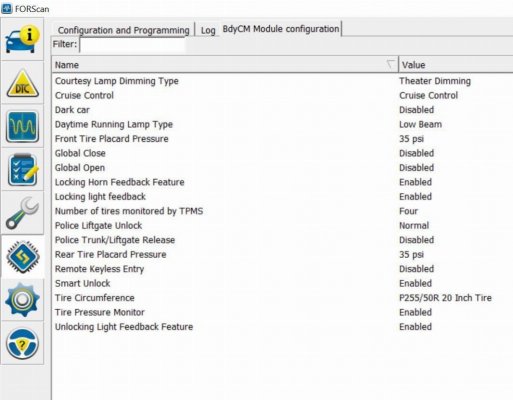
So the 15-17 Expedition BCM Configuration menu doesnt display this like the Fusion

ol_config_04a014fde5ad3ee5b0eb83579dcf448aa88a7e58.jpg
 
Top